Prime Levels Black
This is a powerful addition to your MetaTrader 4 toolkit designed to optimize market analysis and performance. This technical indicator acts as a specialized analysis tool designed to visualize market data. It helps traders identify emerging trends, momentum shifts, and key support or resistance levels by plotting statistical calculations directly onto price charts.
How to Setup and Use Prime Levels Black
1. Installation: Place your file in the MQL/Indicators folder via "Open Data Folder" and restart your terminal.
2. Loading: Find the indicator in the Navigator, drag it onto your chart, and configure the input parameters in the popup window.
3. Customization: Press Ctrl+I to open the indicator list, select your tool, and click "Properties" to change colors, levels, or visual styles.
4. Updating: Replace the old file in the Indicators folder with the new version and restart the platform to apply changes.
Frequently Asked Questions
Q: Why is my indicator not showing? A: Verify the file is in the MQL/Indicators folder, or try right-clicking the "Indicators" tree in the Navigator and clicking "Refresh."
Q: Do custom indicators slow down the platform? A: Too many complex indicators can impact performance; remove unused ones via the "Indicator List" (Ctrl+I).
Q: Can I use MT4 indicators on MT5? A: No, MQL4 and MQL5 are distinct languages; ensure the indicator is compiled specifically for your platform version.
Description & Settings
Doblece, Domas4 & Traderathome
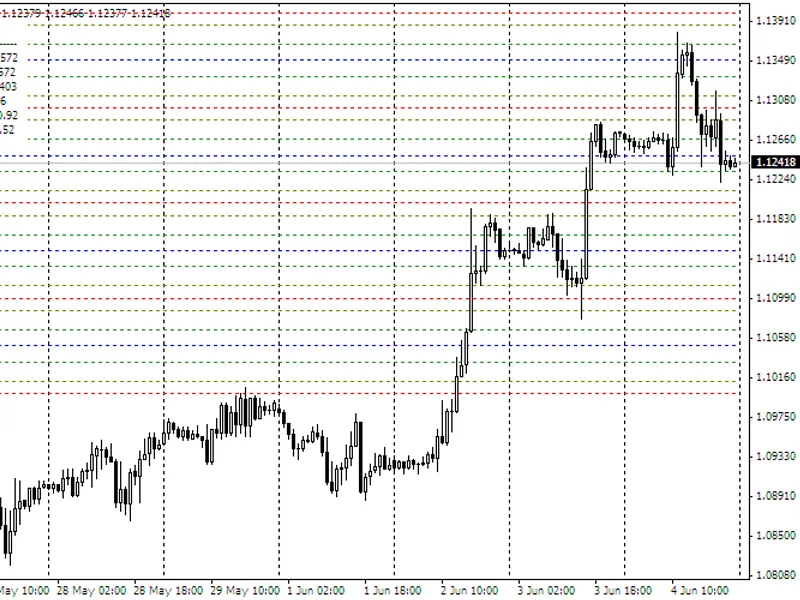
This indicator will place up to 6 lines, at prime levels of your choosing, in a successive pattern on the chart. You can have the pattern repeated as many times as you like. For example, you might select lines to be placed at the whole number, plus 20 pips, plus 33 pips, plus 50 pips, plus 66 pips, plus 80 pips and then the next whole number again. This range of lines can then be repeated both above and below this initial range. You can have as many levels of ranges above and below the initial range as you like. Or, you can select zero additional ranges and the initial range will automatically fill below or above the next whole number as the price moves there.
The lines can individually be of any color and style, and of any thickness when using solid lines. You can turn on/off each line individually. When lines are full screen wide, you can turn on/off the right margin price labels. You can select to have the lines stop at the current candle. Lines can be subordinated. To specify a level for a line just enter the last two digits of the price level.
The labels for the lines can be of any color, font size and font style. You can give the labels a name of your choice (example: Psych Level) and include the price. Labels can be positioned from right of the current candle (0), to far left (100), and they can be subordinated. Zooming in and out on the chart will displace the labels, but with the next data tick, their selected position is restored.
The indicator has an ON/OFF switch so you can turn the indicator off when the display of the prime levels is not desired, yet preserve your settings for the chart. You can also enter a time frame, above which the indicator will automatically not display. This enables switching to larger time frames for analysis, and having a chart clear of this indicator's display.
EURUSD.f, H1: PrimeLevelsBlack
EURUSD.f, M15: PrimeLevelsBlack
EURUSD.f, M5: PrimeLevelsBlack
Inputs page 1
Inputs page 2
Acknowledgments:
Doblece
: For the code enabling the indicator to work with platforms with unconventional Point digits number (0.00001 and 0.001). Also for adding two more customizable line levels which default to 66 and 33, as these are places where price usually stops and bounces.
Domas4
: For the code enabling the indicator to be set to automatically not display above any time frame, as set by the user.
Shimodax
: For the idea and some core code to get started with (ref: SweetSpots.mq4).