
Graphical Indicator for Current Trend Across All Time Frames
Info
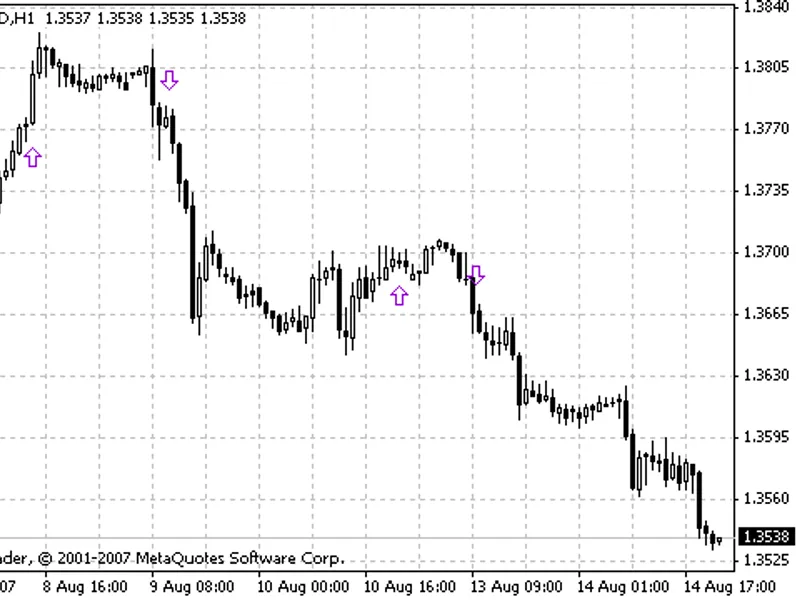
The Graphical Indicator for Current Trend Across All Time Frames is a Indicator for MetaTrader 4 that this is a graphical indicator based on the slope direction trend indicator, which has been published in various forms. The indicator has been transformed into a graphical panel, displaying all time frames with some modifications to the original code.
Usage
This tool is typically used for trend following strategies across multiple currency pairs.
Platform
This Indicator works exclusively on MetaTrader 4 (both build 600+ and newer versions).
Setup
Place the downloaded file in MQL4/Indicators folder via File ? Open Data Folder in MetaTrader 4.
How to Install and Use Graphical Indicator for Current Trend Across All Time Frames
1. Installation: Place your file in the MQL/Indicators folder via "Open Data Folder" and restart your terminal.
2. Loading: Find the indicator in the Navigator, drag it onto your chart, and configure the input parameters in the popup window.
3. Customization: Press Ctrl+I to open the indicator list, select your tool, and click "Properties" to change colors, levels, or visual styles.
4. Updating: Replace the old file in the Indicators folder with the new version and restart the platform to apply changes.
Frequently Asked Questions
Q: Why is my indicator not showing? A: Verify the file is in the MQL/Indicators folder, or try right-clicking the "Indicators" tree in the Navigator and clicking "Refresh."
Q: Do custom indicators slow down the platform? A: Too many complex indicators can impact performance; remove unused ones via the "Indicator List" (Ctrl+I).
Q: Can I use MT4 indicators on MT5? A: No, MQL4 and MQL5 are distinct languages; ensure the indicator is compiled specifically for your platform version.
What this tool does
This is a graphical indicator based on the Slope Direction Trend indicator, which has been published in various forms.
Typical Use Case
This Indicator excels in trend following on MetaTrader 4.
Compatible Platform & Setup
This Indicator works on MetaTrader 4. Place the file in the MQL4/Indicators folder and restart the terminal.
Description & Settings
Related: Range Filter Buy and Sell Indicator for MT4 with Signal Statistics - another powerful indicator for MetaTrader 4 traders.
This is a graphical indicator based on the Slope Direction Trend indicator, which has been published in various forms.Also recommended: Quantum Apex Color Indicator - similar indicator with strong performance on MetaTrader 4.
The indicator has been transformed into a graphical panel, displaying all time frames with some modifications to the original code. One significant change is the option for users to select the second moving average method for smoothing. The original code used linear weighted for the second pass, but now users can choose their preferred method. Using linear weighted for both calculations can make the indicator overly responsive, potentially leading to false trend readings.
Another notable modification is the ability to not only determine the trend direction (up, down, or flat) but also its value. This aspect will be explored further in an upcoming article on creating an expert advisor using a double Slope Direction indicator.
The code begins by defining object names, which is a good practice to minimize space allocation in the program. Two arrays are then defined: one for pixel positions of the 9 time frames and another for the time frames themselves, both as global variables.
The oninit() function initiates the creation of the panel and its objects, along with a check on the bars used for trend calculation (less than 3 bars are considered insufficient).
The gettrend() function's workings are well-documented on the site, so we'll focus on the graphical displaytrend() function. This function loops through the trendperiods[] array to set the trend arrow for each time frame based on its direction. For flat trends, it identifies the first non-flat direction to determine the side arrow's color.
The create_panel() function in oninit() positions the objects at the bottom left of the screen, utilizing trendposition[] for accurate arrow placement. It returns true if all objects are created successfully or false with error details in the expert tab of the console.
The start() function updates the trend indicator for each new tick by calling displaytrend().
Upon closing the indicator, all created objects are destroyed.
In summary, this indicator provides a clear view of the current trend across all time frames in the lower left corner of the screen.
You may also like: Mistral Trend Candles Indicator - excellent alternative for indicator users on MetaTrader 4.
Source Code
#property copyright "robotfx"
#property link "https://robotfx.org"
#property version   "1.00"
#property strict
#property indicator_chart_window
extern int              barcount = 9;
extern enum_ma_method   method   = mode_sma;
#define     uptrend           1
#define     downtrend         -1
#define     flattrend         0
.......
⚠ Limitations & Risk Warning
- This tool is provided for educational and testing purposes only.
- Past performance does not guarantee future results.
- Trading involves substantial risk of loss. Use on a demo account first.
- Results may vary depending on market conditions, broker, and settings.
- We recommend thorough backtesting and forward testing before using with real funds.