







Classic Turtle Trading Indicator
Info
The Classic Turtle Trading Indicator is a Indicator for MetaTrader 4 that this trend-following system relies on breakouts of historical highs and lows for trade entry and exit, a strategy that challenges the traditional 'buy low, sell high' approach. Developed by Dennis Gartman and Bill Eckhart, the system was taught to a group of ordinary individuals, many of whom became profitable traders.
Usage
This tool is typically used for enhancing chart analysis and decision making.
Platform
This Indicator works exclusively on MetaTrader 4 (both build 600+ and newer versions).
Setup
Place the downloaded file in MQL4/Indicators folder via File ? Open Data Folder in MetaTrader 4.
How to Install and Use Classic Turtle Trading Indicator
1. Installation: Place your file in the MQL/Indicators folder via "Open Data Folder" and restart your terminal.
2. Loading: Find the indicator in the Navigator, drag it onto your chart, and configure the input parameters in the popup window.
3. Customization: Press Ctrl+I to open the indicator list, select your tool, and click "Properties" to change colors, levels, or visual styles.
4. Updating: Replace the old file in the Indicators folder with the new version and restart the platform to apply changes.
Frequently Asked Questions
Q: Why is my indicator not showing? A: Verify the file is in the MQL/Indicators folder, or try right-clicking the "Indicators" tree in the Navigator and clicking "Refresh."
Q: Do custom indicators slow down the platform? A: Too many complex indicators can impact performance; remove unused ones via the "Indicator List" (Ctrl+I).
Q: Can I use MT4 indicators on MT5? A: No, MQL4 and MQL5 are distinct languages; ensure the indicator is compiled specifically for your platform version.
What this tool does
This trend-following system relies on breakouts of historical highs and lows for trade entry and exit, a strategy that challenges the traditional 'buy low, sell high' approach.
Typical Use Case
This Indicator excels in automated trading and technical analysis on MetaTrader 4.
Compatible Platform & Setup
This Indicator works on MetaTrader 4. Place the file in the MQL4/Indicators folder and restart the terminal.
Description & Settings
Related: Turtle Trading Channel Indicator - another powerful indicator for MetaTrader 4 traders.
This trend-following system relies on breakouts of historical highs and lows for trade entry and exit, a strategy that challenges the traditional 'buy low, sell high' approach. Developed by Dennis Gartman and Bill Eckhart, the system was taught to a group of ordinary individuals, many of whom became profitable traders.Also recommended: Multi-Timeframe RSI Indicator - similar indicator with strong performance on MetaTrader 4.
The core principle is to 'trade an n-day breakout and take profits when an m-day high or low is breached (n must be above m)'.
Examples:
- Buy on a 10-day breakout, close the trade when price action reaches a 5-day low.
- Go short on a 20-day breakout, close the trade when price action reaches a 10-day high.
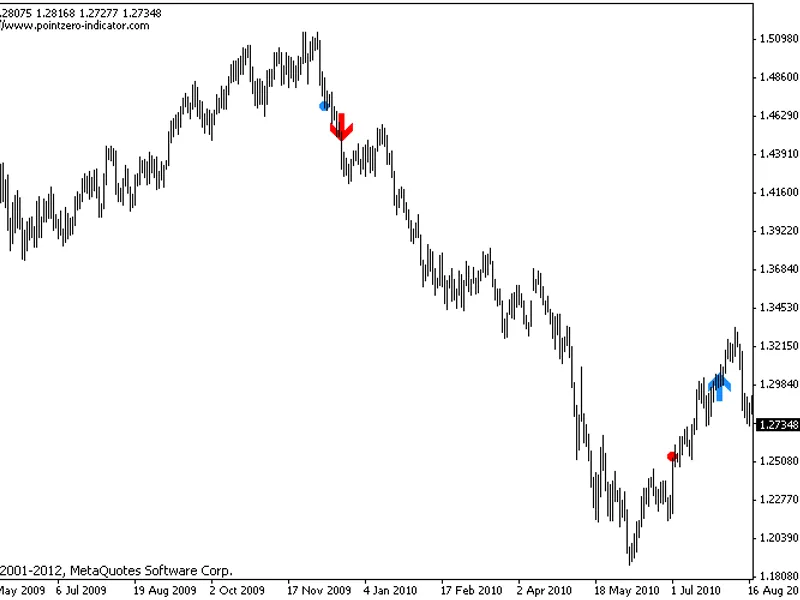
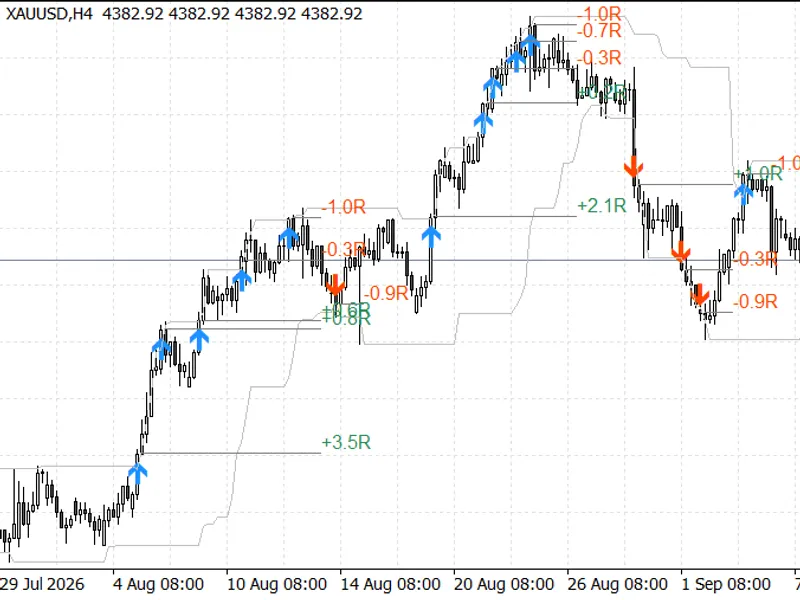
This indicator displays entry and exit signals as arrows and dots:
- Go long on blue arrows.
- Go short on red arrows.
- Exit long positions on blue dots.
- Exit short positions on red dots.
For optimal results, use this indicator in conjunction with the author's other indicator, ensuring they represent the same period or the failsafe trading system. A key feature is its ability to check if the last trade has been stopped out and provide subsequent entry signals along the trend, making it a valuable addition to the trading channel for a comprehensive Turtle Trading approach.
Both indicators offer trading alerts, which can be enabled or disabled as needed. The recommended setup involves using the channel and the classic indicator together.
Additionally, this indicator provides entry/exit alerts.
Parameters:
- tradeperiod: Donchian channel period for trading signals.
- stopperiod: Donchian channel period for exit signals.
- strictentry: Apply strict entry parameters as per the Turtles' strategy.
- strictexit: Apply strict exit parameters as per the Turtles' strategy.
- strictstop: Apply strict stop-loss as per the Turtles' strategy.
- greedy: Maintain trades unless in profit or the stop-loss is triggered.
- evaluatestoploss: Assess if stopped out and display future signals.
- atrperiod: ATR period for stop-loss calculation.
- atrstopnumber: N.factor for stop-loss calculation.
- displayalerts: Enable/disable alerts.
Recommendations:
Refer to the author's other indicator for comprehensive trading rules. It can be used for entry signals in the S1 system or to indicate the S2 (failsafe) system.
Changelog:
2026-06-12: Indicator update introduced various strict options for entries, exits, and stops. The profitability of the Turtle Trading system has been a subject of debate. The following EURUSD backtest (2012-2026) involves trading all signals without filtering, trading only after the current bar closes, adjusting exposure per Turtle rules, adding to positions, and trailing the stop-loss using ATR*2. The same system is also tested with a 5% initial risk per trade.
You may also like: i double channel - excellent alternative for indicator users on MetaTrader 4.
Source Code
#property copyright "robotfx"
#property link "https://robotfx.org"
#property indicator_chart_window
#property indicator_buffers 4
#property indicator_color1 dodgerblue
#property indicator_color2 red
#property indicator_color3 dodgerblue
#property indicator_color4 red
#property indicator_width1 2
#property indicator_width2 2
.......
⚠ Limitations & Risk Warning
- This tool is provided for educational and testing purposes only.
- Past performance does not guarantee future results.
- Trading involves substantial risk of loss. Use on a demo account first.
- Results may vary depending on market conditions, broker, and settings.
- We recommend thorough backtesting and forward testing before using with real funds.