Session Range Boxes
This is a powerful addition to your MetaTrader 5 toolkit designed to optimize market analysis and performance. This technical indicator acts as a specialized analysis tool designed to visualize market data. It helps traders identify emerging trends, momentum shifts, and key support or resistance levels by plotting statistical calculations directly onto price charts.
How to Setup and Use Session Range Boxes
1. Installation: Place your file in the MQL/Indicators folder via "Open Data Folder" and restart your terminal.
2. Loading: Find the indicator in the Navigator, drag it onto your chart, and configure the input parameters in the popup window.
3. Customization: Press Ctrl+I to open the indicator list, select your tool, and click "Properties" to change colors, levels, or visual styles.
4. Updating: Replace the old file in the Indicators folder with the new version and restart the platform to apply changes.
Frequently Asked Questions
Q: Why is my indicator not showing? A: Verify the file is in the MQL/Indicators folder, or try right-clicking the "Indicators" tree in the Navigator and clicking "Refresh."
Q: Do custom indicators slow down the platform? A: Too many complex indicators can impact performance; remove unused ones via the "Indicator List" (Ctrl+I).
Q: Can I use MT4 indicators on MT5? A: No, MQL4 and MQL5 are distinct languages; ensure the indicator is compiled specifically for your platform version.
Description & Settings
The
Session Range Boxes
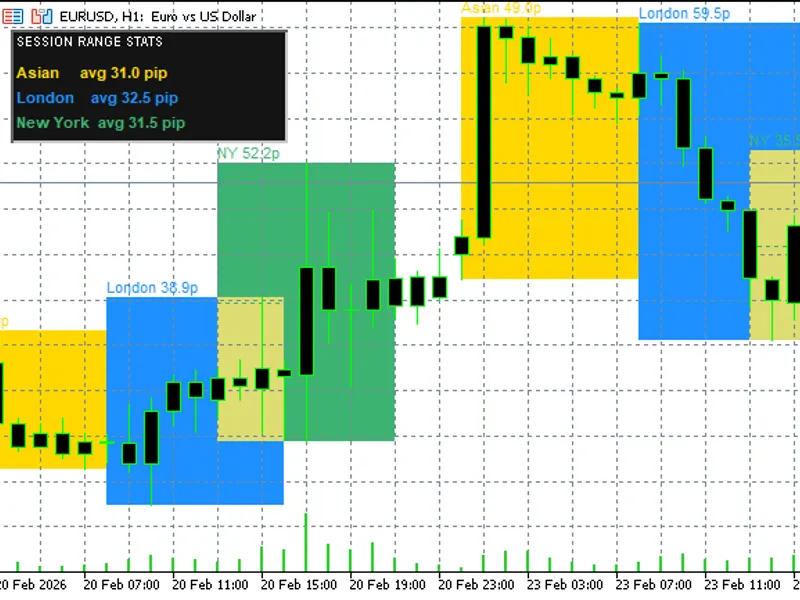
indicator automatically draws colored high/low range boxes for the three major Forex trading sessions — Asian, London, and New York — directly on the price chart. For each configured past day, the indicator scans M1 bars within the session time window and marks the exact high and low with a filled rectangle. This gives traders a clear visual reference of where price was contained during each session, making it immediately obvious when the current session breaks out of a previous range.
The indicator is based on a concept widely used by professional traders: session range analysis. Many institutional participants plan their entries around the high and low established during the Asian session, waiting for London or New York to break those levels. By overlaying all three sessions simultaneously, traders can compare range sizes, identify overlap zones, and anticipate likely breakout directions at a glance.
A built-in stats panel in the top-left corner shows the average range in pips for each session, calculated over the configured number of past days. This average helps traders set realistic targets and stops relative to typical session volatility. An optional breakout alert fires the moment price moves beyond any of today's session box boundaries, supporting a rules-based approach to breakout trading.
How to Use
Apply the indicator to any Forex pair on any timeframe. Boxes are always calculated from M1 data internally, so the active chart timeframe does not affect accuracy. The recommended view is H1 or H4 for a clean overview of multiple days at once.
Reading the boxes:
Top edge of each box = session high
Bottom edge = session low
Dotted midline = session midpoint (50% level)
Label on top-left of each box = session name and range size in pips
Trading ideas:
Wait for price to break above the Asian box high at London open — potential long entry
A London box entirely inside the Asian box signals consolidation — expect a larger New York move
Use the average range panel to judge whether today's session range is already extended
The midline acts as dynamic support/resistance within the session Input Parameters Important Notes
Session times are in server time
, not local time. Check your broker's GMT offset and adjust defaults if needed. Most brokers on UTC+2 or UTC+3 can use the defaults as-is.
The indicator requires
M1 history to be loaded
for accurate boxes. If boxes appear incomplete on first attach, scroll the chart left to force history download, then re-attach.
Breakout alerts fire
once per session per day
and reset automatically at midnight server time.
The stats panel average is computed over the same DaysBack period as the boxes. A minimum of 3 days is recommended for a meaningful result.