





VP S Trailing Stop Service
Info
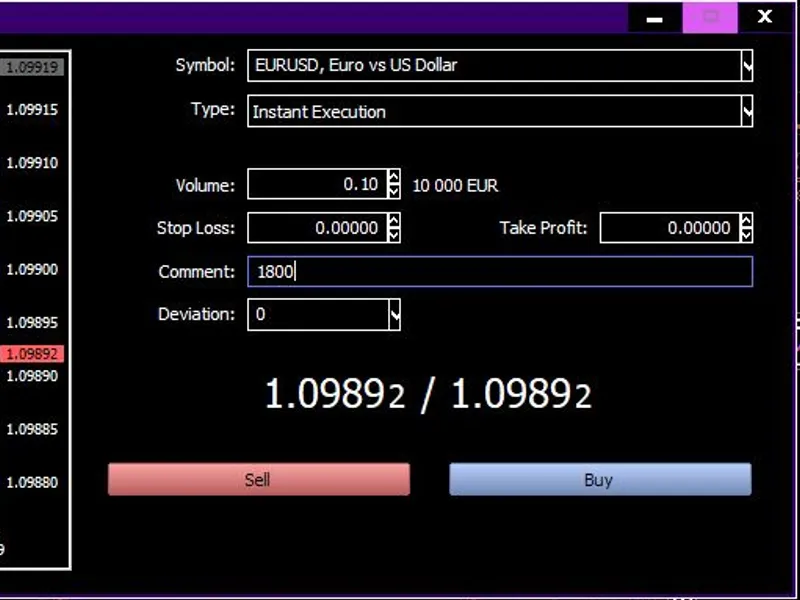
The VP S Trailing Stop Service is a Library for MetaTrader 5 that place the file into services terminal folder. The picture above shows an example of setting up a new sell order with the corresponding comment - 1800 points.
Usage
This tool is typically used for enhancing chart analysis and decision making.
Platform
This Library works exclusively on MetaTrader 5 (both build 600+ and newer versions).
Setup
Place the downloaded file in MQL5/Libraries folder via File ? Open Data Folder in MetaTrader 5.
What this tool does
Place the file into Services Terminal Folder.
Typical Use Case
This Library excels in automated trading and technical analysis on MetaTrader 5.
Compatible Platform & Setup
This Library works on MetaTrader 5. Place the file in the MQL5/Libraries folder and restart the terminal.
Description & Settings
Related: Swap Monitor - another powerful services for MetaTrader 5 traders.
Place the file into Services Terminal Folder.
The picture above shows an example of setting up a new sell order with the corresponding comment - 1800 points.
Also recommended: Period Converter Mod - similar services with strong performance on MetaTrader 5.
The picture above shows the result of sell order the corresponding comment - 1800 points.The picture above shows an example of setting up a graphical object of a horizontal line - 450 points.
The picture above shows an example of the result of creating a horizontal line.
To use Real SL Trailing - when you open a trade order in the comment indicate the real stop loss distance in points.
To use Virtual SL Trailing - create horizontal line on same symbol chart then rename it to the name you used before launching the program and in the description of the object indicate the virtual stop loss distance in points.
!!! Be careful !!!
When placing an object on chart use correct SL distance depending on trade direction.
To disable virtual trailing just delete created horizontal line.
To disable real trailing you have to stop this program.
This code is designed to manage only one open position per symbol.
To manage a large number of open positions for a single symbol, you need to edit the code.
You may also like: EV Z Reader - excellent alternative for services users on MetaTrader 5.
⚠ Limitations & Risk Warning
- This tool is provided for educational and testing purposes only.
- Past performance does not guarantee future results.
- Trading involves substantial risk of loss. Use on a demo account first.
- Results may vary depending on market conditions, broker, and settings.
- We recommend thorough backtesting and forward testing before using with real funds.