









Translator
Info
The Translator is a Library for MetaTrader 5 that the class is designed for localization of messages in mql5 programs. In brief, all that outputs in the log with the help of the print() function and text messages displayed in alert(), comment(), and messagebox() can be made multilingual in one code.
Usage
This tool is typically used for enhancing chart analysis and decision making.
Platform
This Library works exclusively on MetaTrader 5 (both build 600+ and newer versions).
Setup
Place the downloaded file in MQL5/Libraries folder via File ? Open Data Folder in MetaTrader 5.
How to Install and Use Translator
1. Storage: Place library files in the MQL/Libraries directory to ensure they are accessible to your projects.
2. Implementation: Include the library in your code using the #import directive, ensuring you match the exact function names and parameters.
3. Compilation: Ensure the library is present in the directory before you compile your main EA or script, as the compiler links them during this phase.
4. Management: Keep libraries organized in sub-folders if you manage many custom functions to maintain a clean project structure.
Frequently Asked Questions
Q: What is a library file used for? A: Libraries store reusable code modules, allowing you to centralize common logic used by multiple EAs or indicators.
Q: Is a library executable? A: No, libraries are non-executable files containing functions; they must be imported into an EA, indicator, or script to function.
Q: Can I update a library while the platform is running? A: You should compile your EA or script after updating a library to ensure the latest code changes are integrated.
What this tool does
The class is designed for localization of messages in MQL5 programs.
Typical Use Case
This Library excels in automated trading and technical analysis on MetaTrader 5.
Compatible Platform & Setup
This Library works on MetaTrader 5. Place the file in the MQL5/Libraries folder and restart the terminal.
Description & Settings
Related: decorator - structural design pattern - another powerful library for MetaTrader 5 traders.
The class is designed for localization of messages in MQL5 programs. In brief, all that outputs in the log with the help of the print() function and text messages displayed in alert(), comment(), and messagebox() can be made multilingual in one code.Also recommended: isnewbar Class for Efficient Expert Advisor Calculations - similar library with strong performance on MetaTrader 5.
Class methods:
- bool init(string progname, enum_languages lang)
Initialize the object. Set the program name and language code from the languagesenum.mqh file.
- string tr(string str)
Translates the str string.
- void print(string str)
Prints the translation of the str string in the log.
- void alert(string str)
Displays an alert with the translated string.
- void comment(string str)
Displays a comment with the translated string.
- int messagebox(string text, string caption=null, int flags=0)
Displays the translated text in a message window and translates the window title. Returns a messagebox() return code. As with messagebox(), this method cannot be fetched from user indicators.
* If the language file does not have an equivalent translation, it returns/displays the input string.
Usage:
- Download translator.mqh and languagesenum.mqh files to the MetaTrader 5\mql5\include folder. The class is in the first file, and the list of languages is in the second file, following the ISO 639 standard. You can add other language codes as needed, preferably adhering to ISO 639.
- Create a text file for translation in the format alias = translation, where alias is a name for the translatable string and translation is the text to be displayed.
- Language file coding: UTF8 (no BOM).
- Name the file <mql5 code name>.<language code in Latin capital letter>.ini. For instance, a Russian translation file for mycode should be named mycode.RU.ini. The number of language files should match the number of target languages.
- Place language files in the MetaTrader 5\mql5\files\languages folder.
- In your code, include the translator file (#include <translator.mqh>).
- Create an object, e.g., ctranslator ru.
- Add an input parameter for translation, e.g., input enum_languages inptolanguage = ru.
- Initialize the object, e.g., ru.init(mql5infostring(mql5_program_name), inptolanguage).
- Use the methods as needed, e.g., ru.print("your text").
If the required file is missing or lacks a suitable alias, the method argument will be displayed.
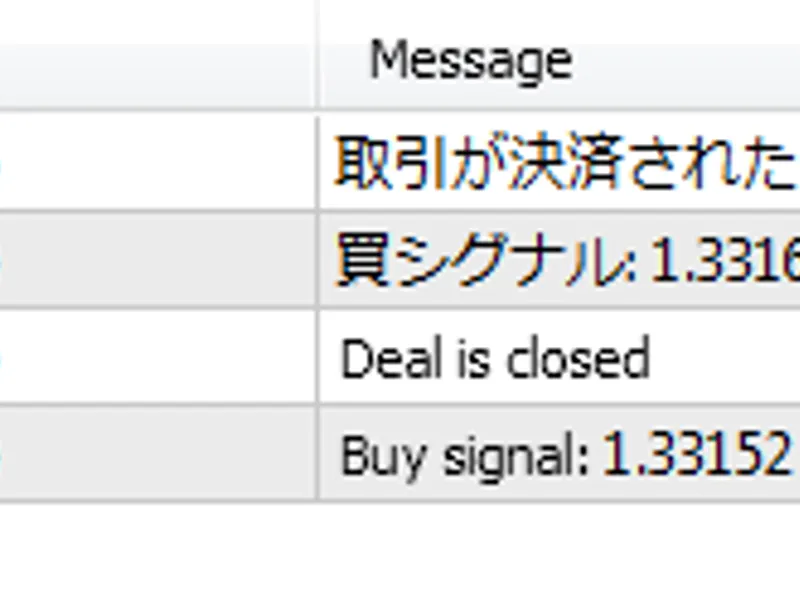
An illustrative example is provided with the sample.mq5 script and two language files for Russian and Japanese translations. The script's output is shown when run with parameters for both languages.
Recommendations: While aliases can be in any language or abbreviated, it's best to use English and full phrases. This ensures:
- Messages will be in English if no language file is available.
- No need for a separate English translation file, similar to the logic in Joomla CMS extensions.
You may also like: Bulls and Bears Power Calculation on Indicator Buffers - excellent alternative for library users on MetaTrader 5.
Source Code
#property copyright "robotfx"
#property link "https://robotfx.org"
#property version   "1.00"
#include <translator.mqh>
#property script_show_inputs
input enum_languages      inptolanguage = ru;
ctranslator trobj;
void onstart() {
   trobj.init(mql5infostring(mql5_program_name), inptolanguage);
   print(trobj.tr("buy signal"), ": ", symbolinfodouble(_symbol, symbol_ask));
.......
⚠ Limitations & Risk Warning
- This tool is provided for educational and testing purposes only.
- Past performance does not guarantee future results.
- Trading involves substantial risk of loss. Use on a demo account first.
- Results may vary depending on market conditions, broker, and settings.
- We recommend thorough backtesting and forward testing before using with real funds.