

Inc Price Channel On Array
Info
The Inc Price Channel On Array is a Library for MetaTrader 5 that the cpricechannelonarray class is intended for calculation of the on indicator buffers. Usage: The Init()method with the following parameters is called in the function of the indicator:int aPeriodis indicator period.
Usage
This tool is typically used for enhancing chart analysis and decision making.
Platform
This Library works exclusively on MetaTrader 5 (both build 600+ and newer versions).
Setup
Place the downloaded file in MQL5/Libraries folder via File ? Open Data Folder in MetaTrader 5.
How to Install and Use Inc Price Channel On Array
1. Storage: Place library files in the MQL/Libraries directory to ensure they are accessible to your projects.
2. Implementation: Include the library in your code using the #import directive, ensuring you match the exact function names and parameters.
3. Compilation: Ensure the library is present in the directory before you compile your main EA or script, as the compiler links them during this phase.
4. Management: Keep libraries organized in sub-folders if you manage many custom functions to maintain a clean project structure.
Frequently Asked Questions
Q: What is a library file used for? A: Libraries store reusable code modules, allowing you to centralize common logic used by multiple EAs or indicators.
Q: Is a library executable? A: No, libraries are non-executable files containing functions; they must be imported into an EA, indicator, or script to function.
Q: Can I update a library while the platform is running? A: You should compile your EA or script after updating a library to ensure the latest code changes are integrated.
What this tool does
The CPriceChannelOnArray class is intended for calculation of the on indicator buffers.
Typical Use Case
This Library excels in automated trading and technical analysis on MetaTrader 5.
Compatible Platform & Setup
This Library works on MetaTrader 5. Place the file in the MQL5/Libraries folder and restart the terminal.
Description & Settings
Related: Channel Proximity Engine - another powerful library for MetaTrader 5 traders.
The CPriceChannelOnArray class is intended for calculation of the on indicator buffers.
Usage:
Also recommended: Trading signals module based on Price Channel Stop indicator - similar library with strong performance on MetaTrader 5.
TheInit()
method with the following parameters is called in the function of the indicator:
int aPeriod
is indicator period.
The
Solve()
method with the following parameters is called in the function:
const int aRatesTotal
is the rates_total variable from the OnCalculate() function parameters;
const int aPrevCalc
is the prev_calculated variable from the OnCalculate() function parameters;
double aDataHigh[]
is the buffer with the High data for the indicator calculation;
double aDataLow[]
is the buffer with the Low data for the indicator calculation;
double & aUpper[]
is a calculated value of the upper line of the indicator;
double & aLower[]
is a calculated value of the lower line of the indicator;
double & aMiddle[]
is a calculated value of the central line of the indicator.
Additional methods:
int BarsRequired()
returns the minimum number of bars required for the indicator calculation;
string Name()
returns a string with the indicator name.
The Test_PriceChannelOnArray.mq5 file is an indicator demonstrating how to use the CPriceChannelOnArray class. The IncPriceChannelOnArray file must be located in the MQL5\Include\IncOnArray directory of the terminal data folder (the IncOnArray folder must be created).
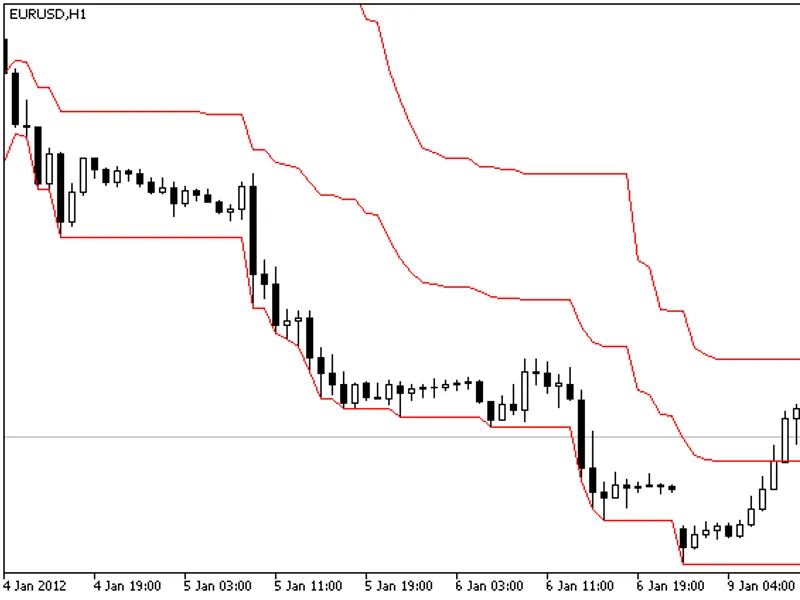
The market is often accelerates and decelerates its movements, so it's not easy to draw the straight lines of support and resistance levels. The Indicator draws the price channel, its upper and lower boundaries are determined by maximal and minimal prices for a certain period.
You may also like: CPrice - excellent alternative for library users on MetaTrader 5.
⚠ Limitations & Risk Warning
- This tool is provided for educational and testing purposes only.
- Past performance does not guarantee future results.
- Trading involves substantial risk of loss. Use on a demo account first.
- Results may vary depending on market conditions, broker, and settings.
- We recommend thorough backtesting and forward testing before using with real funds.