










CCalendar Input Box
Info
The CCalendar Input Box is a Library for MetaTrader 5 that new ccalendarinputbox control element of the incgui library has been designed for date and/or time input. CCalendarInputBox control element can be used in different modes: date and time input, date input, time input.
Usage
This tool is typically used for enhancing chart analysis and decision making.
Platform
This Library works exclusively on MetaTrader 5 (both build 600+ and newer versions).
Setup
Place the downloaded file in MQL5/Libraries folder via File ? Open Data Folder in MetaTrader 5.
How to Install and Use CCalendar Input Box
1. Storage: Place library files in the MQL/Libraries directory to ensure they are accessible to your projects.
2. Implementation: Include the library in your code using the #import directive, ensuring you match the exact function names and parameters.
3. Compilation: Ensure the library is present in the directory before you compile your main EA or script, as the compiler links them during this phase.
4. Management: Keep libraries organized in sub-folders if you manage many custom functions to maintain a clean project structure.
Frequently Asked Questions
Q: What is a library file used for? A: Libraries store reusable code modules, allowing you to centralize common logic used by multiple EAs or indicators.
Q: Is a library executable? A: No, libraries are non-executable files containing functions; they must be imported into an EA, indicator, or script to function.
Q: Can I update a library while the platform is running? A: You should compile your EA or script after updating a library to ensure the latest code changes are integrated.
What this tool does
New CCalendarInputBox control element of the IncGUI library has been designed for date and/or time input.
Typical Use Case
This Library excels in automated trading and technical analysis on MetaTrader 5.
Compatible Platform & Setup
This Library works on MetaTrader 5. Place the file in the MQL5/Libraries folder and restart the terminal.
Description & Settings
Related: Inc GU I Color Input - another powerful library for MetaTrader 5 traders.
New CCalendarInputBox control element of the IncGUI library has been designed for date and/or time input.
Also recommended: Input Struct - similar library with strong performance on MetaTrader 5.
CCalendarInputBox control element can be used in different modes: date and time input, date input, time input.The time can be entered up to minutes or seconds (optional). Additionally Date and time can be amended by relocating the vertical line. In the normal state the element is a text field with the button. The tab is opened when the button is hit.
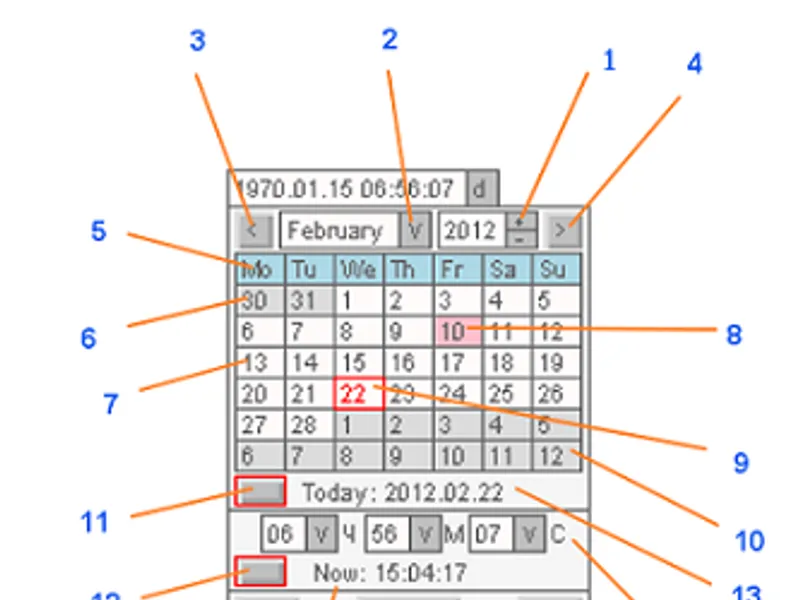
The tab with the numbered control elements is shown in the figure below.
The tab of the CCalendarInput control element
Year change buttons;
Month selection list;
Previous month button;
Next month button;
Data string with weekdays names;
Previous month days (having darker background color comparing to the current month days);
Current month day. The current month means selected month (2) of a selected year (1);
Selected day;
Actual current day;
Next month days;
Actual current date setting button;
Actual current time setting button;
Actual current date;
Time selection;
Actual current time;
Enabling the vertical line for displaying date/time;
Closing the tab without implementing new date/time;
Closing the tab implementing new date/time.
Control element application starts from the Init() method call, the following parameters are indicated when the method is called:
string aName="CCalendar" - control element name;
bool aDate=true - if date input is used;
bool aTime=true - if time input is used;
bool aSeconds=true - time up to seconds;
bool aLine=true - if the vertical line is enabled (additionally to date and/or time input);
int aTimeMode=0 - current time type: 0 - terminal time, 2 - local time (time and date displayed at positions 13 and 15 of the figure above);
string aCaption - label text near control element.
The current value is received using ValueDateTime() (in datetime format) and ValueString() (string in format). The time program set is executed using the SetValueDateTime() method.
In different modes (date/time input) the control element has different width that correpsonds to the length of a displayed value but the width can be changed using SetWidth() method. Control element uses the two interdependent classes CCalendar (not used independently) and CCalendarInputBox. Both classes are added to the IncGUI_v4.mqh file (attached).
Also, IncGUIv4mqh.chm file (IncGUI_v4.mqh library documentation) prepared in and eIncGUI_v4_Test_CCalendarInputBox.mq5 Expert Advisor with the example of the control element application are attached here.
You may also like: Singleton - creational design pattern - excellent alternative for library users on MetaTrader 5.
⚠ Limitations & Risk Warning
- This tool is provided for educational and testing purposes only.
- Past performance does not guarantee future results.
- Trading involves substantial risk of loss. Use on a demo account first.
- Results may vary depending on market conditions, broker, and settings.
- We recommend thorough backtesting and forward testing before using with real funds.