
AS Q Telegram Notifier
Info
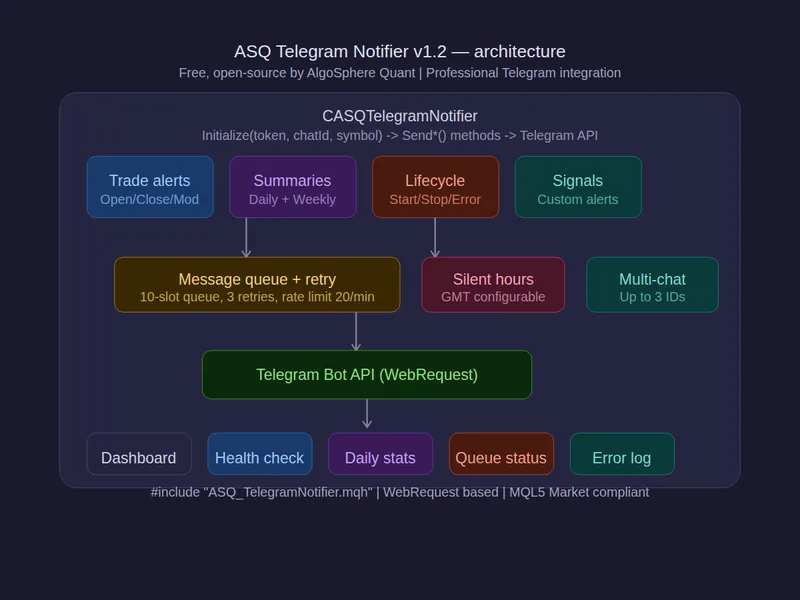
The AS Q Telegram Notifier is a Library for MetaTrader 5 that features: - trade open/close/modify notifications with entry, sl, tp, and p/l - daily and weekly p/l summaries with win rate, drawdown, and balance - ea startup and shutdown alerts (know when your ea goes online/offline) - error, warning, signal, and custom message support - message queue with retry — 10-slot buffer, 3 auto-retries on failure - silent hours — suppress notifications during configurable gmt hours - daily message stats (sent/failed counters, auto-reset at midnight) - markdown formatting with tag labels ([open], [close], [daily], etc. ) - URL encoding and Markdown character escaping - WebRequest-based — fully MQL5 Market compliant, no DLLs SETUP (3 steps): DEMO EA INCLUDED: Attach to any chart with your credentials: — Sends test message and startup notification on initialization — Auto-detects closed trades and sends close notifications — Sends shutdown notification with session P/L on EA removal — Dashboard shows connection status (Verified/Connected/Not Configured), daily send/error counts, queue status, total messages, and last error USAGE: tg.
Usage
This tool is typically used for enhancing chart analysis and decision making.
Platform
This Library works exclusively on MetaTrader 5 (both build 600+ and newer versions).
Setup
Place the downloaded file in MQL5/Libraries folder via File ? Open Data Folder in MetaTrader 5.
How to Install and Use AS Q Telegram Notifier
1. Storage: Place library files in the MQL/Libraries directory to ensure they are accessible to your projects.
2. Implementation: Include the library in your code using the #import directive, ensuring you match the exact function names and parameters.
3. Compilation: Ensure the library is present in the directory before you compile your main EA or script, as the compiler links them during this phase.
4. Management: Keep libraries organized in sub-folders if you manage many custom functions to maintain a clean project structure.
Frequently Asked Questions
Q: What is a library file used for? A: Libraries store reusable code modules, allowing you to centralize common logic used by multiple EAs or indicators.
Q: Is a library executable? A: No, libraries are non-executable files containing functions; they must be imported into an EA, indicator, or script to function.
Q: Can I update a library while the platform is running? A: You should compile your EA or script after updating a library to ensure the latest code changes are integrated.
What this tool does
FEATURES: - Trade open/close/modify notifications with entry, SL, TP, and P/L - Daily and weekly P/L summaries with win rate, drawdown, and balance - EA startup and shutdown alerts (know when your EA goes online/offline) - Error, warning, signal, and custom message support - Message queue with retry — 10-slot buffer, 3 auto-retries on failure - Silent hours — suppress notifications during configurable GMT hours - Daily message stats (sent/failed counters, auto-reset at midnight) - Markdown formatting with tag labels ([OPEN], [CLOSE], [DAILY], etc.
Typical Use Case
This Library excels in automated trading and technical analysis on MetaTrader 5.
Compatible Platform & Setup
This Library works on MetaTrader 5. Place the file in the MQL5/Libraries folder and restart the terminal.
Description & Settings
Related: Telegram integration made easy - another powerful library for MetaTrader 5 traders.
FEATURES: - Trade open/close/modify notifications with entry, SL, TP, and P/L - Daily and weekly P/L summaries with win rate, drawdown, and balance - EA startup and shutdown alerts (know when your EA goes online/offline) - Error, warning, signal, and custom message support - Message queue with retry — 10-slot buffer, 3 auto-retries on failure - Silent hours — suppress notifications during configurable GMT hours - Daily message stats (sent/failed counters, auto-reset at midnight) - Markdown formatting with tag labels ([OPEN], [CLOSE], [DAILY], etc.) - URL encoding and Markdown character escaping - WebRequest-based — fully MQL5 Market compliant, no DLLs SETUP (3 steps): DEMO EA INCLUDED: Attach to any chart with your credentials: — Sends test message and startup notificaAlso recommended: Telegram To MT5 Copier - similar library with strong performance on MetaTrader 5.
tion on initialization — Auto-detects closed trades and sends close notifications — Sends shutdown notification with session P/L on EA removal — Dashboard shows connection status (Verified/Connected/Not Configured), daily send/error counts, queue status, total messages, and last error USAGE: tg.Initialize("YOUR_BOT_TOKEN", "YOUR_CHAT_ID", _Symbol); tg.AddChatId("GROUP_CHAT_ID"); // Optional 2nd chat tg.SetSilentHours(true, 22, 6); // No buzzing at night tg.VerifyConnection(); // Check bot token tg.SendStartup(); // EA is live tg.SendTradeOpen(_Symbol, "BUY", 0.10, ask, sl, tp); tg.Update(); // Process queue (call periodically) Place both files in the same folder — compiles instantly, no subfolder setup needed. This is the open-source notification engine behind Quant Cristina on the MQL5 Market. Same logic, same accuracy. FILES: MetaTrader 5, all brokers, all instruments, all timeframes. Free and open-source. 964 lines of production MQL5. AlgoSphere Quant — Precision before profit.You may also like: MT5 to Telegram Professional Library - excellent alternative for library users on MetaTrader 5.
⚠ Limitations & Risk Warning
- This tool is provided for educational and testing purposes only.
- Past performance does not guarantee future results.
- Trading involves substantial risk of loss. Use on a demo account first.
- Results may vary depending on market conditions, broker, and settings.
- We recommend thorough backtesting and forward testing before using with real funds.