XPoints
This professional-grade solution for MetaTrader 5 helps traders achieve greater efficiency in their daily workflow. This technical indicator acts as a specialized analysis tool designed to visualize market data. It helps traders identify emerging trends, momentum shifts, and key support or resistance levels by plotting statistical calculations directly onto price charts.
How to Setup and Use XPoints
1. Installation: Place your file in the MQL/Indicators folder via "Open Data Folder" and restart your terminal.
2. Loading: Find the indicator in the Navigator, drag it onto your chart, and configure the input parameters in the popup window.
3. Customization: Press Ctrl+I to open the indicator list, select your tool, and click "Properties" to change colors, levels, or visual styles.
4. Updating: Replace the old file in the Indicators folder with the new version and restart the platform to apply changes.
Frequently Asked Questions
Q: Why is my indicator not showing? A: Verify the file is in the MQL/Indicators folder, or try right-clicking the "Indicators" tree in the Navigator and clicking "Refresh."
Q: Do custom indicators slow down the platform? A: Too many complex indicators can impact performance; remove unused ones via the "Indicator List" (Ctrl+I).
Q: Can I use MT4 indicators on MT5? A: No, MQL4 and MQL5 are distinct languages; ensure the indicator is compiled specifically for your platform version.
Description & Settings
RedPlumSoft, Inc
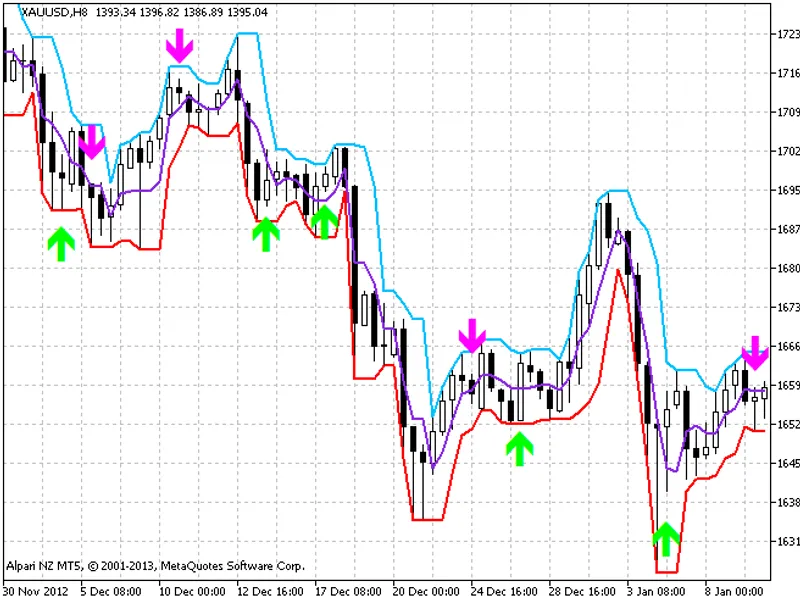
The indicator predicts the possible reversal points. The EURUSD chart show an interesting pattern - some time before the reversal, there are bars with the following features:
rate = (High - Low) / MathAbs(Close - Open) is significantly greater than 1;
the lowest point (Low) touches the bottom of the channel (possible price growth), or the highest point (High) touches the top of the channel (possible price fall)
These bars are conventionally called X-points. The indicator finds X-points based on the xrate parameter:
(rate >= xrate) && (High-Low) >= xsize && (Up-Dn)>= xminupdn
To filter out false signals, the indicator analyzes the bar that follows the X-point for any price movement in the predicted direction, as well as the position of bar midpoints relative to the center of the channel and each other.
Indicator input parameters:
It is possible that the indicator may produce false signals. Therefore it is necessary to apply additional filtering using other indicators, or treat the indicator signals as a warning against hasty opening of positions that contradict the prediction.
Added time filtering of signals. By default, the night signals are ignored.
The testing revealed another interesting feature of the ixndent parameter - it can be used to accurately calculate the opening moment. For example, open short positions when the price is above the arrow and vice versa, which provides an approximation of the opening to the point of a local extremum.
This indicator was first implemented in MQL4 and published in on 07.06.2008.
Figure 1. The XPoints indicator