BI T E X. ON E Market Maker
This software component for MetaTrader 5 is built to enhance the capabilities of your trading environment. This Expert Advisor serves as automated trading software. It is utilized to monitor financial markets and execute trades based on predefined algorithmic rules, enabling precise position management without the need for constant manual oversight.
How to Setup and Use BI T E X. ON E Market Maker
1. Installation: Open the "File" menu, select "Open Data Folder," navigate to MQL/Experts, paste your file, and restart the terminal.
2. Activation: Drag the EA from the Navigator onto a chart, ensure "Allow live trading" is checked in the Common tab, and verify the AutoTrading button is green.
3. Optimization: Right-click your chart, choose "Expert List," click "Properties" to adjust inputs, and save your preferred setup as a set file for future use.
4. Maintenance: Regularly check the "Experts" tab in the terminal window to monitor trade logs and potential execution errors.
Frequently Asked Questions
Q: Why is my EA not opening trades? A: Check the "AutoTrading" button, ensure "Allow live trading" is enabled, and verify your broker allows automated trading on your account type.
Q: Can I run multiple EAs on one chart? A: No, each chart can only host one active EA; however, you can open multiple charts for different currency pairs to run several EAs.
Q: What does the "smiley face" icon mean? A: A smiley face in the top-right corner of the chart indicates the EA is successfully running; a frowny face means it is disabled.
Description & Settings
The robot works only on cryptocurrency exchange. It places a specified number of buy and sell orders considering the market depth price or a guide (fair contract price obtained from other cryptocurrency exchanges). The idea is to make money on the inefficiency of the real contract price and rebates, which the exchange pays for providing liquidity (for trading limit orders). One of the advantages of the robot is that it uses a full-fledged asynchronous model of working with transactions.
Fig.1. Example of the robot setting the orders with max_pos=100, shift=0.001, level_count=3
Inputs description:
magic_number
- robot ID. If there are several robots, then be sure to assign each next robot this identifier plus 100, for example, if the first robot has magic_number = 100, then the next ones should have magic_number = 200, 300, 400, etc.
price_type
- type of price, relative to which the prices of placed orders are to be calculated. 1 - price from traded symbol's market depth, 2 - marking contract price, 3 - contract index price.
max_pos
- number of contracts in each EA request.
shift
- shift of the first order relative to the marking price (marked purple). It is set in shares of the absolute price value, for example, if shift = 0.001 and the marking price = 6600, the closest buy and sell requests are shifted up and down from the marking price by 6.6 price points up and down (see Fig. 1)
level_count
- number of quotes levels. Each subsequent request is shifted by 'shift' value relative to the previous one.
Fig. 2. Performed deals
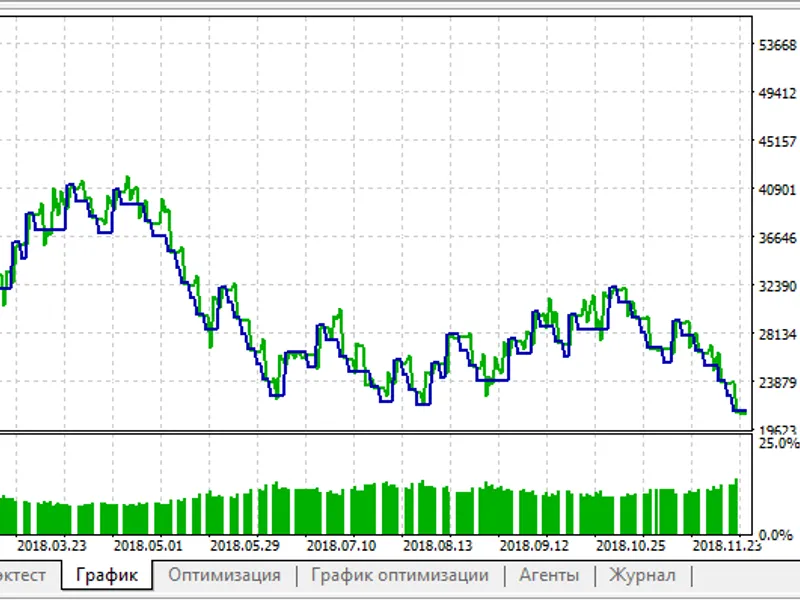
Fig. 3. Equity from the strategy tetser, BTCUSD, real tick, 79 ms of delays, profit in BTC
Fig. 4. Statistics from the strategy tetser, BTCUSD, real tick, 79 ms of delays, profit in BTC