










Symmetrical Triangle Detector: Objective Rules with Gann Box
Info
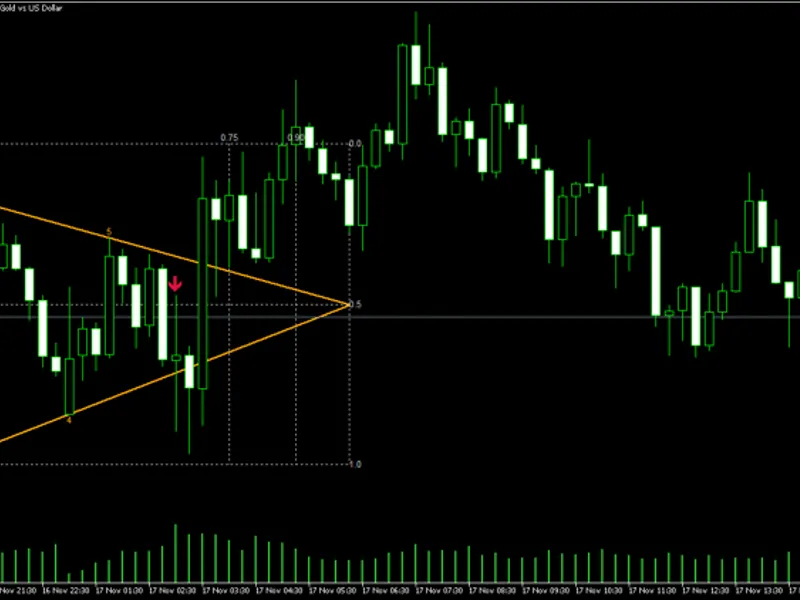
The Symmetrical Triangle Detector: Objective Rules with Gann Box is a Indicator for MetaTrader 5 that this indicator objectively detects horizontal symmetrical triangles using precise, measurable rules, ensuring consistent results across different chart analyses. It operates solely on closed bars and does not repaint, offering a reliable pattern identification tool.
Usage
This tool is typically used for enhancing chart analysis and decision making.
Platform
This Indicator works exclusively on MetaTrader 5 (both build 600+ and newer versions).
Setup
Place the downloaded file in MQL5/Indicators folder via File ? Open Data Folder in MetaTrader 5.
How to Install and Use Symmetrical Triangle Detector: Objective Rules with Gann Box
1. Installation: Place your file in the MQL/Indicators folder via "Open Data Folder" and restart your terminal.
2. Loading: Find the indicator in the Navigator, drag it onto your chart, and configure the input parameters in the popup window.
3. Customization: Press Ctrl+I to open the indicator list, select your tool, and click "Properties" to change colors, levels, or visual styles.
4. Updating: Replace the old file in the Indicators folder with the new version and restart the platform to apply changes.
Frequently Asked Questions
Q: Why is my indicator not showing? A: Verify the file is in the MQL/Indicators folder, or try right-clicking the "Indicators" tree in the Navigator and clicking "Refresh."
Q: Do custom indicators slow down the platform? A: Too many complex indicators can impact performance; remove unused ones via the "Indicator List" (Ctrl+I).
Q: Can I use MT4 indicators on MT5? A: No, MQL4 and MQL5 are distinct languages; ensure the indicator is compiled specifically for your platform version.
What this tool does
This indicator objectively detects horizontal symmetrical triangles using precise, measurable rules, ensuring consistent results across different chart analyses.
Typical Use Case
This Indicator excels in automated trading and technical analysis on MetaTrader 5.
Compatible Platform & Setup
This Indicator works on MetaTrader 5. Place the file in the MQL5/Indicators folder and restart the terminal.
Description & Settings
Related: Symmetrical Normalized Oscillator Indicator - another powerful indicator for MetaTrader 5 traders.
This indicator objectively detects horizontal symmetrical triangles using precise, measurable rules, ensuring consistent results across different chart analyses. It operates solely on closed bars and does not repaint, offering a reliable pattern identification tool.Also recommended: triangle day - similar indicator with strong performance on MetaTrader 5.
Detection Rules
The indicator identifies pivots within a specified number of bars on either side, forming an alternating zigzag pattern. For consecutive highs, the higher pivot is retained; for consecutive lows, the lower pivot is kept.
The pattern considers the last 4 to 8 pivots. An upper line connects the first and last high pivots, and a lower line connects the first and last low pivots. All intermediate pivots must remain within these lines.
A valid triangle requires at least three touches on one trendline and two on the other. A touch is defined as a pivot point falling within a defined tolerance of its respective trendline.
Symmetry is assessed by comparing the slopes of the upper and lower trendlines. The upper line must decline, and the lower line must rise. The ratio of the steeper slope to the flatter slope must not exceed RatioMax.
Horizontal and Compactness constraints ensure the pattern is well-defined. The middle axis of the triangle should move less than AxisPct percent of the initial height. Compactness is further controlled by limiting the slope and height relative to the Average True Range (ATR).
Cleanliness ensures that no candlestick wicks or bodies breach the trendlines between the first and last touch points. Additionally, at least FillPct percent of the candles must touch a trendline.
The apex must appear after the last touch and be no farther than ApexK times the pattern's width.
The pattern concludes at the first wick that extends beyond the trendlines or at the apex. A close outside the lines after the 0.75 time mark also signals the end. An arrow marks the pattern's conclusion. An optional Gann box can be drawn from the first touch to the apex, using price levels of 0, 0.5, and 1, and time levels of 0.75 and 0.9.
Implementation Notes
Bars are processed sequentially and only once, ensuring identical logic for historical and live data.
All thresholds are calibrated as multiples of Wilder ATR(14), making the inputs adaptable to various markets and timeframes.
All visual elements, including trendlines and the Gann box, are drawn using chart objects with the prefix STRI_ and are automatically removed when the indicator is deleted.
This tool is designed for pattern detection only and does not generate trading signals. Historical testing indicates that trading breakouts from these patterns may not provide an edge after accounting for trading costs.
You may also like: Quantora Drawdown Monitor MT5: Professional Account Risk and Drawdown Dashboard - excellent alternative for indicator users on MetaTrader 5.
Source Code
#property copyright "RobotFX"
#property version   "1.00"
#property description "This code is educational. Feel free to use, modify and upgrade as you wish. Visit ROBOTFX.ORG for professional trading tools"
#property indicator_chart_window
#property indicator_buffers 0
#property indicator_plots   0
input group "Pivots"
input int    InpPivot     = 3;
input double InpTouchAtr  = 0.5;
input double InpWickAtr   = 0.5;
.......
⚠ Limitations & Risk Warning
- This tool is provided for educational and testing purposes only.
- Past performance does not guarantee future results.
- Trading involves substantial risk of loss. Use on a demo account first.
- Results may vary depending on market conditions, broker, and settings.
- We recommend thorough backtesting and forward testing before using with real funds.