


Simple License for MT4/MT5: Secure Your EA with Account, Expiry, and Server Controls
Info
The Simple License for MT4/MT5: Secure Your EA with Account, Expiry, and Server Controls is a Indicator for MetaTrader 5 that simplelicense. mqh is a powerful tool to safeguard your Expert Advisors (EAs) and indicators.
Usage
This tool is typically used for enhancing chart analysis and decision making.
Platform
This Indicator works exclusively on MetaTrader 5 (both build 600+ and newer versions).
Setup
Place the downloaded file in MQL5/Indicators folder via File ? Open Data Folder in MetaTrader 5.
How to Install and Use Simple License for MT4/MT5: Secure Your EA with Account, Expiry, and Server Controls
1. Installation: Place your file in the MQL/Indicators folder via "Open Data Folder" and restart your terminal.
2. Loading: Find the indicator in the Navigator, drag it onto your chart, and configure the input parameters in the popup window.
3. Customization: Press Ctrl+I to open the indicator list, select your tool, and click "Properties" to change colors, levels, or visual styles.
4. Updating: Replace the old file in the Indicators folder with the new version and restart the platform to apply changes.
Frequently Asked Questions
Q: Why is my indicator not showing? A: Verify the file is in the MQL/Indicators folder, or try right-clicking the "Indicators" tree in the Navigator and clicking "Refresh."
Q: Do custom indicators slow down the platform? A: Too many complex indicators can impact performance; remove unused ones via the "Indicator List" (Ctrl+I).
Q: Can I use MT4 indicators on MT5? A: No, MQL4 and MQL5 are distinct languages; ensure the indicator is compiled specifically for your platform version.
What this tool does
SimpleLicense.
Typical Use Case
This Indicator excels in automated trading and technical analysis on MetaTrader 5.
Compatible Platform & Setup
This Indicator works on MetaTrader 5. Place the file in the MQL5/Indicators folder and restart the terminal.
Description & Settings
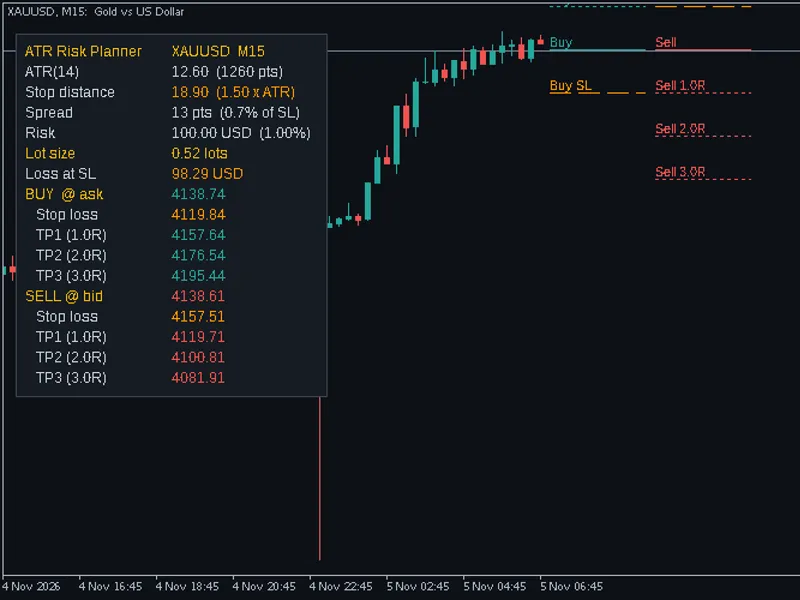
Related: ATR Risk Planner: Trade Planning Made Simple - another powerful indicator for MetaTrader 5 traders.
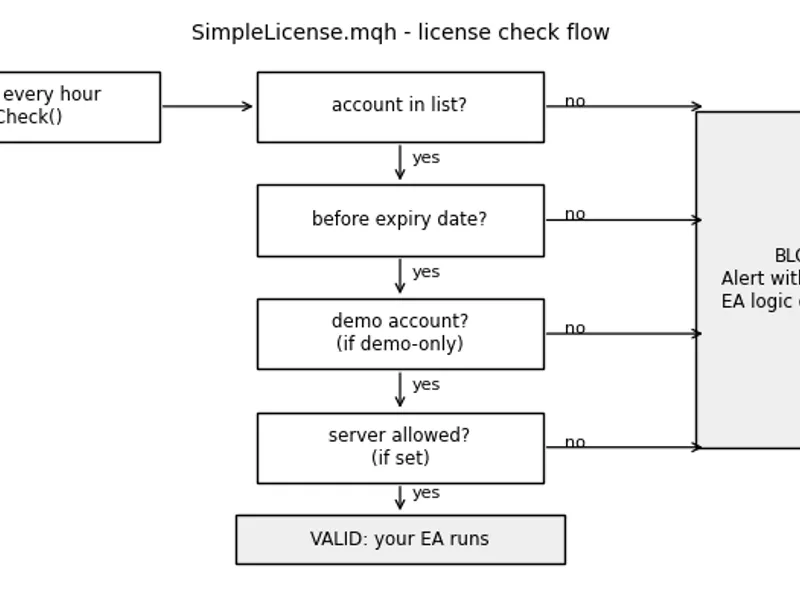
SimpleLicense.mqh is a powerful tool to safeguard your Expert Advisors (EAs) and indicators. It allows you to control access based on accounts, expiry dates, demo restrictions, and server filters.Also recommended: Simple Anchored VWAP - Institutional Volume Benchmark - similar indicator with strong performance on MetaTrader 5.
Features:
- Allowed Accounts: Specify a list of account numbers or leave it empty for any account.
- Expiry Date: Set a date after which the program will stop functioning.
- Demo-Only Mode: Restrict usage to demo accounts, ideal for trial versions.
- Server Filter: Limit usage to specific broker servers by specifying a partial or full server name.
Usage:
1. Place SimpleLicense.mqh alongside your EA or in the MQL5/Include folder.
2. Include the file with #include "SimpleLicense.mqh".
3. Declare CSimpleLicense lic; in your code.
4. In OnInit, call AllowAccounts(), SetExpiry(), DemoOnly(), and AllowServer() as required.
5. Use if(!lic.Check()) return INIT_FAILED; to ensure proper initialization.
6. At the start of OnTick or OnCalculate, add if(!lic.IsValid()) return; to validate the license.
Example:
LicenseDemoEA.mq5 demonstrates the implementation. Edit the #define lines for each customer and compile.
Considerations:
- Compiled Values: The settings are compiled into the .ex5 file, requiring a separate build for each customer.
- Security: While it prevents casual sharing, it may not deter skilled crackers. For enhanced security and automatic licensing, consider the MQL5 Market for paid products.
- Data Source: Checks rely on the terminal's account information and server time.
This license mechanism provides a flexible and secure way to distribute your EAs and indicators with customizable access controls.
You may also like: Simple Countdown Timer for Next Candle - excellent alternative for indicator users on MetaTrader 5.
Source Code
#property copyright "RobotFX"
#property version   "1.00"
#property description "This code is educational. Feel free to use, modify and upgrade as you wish. Visit ROBOTFX.ORG for professional trading tools"
#include "SimpleLicense.mqh"
#define LICENSE_ACCOUNTS  ""
#define LICENSE_EXPIRY    D'2027.12.31 23:59'
#define LICENSE_DEMO_ONLY false
#define LICENSE_SERVER    ""
CSimpleLicense g_license;
int OnInit()
.......
⚠ Limitations & Risk Warning
- This tool is provided for educational and testing purposes only.
- Past performance does not guarantee future results.
- Trading involves substantial risk of loss. Use on a demo account first.
- Results may vary depending on market conditions, broker, and settings.
- We recommend thorough backtesting and forward testing before using with real funds.