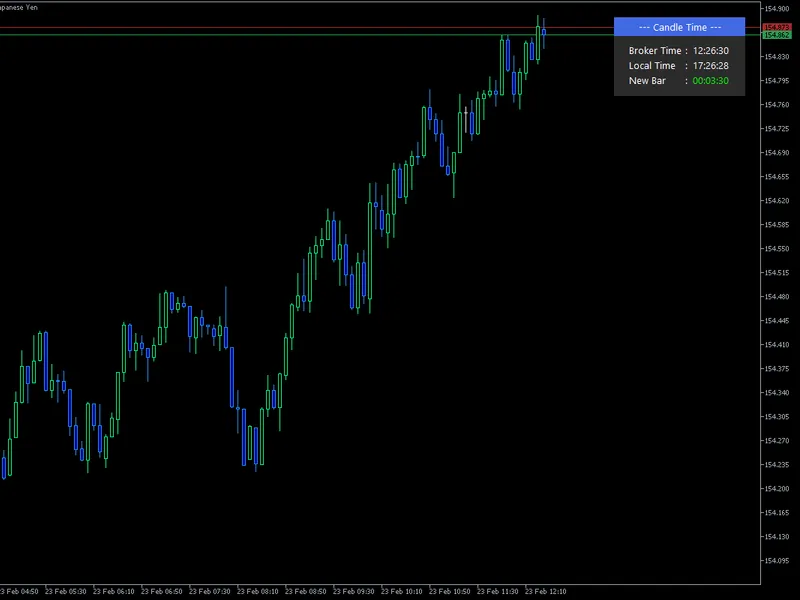
Modern Time Panel - Candle Time
This is a powerful addition to your MetaTrader 5 toolkit designed to optimize market analysis and performance. This technical indicator acts as a specialized analysis tool designed to visualize market data. It helps traders identify emerging trends, momentum shifts, and key support or resistance levels by plotting statistical calculations directly onto price charts.
How to Setup and Use Modern Time Panel - Candle Time
1. Installation: Place your file in the MQL/Indicators folder via "Open Data Folder" and restart your terminal.
2. Loading: Find the indicator in the Navigator, drag it onto your chart, and configure the input parameters in the popup window.
3. Customization: Press Ctrl+I to open the indicator list, select your tool, and click "Properties" to change colors, levels, or visual styles.
4. Updating: Replace the old file in the Indicators folder with the new version and restart the platform to apply changes.
Frequently Asked Questions
Q: Why is my indicator not showing? A: Verify the file is in the MQL/Indicators folder, or try right-clicking the "Indicators" tree in the Navigator and clicking "Refresh."
Q: Do custom indicators slow down the platform? A: Too many complex indicators can impact performance; remove unused ones via the "Indicator List" (Ctrl+I).
Q: Can I use MT4 indicators on MT5? A: No, MQL4 and MQL5 are distinct languages; ensure the indicator is compiled specifically for your platform version.
Description & Settings
Modern Time Panel: Minimalist On-Chart Time & Countdown Dashboard
Enhance your MetaTrader 5 charting experience with the "Modern Time Panel," a professionally designed, lightweight on-chart dashboard. In trading, timing is everything. Knowing exactly when a candlestick is about to close can be the deciding factor for your entry and exit strategies. This indicator provides all the essential time metrics you need at a single glance, wrapped in a modern, clean, and highly readable user interface.
Key Features:
Live Candle Countdown (New Bar):
Displays a real-time countdown to the opening of the next candlestick. Powered by MT5's OnTimer event, the countdown ticks every second flawlessly, regardless of market volatility or incoming price ticks.
Dual Time Display:
Seamlessly view both your Local Time and the Broker Time side-by-side, helping you align your trading sessions with server hours effortlessly.
Professional, Aligned UI:
The dashboard is crafted with visual aesthetics in mind. It features a distinct header and body, with perfectly aligned colons ( : ) and typography that mimics a professional data table.
Non-Intrusive Design:
Permanently anchored to the top-right corner of your chart, it stays out of the way of your price action analysis.
Customization & Inputs:
Tailor the dashboard to fit your exact chart template (perfect for both dark and light modes). You can easily adjust:
X & Y Offsets:
Fine-tune the distance from the chart borders to fit your screen perfectly.
Color Palette:
Customize the background colors of the header and body, as well as the text colors, to match your personal chart theme.
Typography:
Change the font style (e.g., Segoe UI, Arial) and adjust the font size for optimal readability.
Whether you are a scalper waiting for a 1-minute candle to close, or a swing trader monitoring the 4-hour chart, the Modern Time Panel ensures you are always in sync with the market's pulse.