Check for Market Open Hours
This professional-grade solution for MetaTrader 5 helps traders achieve greater efficiency in their daily workflow. This library provides a collection of modular, reusable code. It is utilized by developers to organize common functions, allowing for the integration of complex logic across multiple Expert Advisors, indicators, or scripts without the need for code duplication.
How to Setup and Use Check for Market Open Hours
1. Storage: Place library files in the MQL/Libraries directory to ensure they are accessible to your projects.
2. Implementation: Include the library in your code using the #import directive, ensuring you match the exact function names and parameters.
3. Compilation: Ensure the library is present in the directory before you compile your main EA or script, as the compiler links them during this phase.
4. Management: Keep libraries organized in sub-folders if you manage many custom functions to maintain a clean project structure.
Frequently Asked Questions
Q: What is a library file used for? A: Libraries store reusable code modules, allowing you to centralize common logic used by multiple EAs or indicators.
Q: Is a library executable? A: No, libraries are non-executable files containing functions; they must be imported into an EA, indicator, or script to function.
Q: Can I update a library while the platform is running? A: You should compile your EA or script after updating a library to ensure the latest code changes are integrated.
Description & Settings
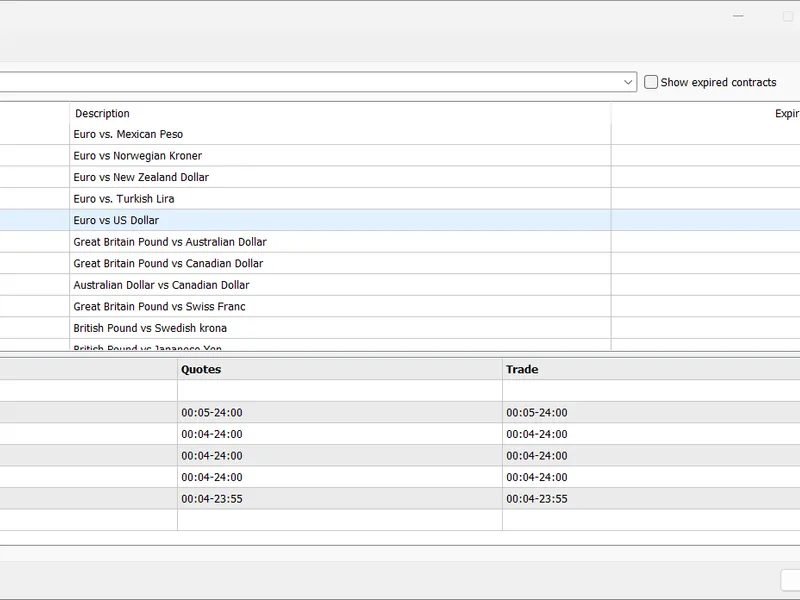
The MarketOpenHours.mqh file checks the Market Open Hours against the server time at the broker. Its input is only the Symbol name as string type. As a result you get a bool, true - the market is open, false - the market is closed. In the following image i show the Open Hours of my broker DarwinEx for the symbol EURUSD.
You can see how different these open times are on different weekdays. So here is your include file:
The first part checks for the weekday, Mon - Fri to allow opening trades and trailing stop during the week. In the switch command the actual server time is checked against the broker's symbol session.
Implications:
If you run this script on every tick or every minute, it will give the exact open hours according to the broker's server like you see in the above image.
If you run this script every 5 minutes on my broker account, it is correct only on Monday 00:05 - 00:00
If you run this script on the open of each new bar, the first bar of every weekday get false, market closed also for the last bar on Friday
If you run this script on PERIOD_D1, PERIOD_W1, PERIOD_MN1 it will not give a true signal for my broker because it runs at 00:00 and market open is at 00:04 Feel free to use it in your EA at your own risk and backtest well.