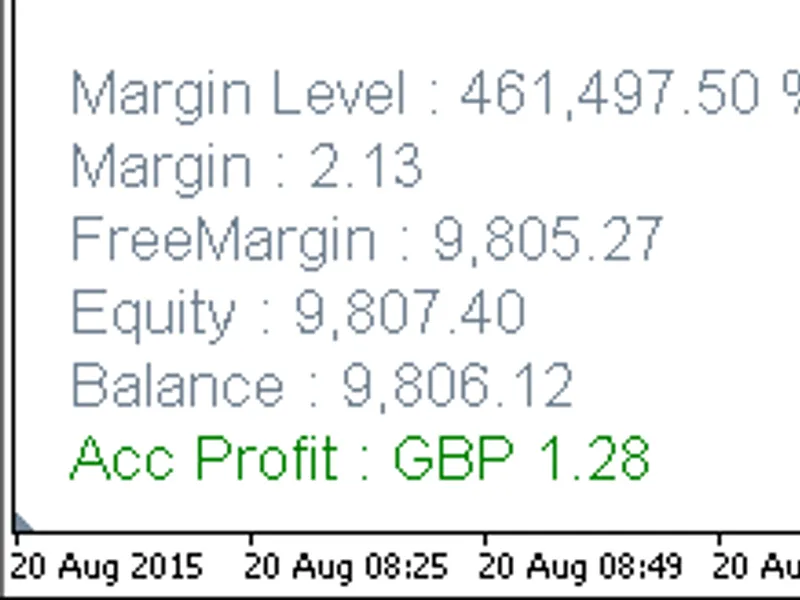
Account Information
This is a powerful addition to your MetaTrader 4 toolkit designed to optimize market analysis and performance. This technical indicator acts as a specialized analysis tool designed to visualize market data. It helps traders identify emerging trends, momentum shifts, and key support or resistance levels by plotting statistical calculations directly onto price charts.
How to Setup and Use Account Information
1. Installation: Place your file in the MQL/Indicators folder via "Open Data Folder" and restart your terminal.
2. Loading: Find the indicator in the Navigator, drag it onto your chart, and configure the input parameters in the popup window.
3. Customization: Press Ctrl+I to open the indicator list, select your tool, and click "Properties" to change colors, levels, or visual styles.
4. Updating: Replace the old file in the Indicators folder with the new version and restart the platform to apply changes.
Frequently Asked Questions
Q: Why is my indicator not showing? A: Verify the file is in the MQL/Indicators folder, or try right-clicking the "Indicators" tree in the Navigator and clicking "Refresh."
Q: Do custom indicators slow down the platform? A: Too many complex indicators can impact performance; remove unused ones via the "Indicator List" (Ctrl+I).
Q: Can I use MT4 indicators on MT5? A: No, MQL4 and MQL5 are distinct languages; ensure the indicator is compiled specifically for your platform version.
Description & Settings
Indicators add account information to chart. Profit, Balance, Equity, Free Margin, Margin and Margin Level %.
Indicator 1: Account Info Vertical 4.01 places account information on the chart in vertical sequence.
Indicator 2: Account Info Horizontal 4.01 places account information on the the chart in horizontal sequence.
Hide account information: Click anywhere on account information text.
Show account information: Click on text 'Account Info'.
Show Profit only: Select 'true' from Inputs value.
Horizontal and vertical axis auto equal space distance between account info headers and no font overlap — see Recommendations below.
Recommendations
Horizontal and vertical axis auto equal space distance between account info headers and no font overlapThe following requirements must be satisfied:
Space distances between successive account headers must be equal.
An increase or decrease of font size must not result in vertical or horizontal font overlap.
Vertical axis equal spacing between account info headers
*
* To avoid unnecessary repetitions any reference to 'equal spacing' implies 'equal spacing between account headers'.
For account headers in vertical sequence vertical axis equal space distance is dependent on an OBJPROP_YDISTANCE parameter formula.
Vertical axis equal space distance is maintained by including in the formula the following:
Successive header OBJPROP_YDISTANCE formulas maintain vertical equal spacing by multiplying the font size in accordance with successive allocated terms of even sequence 2, 4, 6, 8, 10, 12.
Vertical font overlap is avoided because each equal space increases or decreases proportional to change in font size.
OBJPROP_YDISTANCE vertical axis shift is maintained by including as addition the OBJPROP_ YDISTANCE corresponding input parameter value.
The below account_info_vertical code illustrates the solution.
Horizontal axis equal spacing between account info headers
For account headers in horizontal sequence horizontal axis equal space distance is dependent on an OBJPROP XDISTANCE parameter formula.
The OBJPROP_YDISTANCE formula for vertical axis equal spacing is relatively straight forward because all elements of successive header formulas, the OBJPROP_YDISTANCE corresponding input value and even sequence multiples and font size, remain constant in the formula.
Successive header OBJPROP_XDISTANCE formulas for horizontal axis equal space must accommodate a real time updating variable in the form of multiple preceding account header lengths that increase or decrease according to changes in account margin, profit or loss, balance etc.
Horizontal axis equal space distance is maintained by including in the formula the following:
Successive header BJPROP_XDISTANCE formulas maintain horizontal equal space by obtaining a total count of all string lengths in preceding headers and multiplying by a suitable font size related multiplier.
Horizontal font overlap is avoided because each equal space increases or deceases proportional to change in font size.
OBJPROP_XDISTANCE horizontal axis shift is maintained by including as addition the OBJPROP_ XDISTANCE corresponding input parameter value.The below account_info_horizontal code illustrates the solution.
You May Also Like
MT4 Experts






MT5 Experts



MT5 Indicators
-
 Important Information
-
 Bars and Rates Information Utility, displays how many bars there are in all timeframes for any user selected symbol, and shows the 'Copy Rates' information availablity for any bar
-
 Series Integer Info and Rates Bar Information Utility, displays how many bars there are in all timeframes for any user selected symbol, and shows the 'Copy Rates' information availablity for any bar