










iSpread: Synthetic Symbol Creation and Analysis for Pair Trading
Info
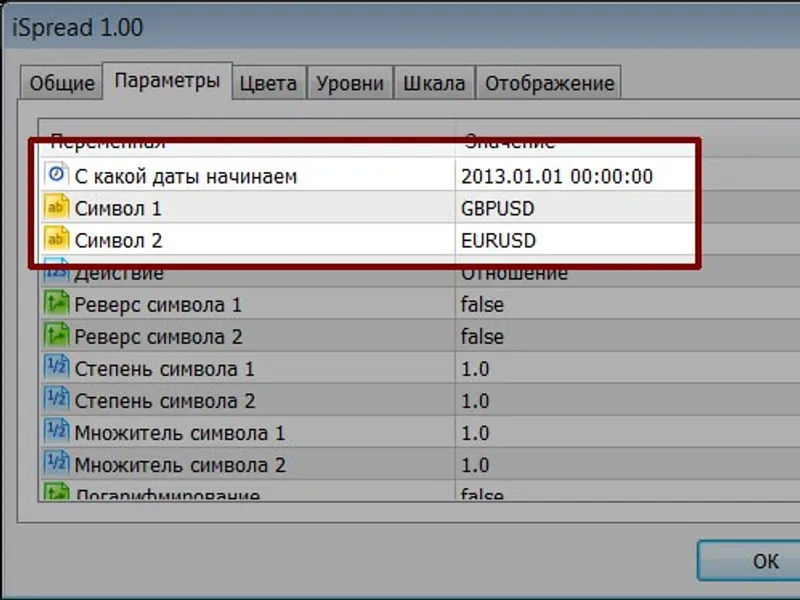
The iSpread: Synthetic Symbol Creation and Analysis for Pair Trading is a Indicator for MetaTrader 5 that ispread is an indicator designed to create synthetic symbols for pair trading strategies. Key Features and Configuration:Start Date- Define the starting date for building the synthetic symbol.
Usage
This tool is typically used for enhancing chart analysis and decision making.
Platform
This Indicator works exclusively on MetaTrader 5 (both build 600+ and newer versions).
Setup
Place the downloaded file in MQL5/Indicators folder via File ? Open Data Folder in MetaTrader 5.
How to Install and Use iSpread: Synthetic Symbol Creation and Analysis for Pair Trading
1. Installation: Place your file in the MQL/Indicators folder via "Open Data Folder" and restart your terminal.
2. Loading: Find the indicator in the Navigator, drag it onto your chart, and configure the input parameters in the popup window.
3. Customization: Press Ctrl+I to open the indicator list, select your tool, and click "Properties" to change colors, levels, or visual styles.
4. Updating: Replace the old file in the Indicators folder with the new version and restart the platform to apply changes.
Frequently Asked Questions
Q: Why is my indicator not showing? A: Verify the file is in the MQL/Indicators folder, or try right-clicking the "Indicators" tree in the Navigator and clicking "Refresh."
Q: Do custom indicators slow down the platform? A: Too many complex indicators can impact performance; remove unused ones via the "Indicator List" (Ctrl+I).
Q: Can I use MT4 indicators on MT5? A: No, MQL4 and MQL5 are distinct languages; ensure the indicator is compiled specifically for your platform version.
What this tool does
iSpread is an indicator designed to create synthetic symbols for pair trading strategies.
Typical Use Case
This Indicator excels in automated trading and technical analysis on MetaTrader 5.
Compatible Platform & Setup
This Indicator works on MetaTrader 5. Place the file in the MQL5/Indicators folder and restart the terminal.
Description & Settings
Related: heiken-ashi indicator: a synthetic candlestick approach - another powerful indicator for MetaTrader 5 traders.
iSpread is an indicator designed to create synthetic symbols for pair trading strategies.Also recommended: PCA Synthetics: Advanced Portfolio Coefficient Calculation - similar indicator with strong performance on MetaTrader 5.
Key Features and Configuration:
Start Date
- Define the starting date for building the synthetic symbol. This helps in utilizing relevant historical data efficiently.
Symbol 1 & 2
- Select two initial trading pairs to be used as the base for the synthetic symbol.
Action
- Choose an arithmetic operation to combine the two selected series. Available operations include addition, subtraction, multiplication, and division.
Symbol Reverse 1 & 2
- Invert the selected series if a negative correlation is detected.
Symbol Degree 1 & 2
- Apply exponentiation to the selected series. This can be used to equalize the dimensions of the two series.
Symbol Multiplier 1 & 2
- Multiply a series by a specific factor. This is often used to equalize series dimensions.
Logarithms
- Convert the resulting series to a logarithmic scale. This can help mitigate the influence of quadratic trends. If logarithms are used, preparing the final series using the difference between two original series is common. Alternatively, when not using logarithms, selecting the ratio as the action is typical.
Smoothing Period
- Apply a simple moving average (MA) smoothing to the resulting data before merging the two series. This can help reduce spikes without significantly distorting the data. A period of 0 disables smoothing. Smoothing is beneficial for reducing noise while preserving data integrity.
Algorithm Selection
- Detrend the resulting series using either a simple MA or the first difference. This step aims to remove the trend from the synthetic symbol.
- Method 1: Remove an MA with a specified period (lag) from the series.
- Method 2: Calculate the first difference twice, first for each pair and then the difference between the results.
Period for Algorithm
- Set a lag or offset for the trend removal algorithm. If set to 0, the synthetic symbol is not modified.
Show Levels
- Toggle the display of deviation levels. Crossing these levels can signal potential market entry points. Three levels are available in both upward and downward directions: red, yellow, and green.
Level Calculation Method
- Determine how deviation levels are calculated:
- Method 1 (Normalization): Detrended synthetic symbol is normalized to a 0 to 1 range with an offset of -0.5, centering fluctuations around 0. Initial data before stable extremes are formed should be viewed cautiously.
- Method 2 (Levels of Extrema): Tracks the absolute maximum deviation and divides it into three entry levels. This method is susceptible to spikes, but a 'levels coefficient' can be used to manually adjust level sensitivity.
- Method 3 (Standard Deviation): Calculates levels based on standard deviation. This method is not implemented due to its dynamic level narrowing behavior.
Notes on MT5 Implementation:
- The indicator may display noise if it cannot retrieve all necessary data, which differs from MT4 behavior.
- In cases of data omissions, the indicator may use previous data. Empty data slots are left visible to highlight omissions.
- Refreshing the chart or changing parameters may resolve display issues.
- Timer functionality for handling data gaps was tested but yielded unsatisfactory results and was removed.
You may also like: Detrended Synthetic Price Indicator (Histo) - excellent alternative for indicator users on MetaTrader 5.
Source Code
#property copyright "robotfx"
#property link "https://robotfx.org"
#property version   "1.00"
#property indicator_separate_window
#property indicator_buffers   15
#property indicator_plots     7
#property indicator_label1    "snt";
#property indicator_label2    "l1 up";
#property indicator_label3    "l2 up";
#property indicator_label4    "l3 up";
.......
⚠ Limitations & Risk Warning
- This tool is provided for educational and testing purposes only.
- Past performance does not guarantee future results.
- Trading involves substantial risk of loss. Use on a demo account first.
- Results may vary depending on market conditions, broker, and settings.
- We recommend thorough backtesting and forward testing before using with real funds.