











ICT Premium, Discount, and OTE Analysis Tool
Info
The ICT Premium, Discount, and OTE Analysis Tool is a Indicator for MetaTrader 5 that understanding the dealing range, standard deviations, and ipda rangesthe core concept of ict's premium and discount strategy revolves around the dealing range. The objective is to buy when price is in the discount zone (below 50% of the range) and sell when price is in the premium zone (above 50%).
Usage
This tool is typically used for enhancing chart analysis and decision making.
Platform
This Indicator works exclusively on MetaTrader 5 (both build 600+ and newer versions).
Setup
Place the downloaded file in MQL5/Indicators folder via File ? Open Data Folder in MetaTrader 5.
How to Install and Use ICT Premium, Discount, and OTE Analysis Tool
1. Installation: Place your file in the MQL/Indicators folder via "Open Data Folder" and restart your terminal.
2. Loading: Find the indicator in the Navigator, drag it onto your chart, and configure the input parameters in the popup window.
3. Customization: Press Ctrl+I to open the indicator list, select your tool, and click "Properties" to change colors, levels, or visual styles.
4. Updating: Replace the old file in the Indicators folder with the new version and restart the platform to apply changes.
Frequently Asked Questions
Q: Why is my indicator not showing? A: Verify the file is in the MQL/Indicators folder, or try right-clicking the "Indicators" tree in the Navigator and clicking "Refresh."
Q: Do custom indicators slow down the platform? A: Too many complex indicators can impact performance; remove unused ones via the "Indicator List" (Ctrl+I).
Q: Can I use MT4 indicators on MT5? A: No, MQL4 and MQL5 are distinct languages; ensure the indicator is compiled specifically for your platform version.
What this tool does
Understanding the Dealing Range, Standard Deviations, and IPDA RangesThe core concept of ICT's premium and discount strategy revolves around the dealing range.
Typical Use Case
This Indicator excels in automated trading and technical analysis on MetaTrader 5.
Compatible Platform & Setup
This Indicator works on MetaTrader 5. Place the file in the MQL5/Indicators folder and restart the terminal.
Description & Settings
Related: DIG Variation HTF - another powerful indicator for MetaTrader 5 traders.
Understanding the Dealing Range, Standard Deviations, and IPDA RangesThe core concept of ICT's premium and discount strategy revolves around the dealing range. The objective is to buy when price is in the discount zone (below 50% of the range) and sell when price is in the premium zone (above 50%). Entries are targeted within the Optimal Trade Entry (OTE) band. This indicator identifies the range based on confirmed price swings and visually displays all associated levels.
Also recommended: Normalized Moving Average Convergence Divergence (MACD) - similar indicator with strong performance on MetaTrader 5.
Dealing Range Definition
The dealing range is established from the older of the last confirmed swing high or swing low up to the current price. The upper boundary is the highest high and the lower boundary is the lowest low recorded since the identified swing. The range expands as price makes new extremes. A newly confirmed swing initiates a new range calculation.
A swing high is defined as a high point with N candles on either side displaying lower highs, where N is the swing strength value (default is 10). A swing high is only confirmed once its N right-side candles have closed, ensuring no repainting of past data.
An up leg occurs when the swing low precedes the swing high. A down leg occurs when the swing high precedes the swing low.
Visual Elements Drawn by the Indicator
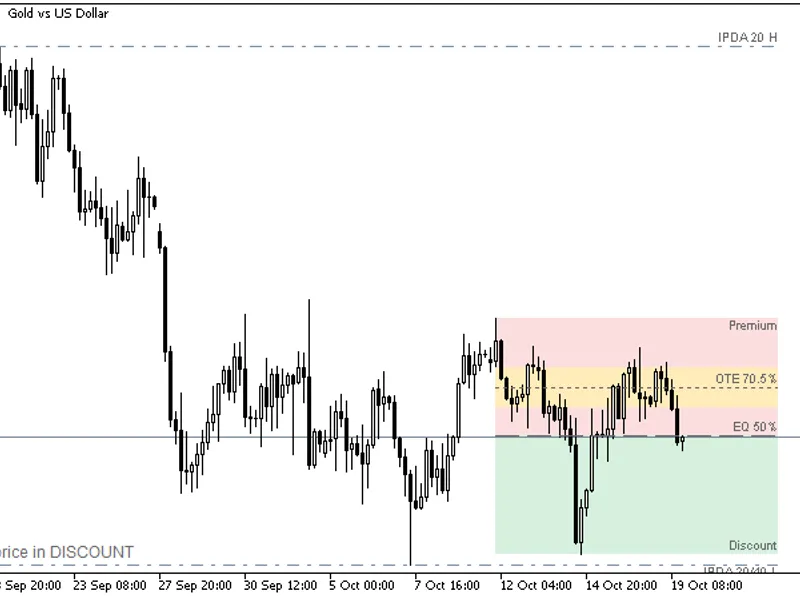
Premium Zone: Displayed in red, representing the area above the equilibrium level.
Discount Zone: Displayed in green, representing the area below the equilibrium level.
Equilibrium Line: A horizontal line marking the 50% level of the range.
Optimal Trade Entry (OTE) Band: An amber band encompassing the 62% to 79% retracement of the price leg, with a distinct line at the 70.5% level. This band is situated within the discount zone for an up leg and within the premium zone for a down leg.
Standard Deviation Projections: These are ICT standard projections that extend the height of the range beyond the end of the leg. By default, levels include -1, -2, -2.5, and -4, but users can define their own custom list.
Optional Retracements: The indicator can display additional retracement levels such as 23.6%, 38.2%, 61.8%, and 78.6%.
IPDA Data Ranges: These represent the highest high and lowest low values over the last 20, 40, and 60 completed trading days. If equal levels occur within these periods, they share a single line and label (e.g., "IPDA 20/40 H"). The short Sunday evening trading session on GMT+0 servers is included with Monday's data.
Status Line: A dynamic line providing information such as "Up leg: price in DISCOUNT + OTE". Hovering over a zone or line will display its corresponding price level.
Alerts (Triggered on Candle Close)
Alerts can be configured for the following events:
- Detection of a new dealing range.
- Price entering the OTE band (on the first touch within each range).
- A candle closing across the equilibrium level.
Alert types include popup, push notification, and email.
Buffers for Expert Advisors (iCustom, Not Drawn)
Closed candle values are stored without repainting:
- Buffer 0 / 1: Represents the range top / bottom.
- Buffer 2: Represents the equilibrium level.
- Buffer 3 / 4: Represents the OTE band's 62% / 79% levels.
- Buffer 5: Indicates the leg direction (+1 for an up leg, -1 for a down leg).
- Buffer 6: Denotes the closing zone (+1 for premium, -1 for discount, 0 at equilibrium, +2 / -2 within the OTE band).
- Buffers 7 - 12: Represent the IPDA 20, 40, and 60-day high and low values.
EMPTY_VALUE is used when a value is not available.
Example Usage: double zone[]; CopyBuffer(handle, 6, 1, 1, zone); If zone[0] equals -2, it signifies that the last closed candle was within the discount zone and inside the OTE band.
Important Considerations
This indicator is compatible with any trading symbol and timeframe. Increasing the swing strength value will result in a larger range, reflecting higher timeframe dynamics.
The indicator has been tested on M1 to D1 timeframes for EURUSD, GBPUSD, and XAUUSD.
It is crucial to understand that these levels are based on ICT conventions and do not guarantee trading outcomes. The indicator's function is to display these levels, not to provide specific buy or sell signals.
The indicator is designed solely for drawing and calculation purposes; it does not execute trades.
You may also like: Price Channel Stop Digit HTF - excellent alternative for indicator users on MetaTrader 5.
Source Code
#property copyright "RobotFX"
#property link "https://robotfx.org"
#property version     "1.00"
#property description "This code is educational. Feel free to use, modify and upgrade as you wish. Visit ROBOTFX.ORG for professional trading tools"
#property indicator_chart_window
#property indicator_buffers 13
#property indicator_plots   13
#property indicator_type1   DRAW_NONE
#property indicator_label1  "Range top"
#property indicator_type2   DRAW_NONE
.......
⚠ Limitations & Risk Warning
- This tool is provided for educational and testing purposes only.
- Past performance does not guarantee future results.
- Trading involves substantial risk of loss. Use on a demo account first.
- Results may vary depending on market conditions, broker, and settings.
- We recommend thorough backtesting and forward testing before using with real funds.