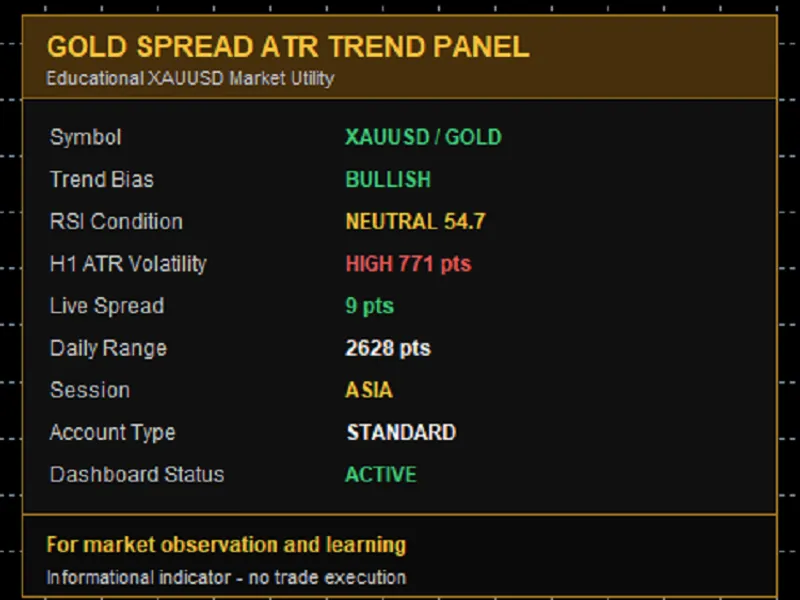
Gold Spread AT R Trend Panel MT5
This professional-grade solution for MetaTrader 5 helps traders achieve greater efficiency in their daily workflow. This technical indicator acts as a specialized analysis tool designed to visualize market data. It helps traders identify emerging trends, momentum shifts, and key support or resistance levels by plotting statistical calculations directly onto price charts.
How to Setup and Use Gold Spread AT R Trend Panel MT5
1. Installation: Place your file in the MQL/Indicators folder via "Open Data Folder" and restart your terminal.
2. Loading: Find the indicator in the Navigator, drag it onto your chart, and configure the input parameters in the popup window.
3. Customization: Press Ctrl+I to open the indicator list, select your tool, and click "Properties" to change colors, levels, or visual styles.
4. Updating: Replace the old file in the Indicators folder with the new version and restart the platform to apply changes.
Frequently Asked Questions
Q: Why is my indicator not showing? A: Verify the file is in the MQL/Indicators folder, or try right-clicking the "Indicators" tree in the Navigator and clicking "Refresh."
Q: Do custom indicators slow down the platform? A: Too many complex indicators can impact performance; remove unused ones via the "Indicator List" (Ctrl+I).
Q: Can I use MT4 indicators on MT5? A: No, MQL4 and MQL5 are distinct languages; ensure the indicator is compiled specifically for your platform version.
Description & Settings
- No trade execution
How To Use: Attach the indicator to an XAUUSD or Gold chart in MetaTrader 5. It can be viewed on any chart timeframe because the panel internally reads H1 and H4 data for trend, RSI and volatility context. Panel Interpretation: - Symbol shows whether the current chart appears to be XAUUSD or Gold. - Trend Bias compares H1 EMA values with the H4 trend EMA. - RSI Condition shows whether the H1 RSI is above 60, below 40 or neutral. - H1 ATR Volatility compares current ATR against the low and high ATR thresholds. - Live Spread shows current spread in points. - Daily Range shows the current D1 high-low range in points. - Session gives a simple time-based market session label. Input Parameters: - Dashboard title: text shown in the dashboard header. - Dashboard corner: chart corner where the panel is displayed. - X and Y position: pixel offset for panel placement. - Theme: visual color theme. - Refresh seconds: timer refresh interval. - ATR period: period used for H1 ATR reading. - Fast EMA period: fast H1 EMA used for trend bias. - Slow EMA period: slow H1 EMA used for trend bias. - Trend EMA period: H4 EMA used as a major trend filter. - RSI period: H1 RSI period. - Low ATR points: threshold for quiet volatility. - High ATR points: threshold for high volatility. - Spread warning points: spread level shown as a warning. - Show account info: show or hide account type text. Notes: This indicator is intended as a free educational chart utility. It is not financial advice, it does not predict future price movement and it does not execute trades.