











false breakups
Info
The false breakups is a Indicator for MetaTrader 5 that indicator documentation "fakebreaks. mq5"overviewthe "false breakouts.
Usage
This tool is typically used for enhancing chart analysis and decision making.
Platform
This Indicator works exclusively on MetaTrader 5 (both build 600+ and newer versions).
Setup
Place the downloaded file in MQL5/Indicators folder via File ? Open Data Folder in MetaTrader 5.
How to Install and Use false breakups
1. Installation: Place your file in the MQL/Indicators folder via "Open Data Folder" and restart your terminal.
2. Loading: Find the indicator in the Navigator, drag it onto your chart, and configure the input parameters in the popup window.
3. Customization: Press Ctrl+I to open the indicator list, select your tool, and click "Properties" to change colors, levels, or visual styles.
4. Updating: Replace the old file in the Indicators folder with the new version and restart the platform to apply changes.
Frequently Asked Questions
Q: Why is my indicator not showing? A: Verify the file is in the MQL/Indicators folder, or try right-clicking the "Indicators" tree in the Navigator and clicking "Refresh."
Q: Do custom indicators slow down the platform? A: Too many complex indicators can impact performance; remove unused ones via the "Indicator List" (Ctrl+I).
Q: Can I use MT4 indicators on MT5? A: No, MQL4 and MQL5 are distinct languages; ensure the indicator is compiled specifically for your platform version.
What this tool does
indicator documentation "fakebreaks.
Typical Use Case
This Indicator excels in automated trading and technical analysis on MetaTrader 5.
Compatible Platform & Setup
This Indicator works on MetaTrader 5. Place the file in the MQL5/Indicators folder and restart the terminal.
Description & Settings
Related: False Breakout Counter - another powerful indicator for MetaTrader 5 traders.
indicator documentation "fakebreaks.mq5"
overview
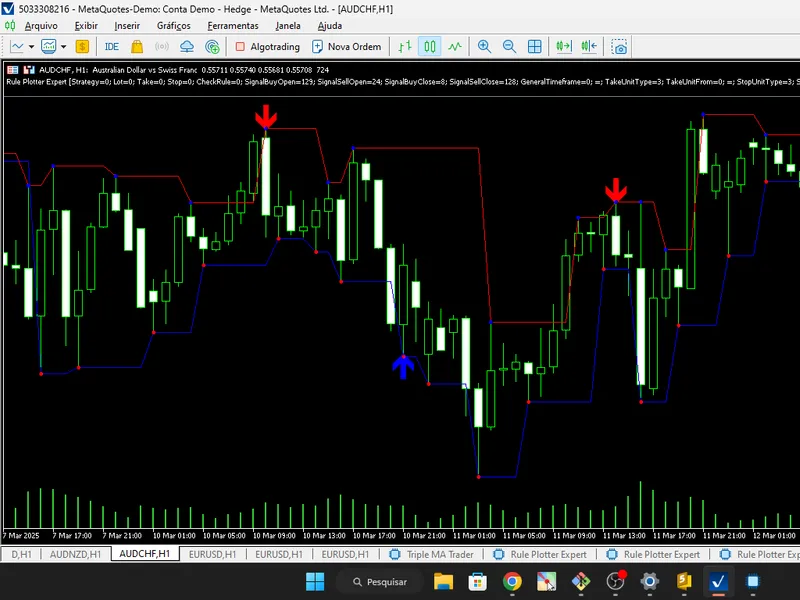
the "false breakouts.mq5" indicator is designed to identify and mark on the chart:
Also recommended: hikkake pattern (inside day false breakout) - similar indicator with strong performance on MetaTrader 5.
buy points
and
sell points
based on false breakouts of support and resistance.
dynamic
support
and
resistance
levels
.
market
tops
and
bottoms
.
it uses buffers to store and display this information on the chart, making it easier to visually analyse false breakout patterns.
code structure
indicator properties
indicator name:
falsebreakouts.mq5
display window:
main chart ( indicator_chart_window ).
buffers and plots
the indicator uses
6 buffers
to store data and
6 plots
to display it on the chart:
buy
:
type: draw_arrow (up arrow).
colour: blue (clrblue).
width: 5.
sell
:
type: draw_arrow (down arrow).
colour: red ( clrred ).
width: 5.
support
:
type: draw_line (solid line).
colour: blue (clrblue).
resistance
:
type: draw_line (continuous line).
colour: red ( clrred ).
bottom
:
type: draw_arrow (down arrow).
colour: red ( clrred ).
top
:
type: draw_arrow (up arrow).
colour: blue ( clrblue ).
global variables
extresistancesbuffer[] : stores the resistance levels.
extsupportsbuffer[] : stores the support levels.
exttopsbuffer[] : stores identified tops.
extbottomsbuffer[] : stores identified bottoms.
extsellbuffer[] : stores the selling points.
extbuybuffer[] : stores the buy points.
main functions
1. oninit()
purpose:
initialises the indicator and maps the buffers.
actions
:
maps the buffers to the plots.
sets empty values ( plot_empty_value ) for the buffers.
sets the arrows (icons) for buy and sell.
defines the displacement of the arrows on the graph.
2. oncalculate()
purpose:
calculates and updates the buffers with each new candle or tick.
actions
:
checks for new data to process.
initialises the buffers if necessary.
identifies tops ( is_top ) and bottoms ( is_bottom ) based on the high and low prices.
updates the resistance, support, top and bottom buffers.
calls the isbuy() and issell() functions to identify buy and sell points.
3. indexnextpoint()
purpose:
finds the index of the next valid (non-zero) point in a buffer.
use:
used by the isbuy() and issell() functions to identify the most recent reference point.
4. isbuy()
purpose:
checks for a buy signal based on a false break of support.
logic
:
checks whether the current price is above the reference point (support).
confirms if there has been a false breakout (price falls below and then returns above support).
returns true if the conditions are met.
5. issell()
purpose:
checks for a sell signal based on a false breakout of resistance.
logic
:
checks whether the current price is below the reference point (resistance).
confirms if there has been a false breakout (price rises above and then returns below resistance).
returns true if the conditions are met.
operating logic
identification of tops and bottoms:
a
top
is identified when the high of the current candle is higher than the highs of the adjacent candles.
a
bottom
is identified when the low of the current candle is lower than the lows of the adjacent candles.
updating support and resistance:
the last identified top is stored as resistance.
the last identified bottom is stored as support.
buy and sell signals:
a
buy
signal is generated when the price breaks through a support and then returns above it.
a
sell
signal is generated when the price breaks through resistance and then returns below it.
example of use
the indicator can be applied to any chart in metatrader 5.
it will display:
blue arrows for buy points.
red arrows for sell points.
blue lines for support.
red lines for resistances.
additional arrows for tops and bottoms.
final considerations
the indicator is useful for traders who trade on the basis of false breakouts of support and resistance.
it is recommended to test the indicator on different markets and timeframes to validate its effectiveness.
it can be customised to include sound alerts or notifications when a signal is generated.
You may also like: digital filters - separate - excellent alternative for indicator users on MetaTrader 5.
Source Code
#property copyright "RobotFX"
#property link "https://robotfx.org"
#property version   "1.00"
#property indicator_chart_window
#property indicator_buffers 6
#property indicator_plots   6
#property indicator_label1 "Buy"
#property indicator_type1   DRAW_ARROW
#property indicator_color1  clrBlue
#property indicator_width1  5
.......
⚠ Limitations & Risk Warning
- This tool is provided for educational and testing purposes only.
- Past performance does not guarantee future results.
- Trading involves substantial risk of loss. Use on a demo account first.
- Results may vary depending on market conditions, broker, and settings.
- We recommend thorough backtesting and forward testing before using with real funds.