Fuzzy - library for developing fuzzy models
This software component for MetaTrader 5 is built to enhance the capabilities of your trading environment. This library provides a collection of modular, reusable code. It is utilized by developers to organize common functions, allowing for the integration of complex logic across multiple Expert Advisors, indicators, or scripts without the need for code duplication.
How to Setup and Use Fuzzy - library for developing fuzzy models
1. Storage: Place library files in the MQL/Libraries directory to ensure they are accessible to your projects.
2. Implementation: Include the library in your code using the #import directive, ensuring you match the exact function names and parameters.
3. Compilation: Ensure the library is present in the directory before you compile your main EA or script, as the compiler links them during this phase.
4. Management: Keep libraries organized in sub-folders if you manage many custom functions to maintain a clean project structure.
Frequently Asked Questions
Q: What is a library file used for? A: Libraries store reusable code modules, allowing you to centralize common logic used by multiple EAs or indicators.
Q: Is a library executable? A: No, libraries are non-executable files containing functions; they must be imported into an EA, indicator, or script to function.
Q: Can I update a library while the platform is running? A: You should compile your EA or script after updating a library to ensure the latest code changes are integrated.
Description & Settings
Dmitry Kalyuzhny. FuzzyNet project website -
Unzip the archive into the. The library codes are located in the <terminal_data_folder>\MQL5\Include\Math\FuzzyNet\ Sample test scripts can be found in the <terminal_data_folder>\MQL5\Scripts\FuzzyNet\
FuzzyNet is one of the most popular mathematical libraries for creating fuzzy models
Fuzzy Logic Library for Microsoft.Net (FuzzyNet) is an easy to use component that implements Mamdani and Sugeno fuzzy inference systems.
FuzzyNet includes:
5 .
Flexible form for developing fuzzy system rules.
fuzzy inference system.
fuzzy inference system.
One method for Mamdani-type systems.
Unlimited amount of input and output variables.
The following additions have been made when converting the library into MQL5:
8 new membership functions.
4 new defuzzification methods for Mamdani-type systems.
Using the Library
Depending on your task, create an empty fuzzy Mamdani or Sugeno-type system.
Create fuzzy input and output variables.
Appropriate terms are added to each fuzzy variable. Before that, a name and a membership function are assigned to a term.
Variables are added to the system.
A set of rules is created.
The rules are added to the system.
Input data is sent to the system.
The system calculation function is called.
Note:
The Mamdani-type inference system can be configured at any stage after its creation before the system calculation function is called. If the system settings have not been changed after its creation, the system works with default settings:
is performed using the Min operator (an output fuzzy set is truncated).
is performed using the Max operator (receiving maximum values of the output membership functions obtained after implication).
Defuzzification is performed using the center of gravity method.
To work with the library, include MamdaniFuzzySystem.mqh or SugenoFuzzySystem.mqh file depending on the system you are creating.
Below is more detailed information about FuzzyNet ported library packages:
Using FuzzyNet Library in MQL5
Before writing a fuzzy system, you should have a clear vision of its elements, including:
Number of input and output values to be rearranged by fuzzy variables.
Number of terms and their membership functions for each fuzzy variable.
The type of a fuzzy system depending on your task.
Number and content of fuzzy rules corresponding to the selected system.
Specific parameters and features of the system.
The system development and calculation:
Create an empty system.
For a Mamdani-type system:
For a Sugeno-type system:
Create all fuzzy input variables separately from the system by assigning a name and maximum/minimum values to all variables as parameters:
Create functions of fuzzy terms, create fuzzy terms themselves and pass appropriate names and membership functions to them. After that, add the terms to the corresponding variables. To reduce the program code, the process can be written as follows:
Enter the input variables to the system:
Create input variables paying attention to your system type. For a Mamdani-type system, creation is similar to steps 2 and 3. For a Sugeno-type model, create special fuzzy variables accepting only a variable name as parameters: Linear functions interpreting the linear combination of input values are added to a Sugeno-type fuzzy variable instead of fuzzy terms. A name and a coefficient array are used as linear function parameters. A linear equation is formed based on that array, therefore, it is important to comply with the order of elements in the array. A coefficient array length should be equal to the amount of input values or exceed it by one. If the lengths are equal, an absolute term of an equation is equal to zero. If the array length exceeds the amount by one, an absolute term is equal to the last element value. All other array elements beginning from the first one are assigned to fuzzy input variables in the order they were entered into the system.
Similar to the step 4, output variables should also be added to the system:
For a Mamdani-type system:
For a Sugeno-type system:
Arrange a set of rules according to the system. The rules are defined as a common string and automatically analyzed based on keywords. The keywords are "if", "then", "is", "and", "or", "not", "(" , ")", "slightly", "somewhat", "very" and "extremely", as well as all names of variables, terms and functions available in your system.
For a Mamdani-type system:
For a Sugeno-type system:
Enter all rules into the system:
For a Mamdani-type system:
For a Sugeno-type system:
Pass input values of the variables to the system for calculation. To do this, they should be defined. At its input, the system accepts the list of values including the Dictionary_Obj_Double class object. The class is described in the Dictionary.mqh file. The class implements the SetAll(CObject *key, const double value) method accepting two parameters - a fuzzy variable and a numerical value. This element is an input variable of the system. All other input values are filled the same way. Create the list and add all values to it:
The output values should be specified as well:
Call the Calculate(CList *&list) function for our system returning the list of the system calculation results: After that, the out list stores all calculated output values in the order they were entered into the system. We only need to receive them: Now, the result variable stores the system calculation result for an output value entered into the system under a number specified in index.
Sample Scripts
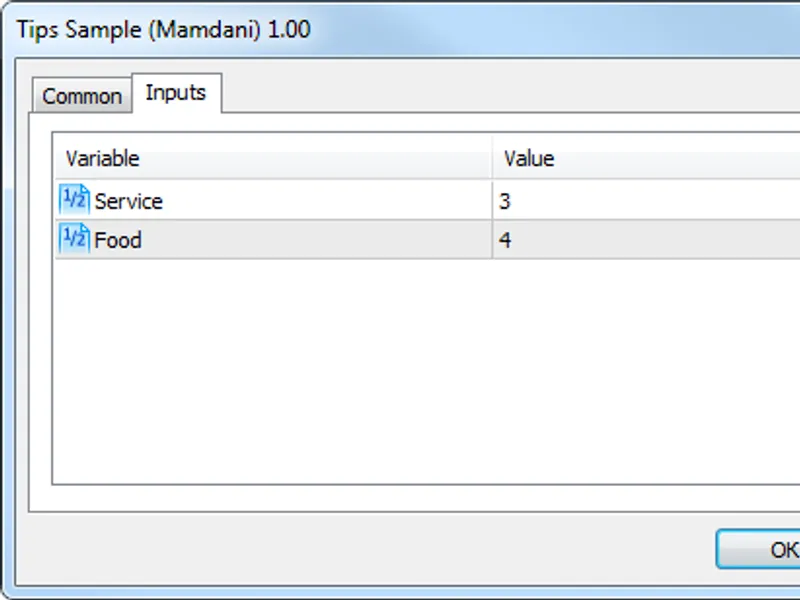
Tips Sample (Mamdani)
Tips_Sample_Mamdani.mq5 calculates the tip percentage you need to pay depending on the quality of service and food.
Enter the input parameters:
Calculation results:
Cruise Control Sample (Sugeno)
Cruise_Control_Sample_Sugeno.mq5 sample script is an example of a fuzzy regulator. It represents a car cruise control system that calculates the necessary acceleration using the data on the current deviation and the deviation rate of change in order for the car to reach a desired speed.
Enter the input parameters:
Calculation results: