







crt indicator (mtf): explorer
Info
The crt indicator (mtf): explorer is a Indicator for MetaTrader 5 that crt indicator (mtf): explorerin the 2026 edition, we developed a streamlined single-timeframe crt model, known for its precision and effectiveness. now, we're taking it further with a multi-timeframe (mtf) exploration tool that bridges the gap between higher and lower timeframes.
Usage
This tool is typically used for enhancing chart analysis and decision making.
Platform
This Indicator works exclusively on MetaTrader 5 (both build 600+ and newer versions).
Setup
Place the downloaded file in MQL5/Indicators folder via File ? Open Data Folder in MetaTrader 5.
How to Install and Use crt indicator (mtf): explorer
1. Installation: Place your file in the MQL/Indicators folder via "Open Data Folder" and restart your terminal.
2. Loading: Find the indicator in the Navigator, drag it onto your chart, and configure the input parameters in the popup window.
3. Customization: Press Ctrl+I to open the indicator list, select your tool, and click "Properties" to change colors, levels, or visual styles.
4. Updating: Replace the old file in the Indicators folder with the new version and restart the platform to apply changes.
Frequently Asked Questions
Q: Why is my indicator not showing? A: Verify the file is in the MQL/Indicators folder, or try right-clicking the "Indicators" tree in the Navigator and clicking "Refresh."
Q: Do custom indicators slow down the platform? A: Too many complex indicators can impact performance; remove unused ones via the "Indicator List" (Ctrl+I).
Q: Can I use MT4 indicators on MT5? A: No, MQL4 and MQL5 are distinct languages; ensure the indicator is compiled specifically for your platform version.
What this tool does
crt indicator (mtf): explorerin the 2026 edition, we developed a streamlined single-timeframe crt model, known for its precision and effectiveness.
Typical Use Case
This Indicator excels in automated trading and technical analysis on MetaTrader 5.
Compatible Platform & Setup
This Indicator works on MetaTrader 5. Place the file in the MQL5/Indicators folder and restart the terminal.
Description & Settings
Related: ICT Kill Zones Indicator: Asian, London, New York in New York Time (2026) - another powerful indicator for MetaTrader 5 traders.
crt indicator (mtf): explorerAlso recommended: Spread Monitor Indicator for MetaTrader 5 - similar indicator with strong performance on MetaTrader 5.
in the 2026 edition, we developed a streamlined single-timeframe crt model, known for its precision and effectiveness. now, we're taking it further with a multi-timeframe (mtf) exploration tool that bridges the gap between higher and lower timeframes.
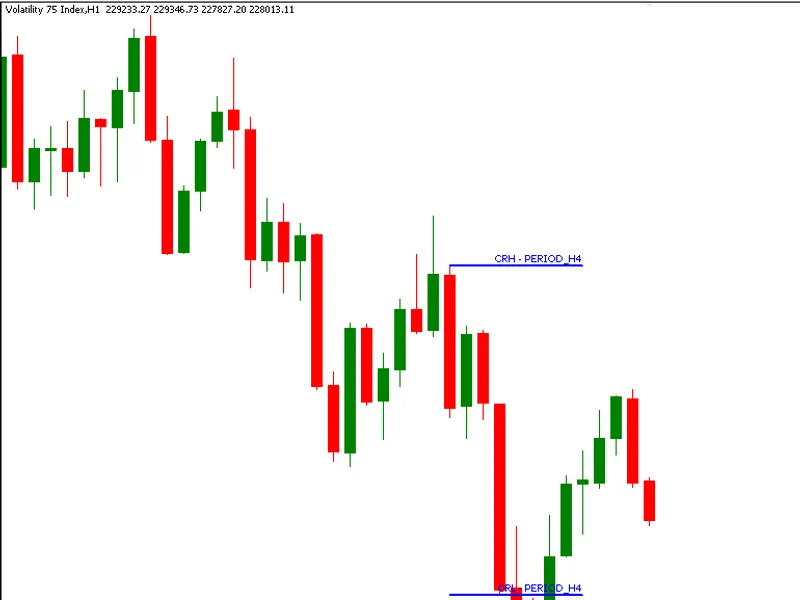
the crt indicator (mtf): explorer offers a structured approach to visualizing higher timeframe crt formations on lower timeframe charts, providing immediate context for price reactions within a broader market narrative.
this innovative implementation monitors a user-selected higher timeframe (htf) and identifies classic crt conditions, then maps these zones using fibonacci objects onto the active lower timeframe (ltf). the result is a clear overlay of crh (crt high) and crl (crt low), allowing traders to analyze microstructure within macro-defined levels without chart switching.
key features:
- true multi-timeframe integration: seamlessly combines htf logic with ltf visualization for comprehensive analysis in one chart.
- event-driven htf synchronization: ensures crt evaluation occurs only at structurally significant moments, triggered by new-bar detection on the higher timeframe.
- rigorous crt validation: adheres to strict price-action rules for both bullish and bearish crt conditions, maintaining model integrity.
- fibonacci-based level projection: utilizes fibonacci objects for clear visualization of crh and crl levels with directional color cues.
learning outcomes:
- master the art of creating multi-timeframe indicators in mql5 without lag or complexity.
- synchronize htf data within an ltf execution loop for seamless integration.
- employ standard library chart objects for structured and informative visualizations.
- design event-driven logic for new bar detection, ensuring clean and predictable indicator performance.
- transform abstract price models like crt into practical, visual trading tools.
this evolution in indicator design offers a fresh perspective on market analysis, empowering traders with a new level of insight.
You may also like: Market Structure BOS and CHoCH Indicator: Swing Points, No Repaint, Alerts - excellent alternative for indicator users on MetaTrader 5.
Source Code
#property copyright "robotfx"
#property link "https://robotfx.org"
#property version   "1.00"
#property indicator_chart_window
#property  indicator_plots 0
#include <chartobjects\chartobjectsfibo.mqh>
#define  prog_name "crt(mtf) explorer"
#define  obj_name prog_name + "_fibo" + (string) objectstotal(0)
input enum_timeframes inphtf = period_h4;
int start = -1;
.......
⚠ Limitations & Risk Warning
- This tool is provided for educational and testing purposes only.
- Past performance does not guarantee future results.
- Trading involves substantial risk of loss. Use on a demo account first.
- Results may vary depending on market conditions, broker, and settings.
- We recommend thorough backtesting and forward testing before using with real funds.