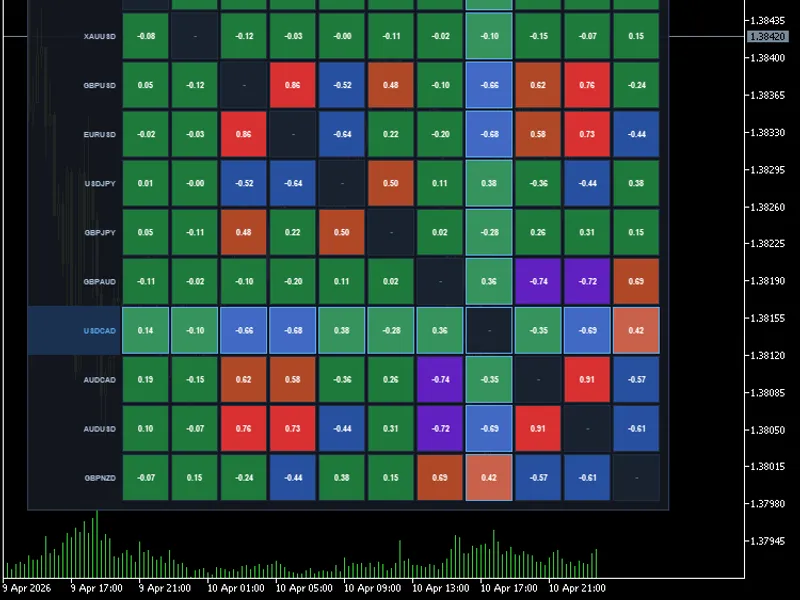
Correlation Matrix Heatmap with Interactive Dashboard
This tool for MetaTrader 5 is specifically engineered to streamline your trading operations. This technical indicator acts as a specialized analysis tool designed to visualize market data. It helps traders identify emerging trends, momentum shifts, and key support or resistance levels by plotting statistical calculations directly onto price charts.
How to Setup and Use Correlation Matrix Heatmap with Interactive Dashboard
1. Installation: Place your file in the MQL/Indicators folder via "Open Data Folder" and restart your terminal.
2. Loading: Find the indicator in the Navigator, drag it onto your chart, and configure the input parameters in the popup window.
3. Customization: Press Ctrl+I to open the indicator list, select your tool, and click "Properties" to change colors, levels, or visual styles.
4. Updating: Replace the old file in the Indicators folder with the new version and restart the platform to apply changes.
Frequently Asked Questions
Q: Why is my indicator not showing? A: Verify the file is in the MQL/Indicators folder, or try right-clicking the "Indicators" tree in the Navigator and clicking "Refresh."
Q: Do custom indicators slow down the platform? A: Too many complex indicators can impact performance; remove unused ones via the "Indicator List" (Ctrl+I).
Q: Can I use MT4 indicators on MT5? A: No, MQL4 and MQL5 are distinct languages; ensure the indicator is compiled specifically for your platform version.
Description & Settings
Stop guessing how your pairs move together. This professional-grade heatmap provides a clear, real-time bird's-eye view of the entire market's relationships directly on your chart.
Key Trading Features
Live Heatmap Visualization:
High-contrast color coding (Red for positive, Blue/Purple for negative) allows you to spot strong relationships in milliseconds.
On-Chart Workspace Control:
Draggable:
Click and move the panel so it never blocks your price action.
Minimize/Restore:
One-click "Dash" mode to hide the grid and keep only the title bar visible when you're focusing on a trade.
Instant Timeframe Analysis:
Switch between
D1, H4, H1, and M15
. Understand if a correlation is a long-term structural trend or just a short-term intraday move.
High-Precision Values:
Displays exact Pearson coefficients (e.g., 0.85, -0.72) so you can distinguish between "correlated" and "perfectly synced."
Real-World Use Cases
1. Risk Management (Avoiding Over-Exposure)
If you are Long $EURUSD$ and Long $GBPUSD$, you might think you have two trades. The matrix will show you if they have a
0.90+ correlation
, alerting you that you are actually holding a double-sized position on "USD weakness."
2. Finding Hedge Opportunities
Identify pairs with a strong
Negative Correlation
(e.g., $EURUSD$ and $USDCHF$). If you want to stay in the market but reduce risk during high volatility, these pairs can act as natural hedges.
3. Confirmation & Confluence
Use the matrix to see if a breakout in $Gold$ is being reflected in correlated pairs like $AUDUSD$. If $Gold$ moves but $AUD$ stays flat, the matrix helps you spot the "divergence" that might save you from a fake-out.
4. Cleaning up your Market Watch
The dashboard automatically pulls from your Market Watch. Use it to quickly see which pairs are currently "active" and moving in sync, helping you focus only on the most tradable setups.
Built for Performance
Pure MQL5:
No external files or complex setups. Just drag, drop, and trade.
Ultra-Lightweight:
Optimized to ensure your MT5 terminal remains snappy, even when analyzing 12+ symbols at once.
Broker-Friendly:
Automatically cleans symbol names (stripping suffixes like .m or +) so it works on any account type.