AI S Central Axis
What this tool does
The AI S Central Axis is a Indicator for MetaTrader 5 that this indicator implements the nonlinear smoothing algorithm of hilo type. Its main difference from the classical algorithm is that it processes extrema of the initial time series.
Typical Use Case
This tool is typically used for enhancing chart analysis and decision making.
Compatible Platform
This Indicator works exclusively on MetaTrader 5 (both build 600+ and newer versions).
Setup Location
Place the downloaded file in MQL5/Indicators folder via File ? Open Data Folder in MetaTrader 5.
How to Install and Use AI S Central Axis
1. Installation: Place your file in the MQL/Indicators folder via "Open Data Folder" and restart your terminal.
2. Loading: Find the indicator in the Navigator, drag it onto your chart, and configure the input parameters in the popup window.
3. Customization: Press Ctrl+I to open the indicator list, select your tool, and click "Properties" to change colors, levels, or visual styles.
4. Updating: Replace the old file in the Indicators folder with the new version and restart the platform to apply changes.
Frequently Asked Questions
Q: Why is my indicator not showing? A: Verify the file is in the MQL/Indicators folder, or try right-clicking the "Indicators" tree in the Navigator and clicking "Refresh."
Q: Do custom indicators slow down the platform? A: Too many complex indicators can impact performance; remove unused ones via the "Indicator List" (Ctrl+I).
Q: Can I use MT4 indicators on MT5? A: No, MQL4 and MQL5 are distinct languages; ensure the indicator is compiled specifically for your platform version.
Description & Settings
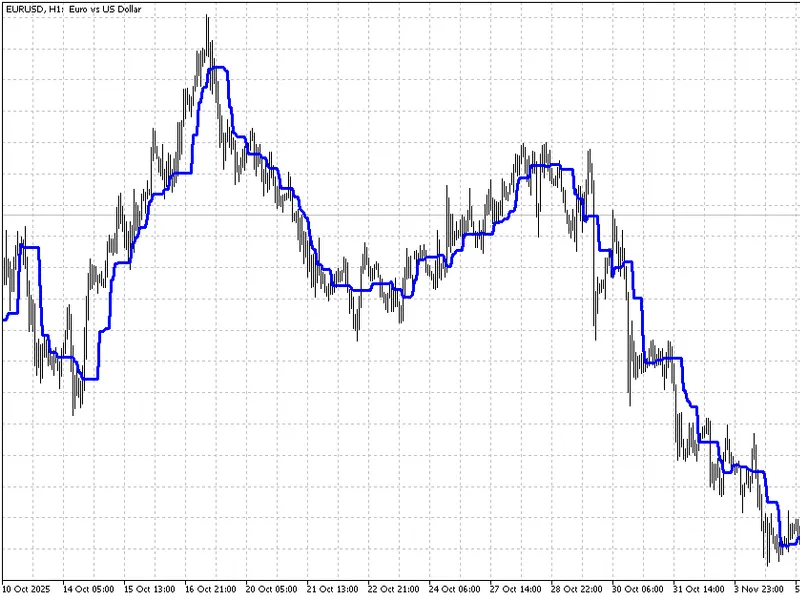
This indicator implements the nonlinear smoothing algorithm of HiLo type. Its main difference from the classical algorithm is that it processes extrema of the initial time series. An example of the indicator operation is shown in the figure.
The indicator has only one parameter:
iPeriod
- period of the indicator.