

Alpha Beta Channel
Info
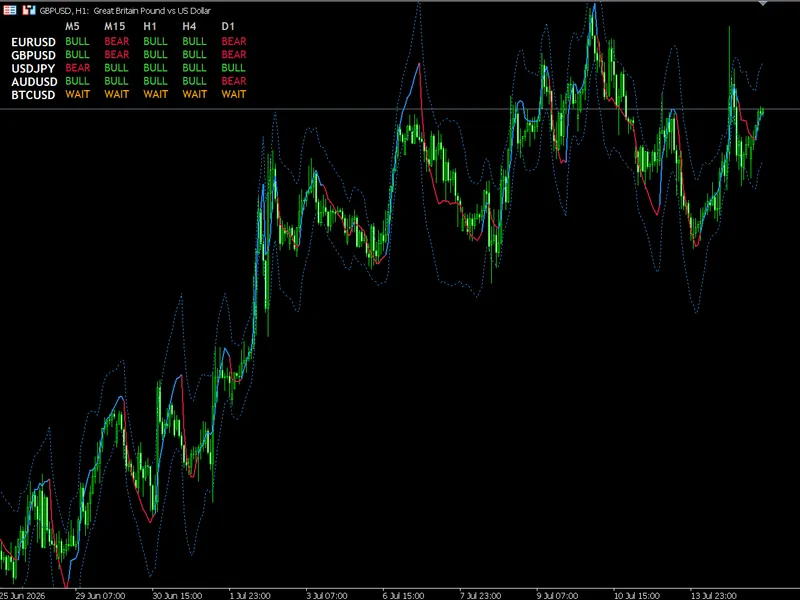
The Alpha Beta Channel is a Indicator for MetaTrader 5 that comprehensive framework for trading this specific adaptive structure across forex, crypto, and high-digit asset matrices. The Core Mechanical RulesBefore taking entries, identify the components' signals:The Baseline Color (Trend Filter): Determined by the internal variable v(Velocity).
Usage
This tool is typically used for enhancing chart analysis and decision making.
Platform
This Indicator works exclusively on MetaTrader 5 (both build 600+ and newer versions).
Setup
Place the downloaded file in MQL5/Indicators folder via File ? Open Data Folder in MetaTrader 5.
How to Install and Use Alpha Beta Channel
1. Installation: Place your file in the MQL/Indicators folder via "Open Data Folder" and restart your terminal.
2. Loading: Find the indicator in the Navigator, drag it onto your chart, and configure the input parameters in the popup window.
3. Customization: Press Ctrl+I to open the indicator list, select your tool, and click "Properties" to change colors, levels, or visual styles.
4. Updating: Replace the old file in the Indicators folder with the new version and restart the platform to apply changes.
Frequently Asked Questions
Q: Why is my indicator not showing? A: Verify the file is in the MQL/Indicators folder, or try right-clicking the "Indicators" tree in the Navigator and clicking "Refresh."
Q: Do custom indicators slow down the platform? A: Too many complex indicators can impact performance; remove unused ones via the "Indicator List" (Ctrl+I).
Q: Can I use MT4 indicators on MT5? A: No, MQL4 and MQL5 are distinct languages; ensure the indicator is compiled specifically for your platform version.
What this tool does
comprehensive framework for trading this specific adaptive structure across Forex, Crypto, and high-digit asset matrices.
Typical Use Case
This Indicator excels in automated trading and technical analysis on MetaTrader 5.
Compatible Platform & Setup
This Indicator works on MetaTrader 5. Place the file in the MQL5/Indicators folder and restart the terminal.
Description & Settings
Related: Alpha Beta Trend Filter with Multi-Timeframe Matrix Dashboard - another powerful indicator for MetaTrader 5 traders.
comprehensive framework for trading this specific adaptive structure across Forex, Crypto, and high-digit asset matrices.Also recommended: Covariation, Correlation, and Beta Indicator for MT4/MT5 - similar indicator with strong performance on MetaTrader 5.
The Core Mechanical Rules
Before taking entries, identify the components' signals:
The Baseline Color (Trend Filter):
Determined by the internal variable
v
(Velocity).
LimeGreen:
Positive acceleration. Institutional momentum is structurally
Bullish
.
Crimson:
Negative acceleration. Institutional momentum is structurally
Bearish
.
The Band Width (Volatility State):
Contracted Bands (Squeeze):
Low Efficiency Ratio (ER). The market consolidates tightly, storing energy for an imminent directional expansion.
Expanded Bands (Stretch):
High Efficiency Ratio (ER). The trend is efficient or the asset is overextended.
Trading Strategies
Strategy A: Adaptive Momentum Breakout (Trend Following)
Ideal for volatile assets like Cryptocurrencies (BTCUSD) and major FX pairs during London/New York session cross.
[Upper Band Breakout] -> BUY ENTRY ▲ Baseline (Green) ───► ▼ [Lower Band Breakout] -> SELL ENTRY
Setup:
Wait for low volatility, with bands compressing around a flat baseline.
Execution (Long):
A candle closes completely
above
the Upper Band, and the Baseline turns
LimeGreen
.
Execution (Short):
A candle closes completely
below
the Lower Band, and the Baseline turns
Crimson
.
Stop Loss:
Place stop loss opposite the baseline or outside the opposite channel band.
Trailing / Exit:
Hold the trade while the Baseline maintains color. Exit when the baseline changes color (e.g., Green to Red for a long trade).
Strategy B: Dynamic Mean Reversion (Counter-Trend Scalping)
Suitable for range-bound or deep Asian session Forex pairs.
Setup:
The baseline is flat, and bands are wide, indicating a stretched market.
Execution (Long):
Price breaches the
Lower Band
, but the baseline stays Crimson or flat. Enter long when a candle closes back inside the lower band.
Execution (Short):
Price breaches the
Upper Band
, but the baseline doesn't turn Crimson. Enter short when a candle closes back inside the upper band.
Target:
Take-profit target is the central
Adaptive Baseline
.
Multi-Symbol Dashboard Matrix
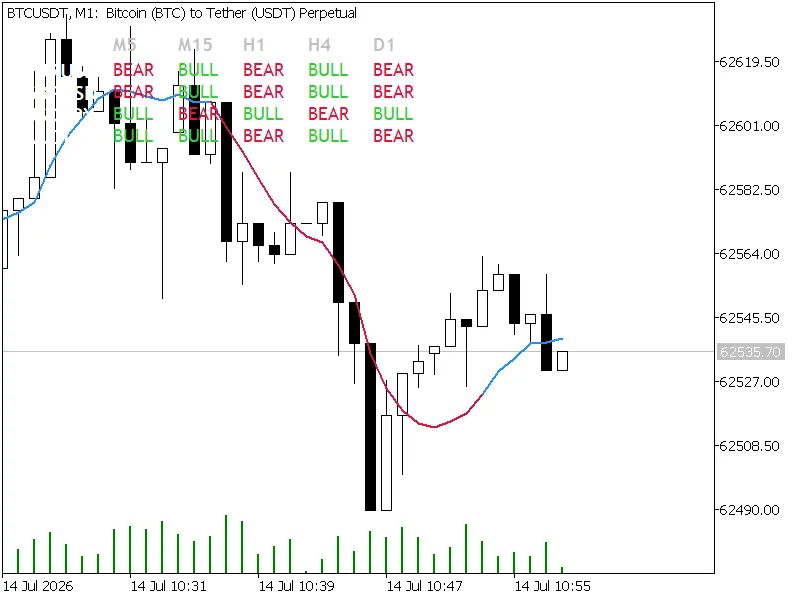
The built-in matrix on the chart serves as a macro-directional filter, preventing trading against the trend.
Symbol
M5
M15
H1
H4
D1
Action
GBPUSD
BULL
BULL
BULL
WAIT
BEAR
Seek M5/M15 continuation longs.
BTCUSD
BEAR
BEAR
BEAR
BEAR
BEAR
High-conviction swing short alignment.
EURUSD
WAIT
BULL
BEAR
WAIT
BULL
No clear efficiency, avoid trading.
Directional Confluence:
When Higher Timeframe (H4 or D1) aligns with entry timeframe (M5 or M15), success probability increases. E.g., H4 shows BULL, and M15 prints an Adaptive Momentum Breakout long.
The WAIT Filter:
An
Orange ( WAIT )
cell indicates near-zero dynamic Alpha due to sideways noise. Avoid new positions on symbols with multiple WAIT states across timeframes.
Key Risk Management
⚠️
Adaptive Drawback Alert:
During erratic "whipsaw" conditions, the Alpha value drops, flattening the center line. Mean-reversion strategies excel in these scenarios.
Adjust inpMultiplier based on the asset:
Forex (5-digit):
Set multiplier between 2.0 and 2.2 .
Crypto / Metals (High Volatility):
Increase multiplier to 2.5 or 3.0 to filter noise and prevent stop-outs.
You may also like: Alpha Trend Spotter PA Free - excellent alternative for indicator users on MetaTrader 5.
Source Code
#property copyright "RobotFX"
#property link "https://robotfx.org"
#property version   "2.00"
#property indicator_chart_window
#property indicator_buffers 5
#property indicator_plots   3
#property indicator_label1  "Adaptive Upper Band"
#property indicator_type1   DRAW_LINE
#property indicator_color1  clrDodgerBlue
#property indicator_style1  STYLE_DOT
.......
⚠ Limitations & Risk Warning
- This tool is provided for educational and testing purposes only.
- Past performance does not guarantee future results.
- Trading involves substantial risk of loss. Use on a demo account first.
- Results may vary depending on market conditions, broker, and settings.
- We recommend thorough backtesting and forward testing before using with real funds.