Terminator. 0
This is a powerful addition to your MetaTrader 5 toolkit designed to optimize market analysis and performance. This Expert Advisor serves as automated trading software. It is utilized to monitor financial markets and execute trades based on predefined algorithmic rules, enabling precise position management without the need for constant manual oversight.
How to Setup and Use Terminator. 0
1. Installation: Open the "File" menu, select "Open Data Folder," navigate to MQL/Experts, paste your file, and restart the terminal.
2. Activation: Drag the EA from the Navigator onto a chart, ensure "Allow live trading" is checked in the Common tab, and verify the AutoTrading button is green.
3. Optimization: Right-click your chart, choose "Expert List," click "Properties" to adjust inputs, and save your preferred setup as a set file for future use.
4. Maintenance: Regularly check the "Experts" tab in the terminal window to monitor trade logs and potential execution errors.
Frequently Asked Questions
Q: Why is my EA not opening trades? A: Check the "AutoTrading" button, ensure "Allow live trading" is enabled, and verify your broker allows automated trading on your account type.
Q: Can I run multiple EAs on one chart? A: No, each chart can only host one active EA; however, you can open multiple charts for different currency pairs to run several EAs.
Q: What does the "smiley face" icon mean? A: A smiley face in the top-right corner of the chart indicates the EA is successfully running; a frowny face means it is disabled.
Description & Settings
How it works
The Expert Advisor opens position according to signals taken from different indicators.
Required indicators:
.
.
.
There are six variants of trade signals:
On the indicator . When the indicator grows, it is allowed to buy, when it falls, it is allowed to sell.
On the Pivot Lines TimeZone indicator. If price is higher than the Pivot level, a buy is allowed, if it is lower, a sell is allowed.
On the Support_and_Resistance indicator. When Resistance level is crossed upwards, a buy position opening performs. If Support level is crossed downwards, a sell position is opened.
On the i_Trend and the indicators. When green line of the i_Trend is higher than the red line and raises, RSI raises, then a buy opens. When green line of the i_Trend is lower than the red line and falls and RSI falls, then a sell opens.
On the i_Trend, RSI and indicators. When green line of the i_Trend indicator is higher than the red line and raises, the main Stochastic Oscillator is higher than the signal and raises staying between high and low levels, RSI raises, then a buy opens. When green line of the i_Trend indicator is lower than the red line and falls, the main Stochastic Oscillator is lower than the signal and falls staying between high and low levels, RSI falls, then a sell opens.
On the i_Trend, RSI, stochastic indicators. When green line of the i_Trend indicator is higher than the red line and raises, the main Stochastic Oscillator is higher than the signal and raises staying between high and low levels, RSI raises, MFI raises, then a buy opens. When green line of the i_Trend indicator is lower than the red line and falls, the main Stochastic Oscillator is lower than the signal and falls staying between high and low levels, RSI falls, MFI falls, then a sell opens.
Initial position volume is equal to Lots variable or calculated proportionally to ready assets (MaximumRisk variable when Lots=0).
If position becomes unprofitable, its volume is increased. Volume is increased through one Pip step of points from last deal price in case of a trade signal corresponding to position direction.
At first increase of volume is performed by multiplying lot by 2. Then the number of deals with multiplying by 2 is defined by DoubleCount variable, after that multiplying by 1.5. performs.
The total number of single sequence deals is defined by MaxCount variable.
First of all, the position opens with TakeProfit. TakeProfit2 variable is used when volume is increased, Take Profit level is calculated from total position price.
If TakeProfit=0 or TakeProfit2=0 the initial position or a position when volume is increased will be without Take Profit. In this case trailing function (TrailingStop variable) must be used.
The last increase of volume is performed by setting Stop Loss (StopLoss variable), if StopLoss variable value is equal to 0, Stop Loss won't be set.
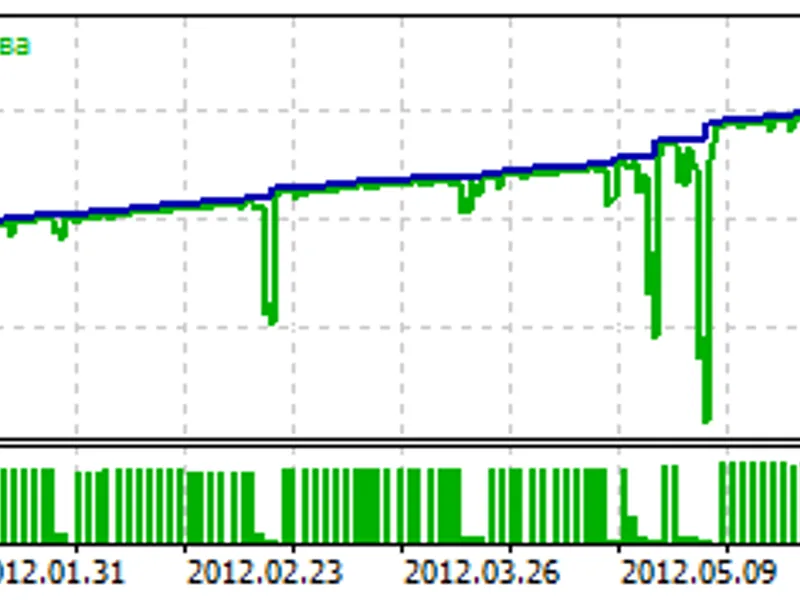
The results of work of the Expert Advisor are shown in tester.
Parameters
Trade_ON - Open position is allowed.
Lots - lot; when 0, the MaxrR parameter is used.
MaximumRisk - Risk (default value Lots=0).
StopLoss - Stop Loss in points, 0 - without Stop Loss.
TakeProfit - Take Profit in initial position in points.
TakeProfit2 - Take Profit in adding in points.
MaxCount - Maximum number of open positions in one side, if -1 is unlimited.
DoubleCount - Number of deals with Lot multiplier factor 2, others open with Lot multiplier factor 1.5.
Pips - Adding level in points.
Trailing - Trailing stop level; when the value is 0, the trailing stop is disabled.
Shift - Bar on which indicators are checked: 0 - forming bar, 1 - first formed bar.
ReverseCondition - Change buy and sell signals.
OPEN_POS_BASED_ON - Type of trade signals.
MACD_FastPeriod - Period of fast МА MACD.
MACD_SlowPeriod - Period of slow МА MACD.
MACD_Price - MACD price.
Pivot_DayStartHour - Hour of day start.
Pivot_DayStartMinute - Minutes of day start.
Pivot_AttachSundToMond - Attach Sunday bars to Monday.
SupRes_iPeriod - Period of the Support_and_Resistance indicator.
iT_Price - Type of price by which price and Bollinger Bands difference is calculated.
iT_BBPeriod - Period of Bollinger Bands (BB).
iT_BBShift - Shift of Bollinger Bands (BB).
iT_BBDeviation - Deviation of Bollinger Bands (BB).
iT_BBPrice - Price of Bollinger Bands (BB).
iT_BBLine - Used line of Bollinger Bands.
iT_BullsBearsPeriod - Period of Bulls Bears Power.
RSI_Period - Period of RSI.
RSI_Price - Price of RSI.
St_KPeriod - Period of К stochastic.
St_DPeriod - Period of D stochastic.
St_SPeriod - Period of S stochastic.
St_Method - The method of stochastic.
St_Price - Price of stochastic.
St_UpperLevel - Upper level of stochastic.
St_LowerLevel - Lower level of stochastic.
MFI_Period - Period of MFI.
MFI_Volume - Volume of MFI.