Self Learning Experts
This tool for MetaTrader 5 is specifically engineered to streamline your trading operations. This Expert Advisor serves as automated trading software. It is utilized to monitor financial markets and execute trades based on predefined algorithmic rules, enabling precise position management without the need for constant manual oversight.
How to Setup and Use Self Learning Experts
1. Installation: Open the "File" menu, select "Open Data Folder," navigate to MQL/Experts, paste your file, and restart the terminal.
2. Activation: Drag the EA from the Navigator onto a chart, ensure "Allow live trading" is checked in the Common tab, and verify the AutoTrading button is green.
3. Optimization: Right-click your chart, choose "Expert List," click "Properties" to adjust inputs, and save your preferred setup as a set file for future use.
4. Maintenance: Regularly check the "Experts" tab in the terminal window to monitor trade logs and potential execution errors.
Frequently Asked Questions
Q: Why is my EA not opening trades? A: Check the "AutoTrading" button, ensure "Allow live trading" is enabled, and verify your broker allows automated trading on your account type.
Q: Can I run multiple EAs on one chart? A: No, each chart can only host one active EA; however, you can open multiple charts for different currency pairs to run several EAs.
Q: What does the "smiley face" icon mean? A: A smiley face in the top-right corner of the chart indicates the EA is successfully running; a frowny face means it is disabled.
Description & Settings
How it works
The Expert Advisor works on ticks, no matter on what timeframe it works. By averaging price patterns of current market price are forming. Several patterns with different parameters are formed. Number of patterns set in the Nidelt variable. For the first pattern dstop parameter is used, for the second - dstop*2, etc. to dstop*N, where N - is a number of patterns. If price changed into dstop*N value, a new point of pattern is captured. The latest point is deleted, thus pattern has a fixed length of Nidelt points. The more settings value a pattern has, the deeper it captures the history. So, the market has been simultaneously traced in different history depth.
It can open from one to three virtual positions with individual Stop Loss/Take Profit, Stop Loss and Take Profit values of each position are the same. Stop Loss/Take Profit value is defined by dstop parameter, for one position dstop*1 is used, for the other - dstop*2, etc. If the price goes up on Stop Loss/Take Profit probability value, it will add values to possible raise for this pattern, if down - it will increase probability value down. Its virtual positions are opened for each of three patterns: pattern parameter, pattern number (its form) and for each value of Stop Loss/Take Profit. Also for each of these combinations in accordance with virtual trade up or down probability is calculated.
If according to any combination of three parameters (parameter, number, Stop Loss/Take Profit) no less than 10 virtual deals are created, if the same situation on the market occurs (definite parameter and number pattern is autodetected), in that case can be considered position opening with a direction definite to probability calculated on the basis of this statistics by Stop Loss/Take Profit value.
Preparing an Expert Advisor
First stage of the Expert Advisor preparing to work will be optimization of its parameters: Nidel, Nstop, dstop, forg, Probab, NN, delta. On this stage optimization is performed with turned-off parameters of ReadHistory and SaveHistory. After an acceptable combination of parameters is found, it is necessary to perform one test with SaveHistory=true. Then run the Expert Advisor on account from ReadHistory=true - the Expert Advisor starts to work immediately as it gathered sufficient statistics in tester. Switch on SaveHistory when working in account is recommended in order to save data automatically when the Expert Advisor will be overlearned and ready to start to work in case of restart of the Expert Advisor.
When using SaveHistory in tester post-run testing learning data is saved in file, it has a name the FD_[Symbol]. If the Expert Advisor tests on EURUSD file will have a name the «FD_EURUSD», if on GBPUSD – the «FD_GBPUSD», etc. The files are saved in Files folder which is the common data folder for all terminals. You can find General Data Folder through main menu of MetaEditor – to open general data folder. Through this folder data are read by ReadHistory.
Except saving teaching results, the Expert Advisor saves two files which are necessary in trade process. Files have names: FDlast_buy[Symbol][TimeFrame], and FDlast_sell[Symbol][TimeFrame]. Do not pay attention on these files.
The Expert Advisor depends on timeframe only in periodicity of learning data saving and minimal time between virtual deals. It is equal to two bars density, so there is some difference in the results of work of the Expert Advisor on different timeframes.
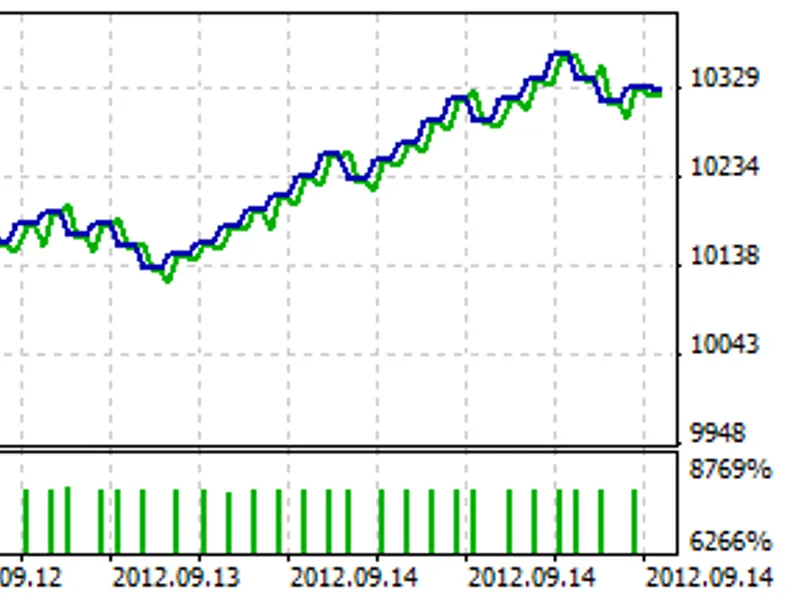
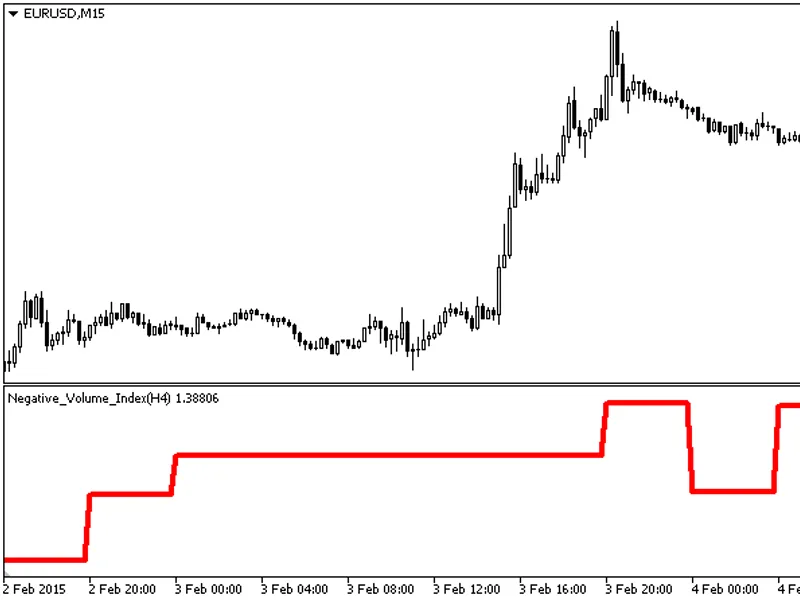
The image shows learning results of work of the Expert Advisor on EURUSD M15 with default settings.
Parameters
ReadHistory - Reading saved history of learning.
SaveHistory - To save history of learning. During testing the history is saved up to the end of testing, when work on account - regularly by way of overlearning.
Lots - Position volume.
Nidelt - Number of patterns must not exceed 30.
Nstop - Number of virtual position parameters (different values of Stop Loss and Take Profit, Stop Loss and Take Profit are equal), 1, 2 or 3.
dstop - Step of virtual positions parameters changes (Stop Loss and Take Profit).
forg - Rate of forgetting learning results, value should be a little more than 1.
Probab - Probability level defined by learning results on which position opening performs.
NN - Pattern size must not exceed 12.
delta - Pattern parameter change step.
ReplaceStops - To modify Stop Loss/Take Profit on new opening signals. Stop Loss/Take Profit transposition is operated only up to position direction.
Trailing - Trailing stop level; when the value is 0, the trailing stop is disabled.
![Schnick [Support Vector Machine Learning Tool Tester - DE M O]](/images/1370.webp)