Countdown 2. 0
This professional-grade solution for MetaTrader 5 helps traders achieve greater efficiency in their daily workflow. This technical indicator acts as a specialized analysis tool designed to visualize market data. It helps traders identify emerging trends, momentum shifts, and key support or resistance levels by plotting statistical calculations directly onto price charts.
How to Setup and Use Countdown 2. 0
1. Installation: Place your file in the MQL/Indicators folder via "Open Data Folder" and restart your terminal.
2. Loading: Find the indicator in the Navigator, drag it onto your chart, and configure the input parameters in the popup window.
3. Customization: Press Ctrl+I to open the indicator list, select your tool, and click "Properties" to change colors, levels, or visual styles.
4. Updating: Replace the old file in the Indicators folder with the new version and restart the platform to apply changes.
Frequently Asked Questions
Q: Why is my indicator not showing? A: Verify the file is in the MQL/Indicators folder, or try right-clicking the "Indicators" tree in the Navigator and clicking "Refresh."
Q: Do custom indicators slow down the platform? A: Too many complex indicators can impact performance; remove unused ones via the "Indicator List" (Ctrl+I).
Q: Can I use MT4 indicators on MT5? A: No, MQL4 and MQL5 are distinct languages; ensure the indicator is compiled specifically for your platform version.
Description & Settings
Key Features
1 - Flexible display modes:
-
Commentary:
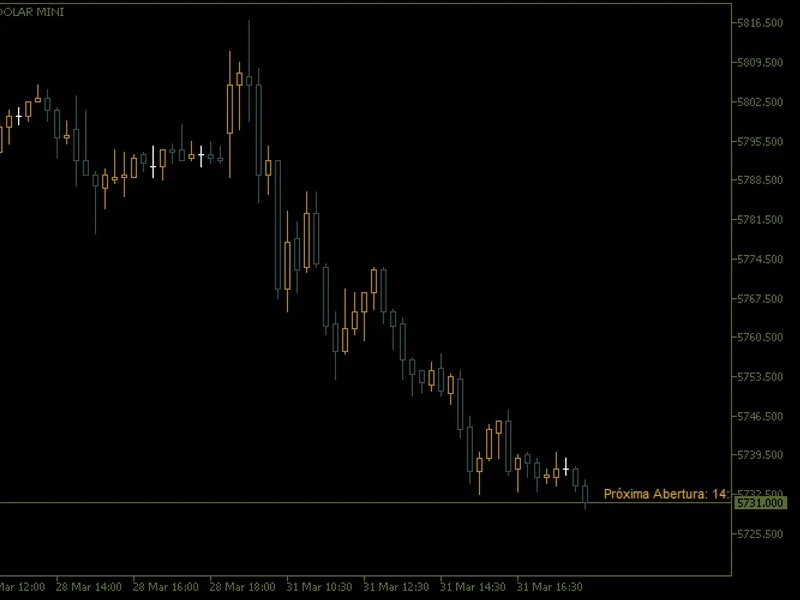
Displays the countdown directly in the top left corner of the chart.
- Chart Edges:
Positions the stopwatch in any corner of the chart, allowing for a fixed view.
- Near Price:
The stopwatch dynamically follows the price in real time, ensuring that it is always visible close to the market action. 2. Time Zone Compatibility:
- The indicator automatically adjusts the time to the Brasilia time zone (UTC-3), including automatic adjustment for daylight saving time (DST). 3. Smart Countdown:
- Calculates the time remaining until the next candlestick when the market is open. - Calculates the time remaining until the next market open when the market is closed, including weekday and weekend adjustments. 4. Full Customisation:
- Choose the colour, font size and anchor point of the text. - Configure market opening and closing times to suit your preferred market. 5. Intuitive Interface:
- Simple, well-documented input parameters make it easy to set up and use the indicator.
How to set up
1 Installation:
- Download the `Countdown.mq5` file and copy it to the `Indicators` folder in MetaTrader 5. - Restart the terminal and add the indicator to the desired chart. 2. Input Parameters:
-
Timer Position:
Choose between "Commentary", "Chart Borders" or "Next to Price".
- Text Colour:
Customise the colour of the timer to improve visibility. -
Font Size:
Adjust the text size to your preference.
- Opening and Closing Times:
Enter the market's opening and closing times in HH:MM format (e.g. 09:00). 3. Use:
- When the market is open, the indicator will display the countdown until the next candlestick. - When the market is closed, the indicator will display the time remaining until the next open.
Benefits
-
Accuracy:
Calculates the time remaining accurately, taking into account time zones and automatic adjustments. -
Versatility:
Works on any timeframe and financial asset. -
Ease
of
Use:
Intuitive interface and clear parameters allow for quick configuration. -
Dynamic Visualisation:
The "Near Price" mode ensures that the timer always keeps up with market action.
![[EA] - Charles 2. 1. 5](/images/10823.webp)