








Nikkei 225 Gap Continuation EA
Info
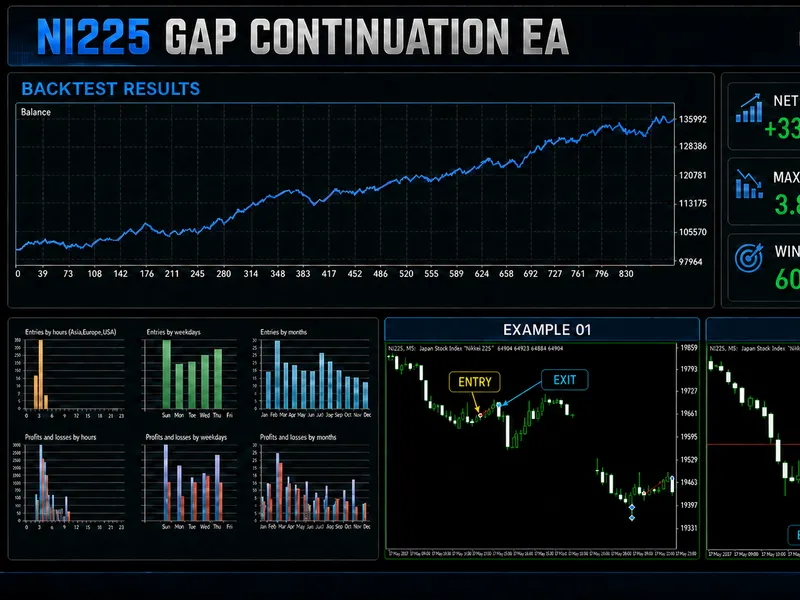
The Nikkei 225 Gap Continuation EA is a Expert Advisor for MetaTrader 5 that nikkei 225 gap continuation expert advisor the nikkei 225 gap continuation ea is an educational expert advisor for metatrader 5. It studies the opening gap of the Nikkei 225 cash session and looks for continuation trades after an initial price range has formed.
Usage
This tool is typically used for automated trading on major forex pairs and gold.
Platform
This Expert Advisor works exclusively on MetaTrader 5 (both build 600+ and newer versions).
Setup
Place the downloaded file in MQL5/Experts folder via File ? Open Data Folder in MetaTrader 5.
How to Install and Use Nikkei 225 Gap Continuation EA
1. Installation: Open the "File" menu, select "Open Data Folder," navigate to MQL/Experts, paste your file, and restart the terminal.
2. Activation: Drag the EA from the Navigator onto a chart, ensure "Allow live trading" is checked in the Common tab, and verify the AutoTrading button is green.
3. Optimization: Right-click your chart, choose "Expert List," click "Properties" to adjust inputs, and save your preferred setup as a set file for future use.
4. Maintenance: Regularly check the "Experts" tab in the terminal window to monitor trade logs and potential execution errors.
Frequently Asked Questions
Q: Why is my EA not opening trades? A: Check the "AutoTrading" button, ensure "Allow live trading" is enabled, and verify your broker allows automated trading on your account type.
Q: Can I run multiple EAs on one chart? A: No, each chart can only host one active EA; however, you can open multiple charts for different currency pairs to run several EAs.
Q: What does the "smiley face" icon mean? A: A smiley face in the top-right corner of the chart indicates the EA is successfully running; a frowny face means it is disabled.
What this tool does
Nikkei 225 Gap Continuation Expert Advisor The Nikkei 225 Gap Continuation EA is an educational Expert Advisor for MetaTrader 5.
Typical Use Case
This Expert Advisor excels in automated trading and technical analysis on MetaTrader 5.
Compatible Platform & Setup
This Expert Advisor works on MetaTrader 5. Place the file in the MQL5/Experts folder and restart the terminal.
Description & Settings
Related: Nikkei 225 EA: High Profitability with Low Volatility and Quiet Volume - another powerful expert for MetaTrader 5 traders.
Nikkei 225 Gap Continuation Expert Advisor The Nikkei 225 Gap Continuation EA is an educational Expert Advisor for MetaTrader 5. It studies the opening gap of the Nikkei 225 cash session and looks for continuation trades after an initial price range has formed. The strategy can process both bullish and bearish gaps and uses session VWAP as an additional confirmation filter. The program includes automatic position sizing, spread protection, partial profit-taking, break-even management and a time-based safety exit. It supports both netting and hedging accounts. All important decisions can be displayed on the chart and written to the Experts log for analysis. Strategy overview At the beginning of each trading day, the EA calculates the effective cash-session schedule. In automatic mode, Japan Standard Time is converted to the server time, including the server daylight-saving adjustment. A manual server-time mode is also available for other brokers. The EA obtains the previous cash-session close and compares it with the current session open. If the absolute opening gap is smaller than the configured threshold, no setup is created. A bullish gap can enable a BUY setup, while a bearish gap can enable a SELL setup. After the session opens, the EA builds an opening range from one-minute bars. It also calculates the session VWAP using real volume when available and tick volume as a fallback. A setup is cancelled if more than half of the original opening gap is filled before an entry. Entry conditions For a BUY trade, the session must open with a qualifying bullish gap. Price must then break above the opening-range high and remain above the current session VWAP. The stop-loss is placed below the opening-range low, including the optional stop buffer and the broker minimum stop distance. For a SELL trade, the session must open with a qualifying bearish gap. Price must break below the opening-range low and remain below VWAP. The stop-loss is placed above the opening-range high. Only one strategy entry is allowed per trading day. Bullish gap: BUY breakout above the opening range and VWAP. Bearish gap: SELL breakout below the opening range and VWAP. The gap must remain less than 50% filled before entry. The spread must pass both configured spread filters. The breakout must occur before the entry deadline. Risk and position management By default, position size is calculated from account equity, the selected risk percentage and the price distance between entry and stop-loss. The EA calls OrderCalcProfit so that the estimated loss per lot is expressed in the account currency. This is useful for index CFDs whose tick value and quote currency can vary between brokers. A fixed lot size can be selected instead of risk-based sizing. The calculated volume is always rounded down to the broker volume step and checked against the minimum and maximum volume. If the broker minimum lot would exceed the allowed risk, the daily setup is cancelled. When price reaches the partial target, the EA closes the configured percentage of the position. It can then move the stop-loss to the entry price. The remaining position is managed toward the final R-multiple target or closed before the cash session ends. Main input groups Input group Purpose Cash session Session time mode, cash-session hours, opening-range duration, entry deadline and forced exit. BUY - bullish gaps Enables BUY setups and defines the minimum bullish opening gap. SELL - bearish gaps Enables SELL setups and defines the minimum bearish opening gap. Common signal filters Volume source, maximum spread, dynamic spread-to-stop filter and stop buffer. BUY risk / SELL risk Separate equity-risk settings and optional reduced risk for smaller bearish gaps. Volume and exits Fixed lots, maximum lots, partial close, R-multiple targets and break-even management. Execution Magic number, slippage, chart status and diagnostic log options. Installation and use Copy the MQ5 file to the MQL5\Experts directory. Open the file in MetaEditor, run Styler and compile it. Attach the EA to the broker symbol that represents the Nikkei 225 index. Use the M5 timeframe for the supplied default setup. Confirm the symbol contract specifications and cash-session hours. Select automatic JST conversion or configure server hours manually. Review the risk, volume, spread and exit parameters. Enable algorithmic trading and test the settings in the Strategy Tester. Broker and testing considerations Nikkei 225 symbol names, quote precision, tick values, minimum volume and trading sessions differ between brokers. The default automatic session conversion was designed for the server schedule. Users of other brokers should verify the manual session settings before running a test. The EA prevents a new entry when another position already exists on the same symbol. It stores essential position-management data in terminal global variables so that partial-close and break-even management can be restored after reconnection or terminal restart. Historical tests are sensitive to data quality, spread assumptions, contract specifications and session definitions. Backtest results do not guarantee future performance. This source code is provided for educational and research purposes, and every user is responsible for validating it under their own trading conditions. The source code is published as a complete educational example of a session-based opening-gap strategy for MetaTrader 5 in 2026.Also recommended: Expert Trend Continuation - similar expert with strong performance on MetaTrader 5.
You may also like: MACD Trend Continuation Strategy for EURUSD on H1 - excellent alternative for expert users on MetaTrader 5.
Source Code
#property copyright "RobotFX"
#property version   "1.50"
#property strict
#include <Trade\Trade.mqh>
CTrade Trade;
enum ENUM_SESSION_TIME_MODE
  {
   SESSION_JST_DARWINEX_AUTO=0,
   SESSION_MANUAL_SERVER=1
  };
.......
⚠ Limitations & Risk Warning
- This tool is provided for educational and testing purposes only.
- Past performance does not guarantee future results.
- Trading involves substantial risk of loss. Use on a demo account first.
- Results may vary depending on market conditions, broker, and settings.
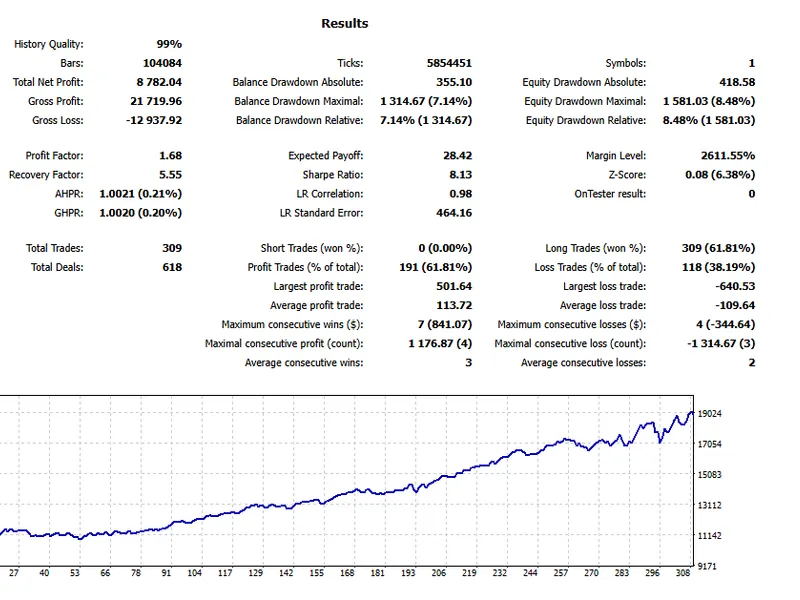
- We recommend thorough backtesting and forward testing before using with real funds.