





MQL5 Wizard: Trading Signals with Hammer/Hanging Man and Stochastic
Info
The MQL5 Wizard: Trading Signals with Hammer/Hanging Man and Stochastic is a Expert Advisor for MetaTrader 5 that this tool allows the creation of ready-made expert advisors based on provided classes. It enables quick testing of your trading ideas; you only need to create your own trading signals class.
Usage
This tool is typically used for automated trading on major forex pairs and gold.
Platform
This Expert Advisor works exclusively on MetaTrader 5 (both build 600+ and newer versions).
Setup
Place the downloaded file in MQL5/Experts folder via File ? Open Data Folder in MetaTrader 5.
How to Install and Use MQL5 Wizard: Trading Signals with Hammer/Hanging Man and Stochastic
1. Installation: Open the "File" menu, select "Open Data Folder," navigate to MQL/Experts, paste your file, and restart the terminal.
2. Activation: Drag the EA from the Navigator onto a chart, ensure "Allow live trading" is checked in the Common tab, and verify the AutoTrading button is green.
3. Optimization: Right-click your chart, choose "Expert List," click "Properties" to adjust inputs, and save your preferred setup as a set file for future use.
4. Maintenance: Regularly check the "Experts" tab in the terminal window to monitor trade logs and potential execution errors.
Frequently Asked Questions
Q: Why is my EA not opening trades? A: Check the "AutoTrading" button, ensure "Allow live trading" is enabled, and verify your broker allows automated trading on your account type.
Q: Can I run multiple EAs on one chart? A: No, each chart can only host one active EA; however, you can open multiple charts for different currency pairs to run several EAs.
Q: What does the "smiley face" icon mean? A: A smiley face in the top-right corner of the chart indicates the EA is successfully running; a frowny face means it is disabled.
What this tool does
This tool allows the creation of ready-made expert advisors based on provided classes.
Typical Use Case
This Expert Advisor excels in automated trading and technical analysis on MetaTrader 5.
Compatible Platform & Setup
This Expert Advisor works on MetaTrader 5. Place the file in the MQL5/Experts folder and restart the terminal.
Description & Settings
Related: Canvas Tabs: A Lightweight Tab Bar for MQL5 using C Canvas - another powerful expert for MetaTrader 5 traders.
This tool allows the creation of ready-made expert advisors based on provided classes.Also recommended: Xlsx Writer: Generate Excel .xlsx Files from MQL5 Without External Libraries - similar expert with strong performance on MetaTrader 5.
It enables quick testing of your trading ideas; you only need to create your own trading signals class.The structure of this class and an example can be found in the article.
The generic concept is as follows: a trading signals class is derived from a base class, and then you need to override specific virtual methods with your own implementations.
There is a book titled "" (in Russian) that discusses many trading strategies. This guide will focus on reversal candlestick patterns, confirmed by indicators and oscillators.
The best approach is to create a separate class, derived from a candlestick pattern base class, specifically for identifying candlestick patterns.
To confirm trade signals generated by candlestick patterns, you can write a class derived from `ccandlepattern` and add the necessary confirmation features, such as oscillator confirmation.
This guide will cover signals based on the "hammer/hanging man" reversal candlestick pattern, confirmed by the Stochastic indicator.
The trade signal module is based on a specific class, providing a simple example of its use for creating trade signals with candlestick patterns.
1. Hammer and Hanging Man Reversal Candlestick Patterns
1.1. Hammer Pattern
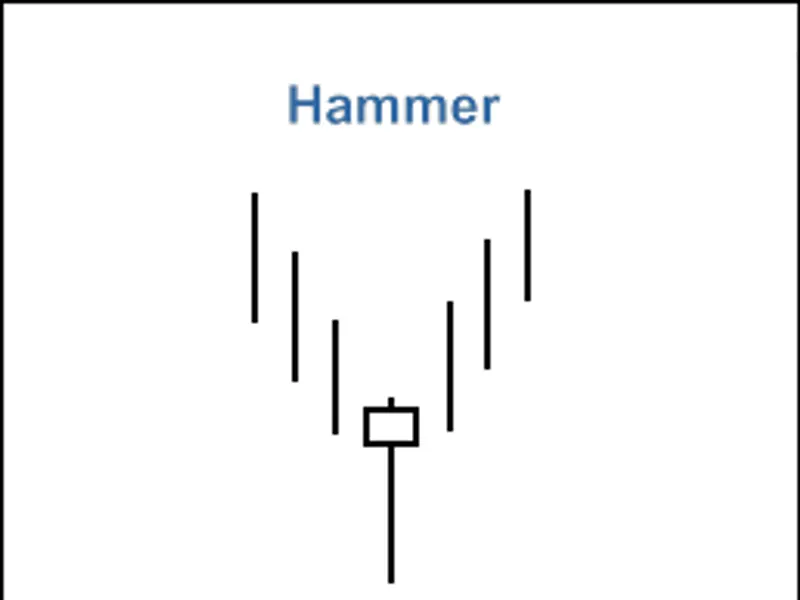
The "hammer" is a candlestick with a small body and a long lower wick, formed after a downward price movement.
The "hammer" pattern indicates the potential end of a bearish trend.
The color of the candlestick body is not critical, but a bullish hammer suggests higher bullish potential.
The body of the "hammer" pattern is often formed near the low of the previous candle.
A longer lower wick and a shorter upper wick increase the potential of this reversal pattern.
Figure 1. "Hammer" Candlestick Pattern
The recognition of the "hammer" pattern is implemented in the `checkpatternhammer()` method of the relevant class.
The `checkcandlestickpattern(candle_pattern_hammer)` method of the class is used to verify the formation of the "hammer" candlestick pattern.
1.2. Hanging Man Pattern
The "hanging man" is a candlestick with a small body and a long lower wick, formed after an upward price movement.
The "hanging man" pattern indicates the potential end of a bullish trend.
The color of the candlestick body is not critical, but a bearish candle suggests higher bearish potential.
The body of the "hanging man" pattern is often formed near the high of the previous candle.
A longer lower wick and a shorter upper wick increase the potential of this reversal pattern.
Figure 2. "Hanging Man" Candlestick Pattern
The recognition of the "hanging man" pattern is implemented in the `checkpatternhangingman()` method of the relevant class.
The `checkcandlestickpattern(candle_pattern_hanging_man)` method of the class is used to verify the formation of the "hanging man" candlestick pattern.
2. Trade Signals Confirmed by Stochastic Indicator
Trading signals to open long or short positions must be confirmed by the Stochastic oscillator.
The %d line must be greater than or less than its corresponding critical level (30 or 70).
Closing opened positions depends on the Stochastic indicator's values. This can occur in two cases:
The %d line reaches the opposite critical level (80 for a long position and 20 for a short position).
A reverse signal is not confirmed (when the %d line reaches the following levels: 20 for a long position and 80 for a short position).
Figure 3. "Hammer" Pattern Confirmed by Stochastic Indicator
The `ch_hm_stoch::longcondition()` method checks conditions to open a long position (returns 80) and close a short position (returns 40).
The `ch_hm_stoch::shortcondition()` method checks conditions to open a short position (returns 80) and close a long position (returns 40).
2.1. Open Long Position / Close Short Position
The formation of a "hammer" pattern must be confirmed by the Stochastic indicator: `stochsignal(1) < 30` (the value of the Stochastic indicator's signal line on the last completed bar must be less than 30).
A short position must be closed if the indicator's signal line has crossed above the 20 or 80 levels.
2.2. Open Short Position / Close Long Position
The formation of a "hanging man" pattern must be confirmed by the Stochastic indicator: `stochsignal(1) > 70` (the value of the Stochastic indicator's signal line on the last completed bar must be greater than 70).
A long position must be closed if the indicator's signal line has crossed below the 80 or 20 levels.
2.3. Creating an Expert Advisor Using MQL5 Wizard
The `ch_hm_stoch` class is not included in the standard library classes. To use it, you must download the `ach_hm_stoch.mqh` file (see attachments) and save it to the `client_terminal_data_folder\mql5\include\expert\signal\mysignals` directory.
The `candlepatterns.mqh` file should be saved similarly.
You can use these files in the MQL5 Wizard after restarting MetaEditor.
To create an expert advisor, launch the MQL5 Wizard.
Figure 4. Creating an Expert Advisor Using MQL5 Wizard
Specify the name of the expert advisor.
Figure 5. General Properties of the Expert Advisor
Next, select the trade signal modules to be used.
Figure 6. Signal Properties of the Expert Advisor
In this case, we use only one trade signal module.
Add the "Signals based on Hammer/Hanging Man confirmed by Stochastic" module of trading signals.
Figure 7. Signal Properties of the Expert Advisor
The module of trade signals is added.
Figure 8. Signal Properties of the Expert Advisor
You can select any trailing properties; however, we will use "trailing stop not used".
Figure 9. Trailing Properties of the Expert Advisor
For money management properties, we will use "trading with fixed trade volume".
Figure 10. Money Management Properties of the Expert Advisor
By clicking the "Finish" button, you will obtain the generated expert advisor code in `expert_ah_hm_stoch.mq5`. This file will be saved in the `terminal_data_folder\mql5\experts\` directory.
The default input parameters of the generated expert advisor:
Must be replaced with:
The `signal_thresholdopen` and `signal_thresholdclose` input parameters allow you to specify threshold levels for opening and closing positions.
In the code of the `longcondition()` and `shortcondition()` methods of the trade signals class, we have specified fixed threshold values:
Open position: 80;
Close position: 40.
The expert advisor generated by the MQL5 Wizard opens and closes positions using "votes" from the trade signal modules.
The vote from the main module (which acts as a container for all added modules) is also used, but its `longcondition()` and `shortcondition()` methods always return 0.
The vote results of the main module are also used in "votes" averaging.
In this scenario, we have the main module plus one trade signal module.
Therefore, you need to account for this when setting threshold values.
Consequently, `thresholdopen` and `thresholdclose` must be set to 40 = (0+80)/2 and 20 = (0+40)/2, respectively.
The `signal_stoplevel` and `signal_takelevel` input parameters are set to 0.
This means that positions will only be closed when the specified closing conditions are met.
2.4. History Backtesting Results
Let's examine the backtesting of the expert advisor on historical data (EURUSD H1, testing period: 2010.01.01-2011.03.04, PeriodK=47, PeriodD=9, SlowPeriod=13, MA_Period=5).
When creating the expert advisor, we used a fixed volume (0.1) and did not employ a trailing stop algorithm.
Figure 11. Testing Results of the Expert Advisor Based on Hammer/Hanging Man + Stochastic
The optimal set of input parameters can be found using the Strategy Tester within the MetaTrader 5 client terminal.
The code for the expert advisor created by the MQL5 Wizard is attached as `expert_ah_hm_stoch.mq5`.
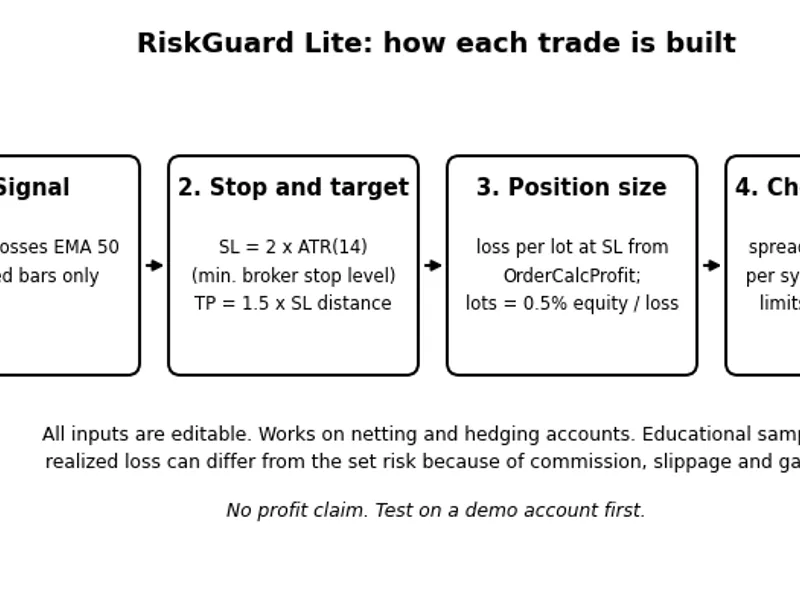
You may also like: Risk Guard Lite: A MQL5 EA for Controlled Risk Trading - excellent alternative for expert users on MetaTrader 5.
Source Code
#property copyright "robotfx"
#property link "https://robotfx.org"
#property version   "1.00"
#include <expert\expert.mqh>
#include <expert\signal\mysignals\ach_hm_stoch.mqh>
#include <expert\trailing\trailingnone.mqh>
#include <expert\money\moneyfixedlot.mqh>
input string         expert_title           ="expert_ah_hm_stoch"; // document name
ulong                expert_magicnumber     =25495;                //
bool                 expert_everytick       =false;                //
.......
⚠ Limitations & Risk Warning
- This tool is provided for educational and testing purposes only.
- Past performance does not guarantee future results.
- Trading involves substantial risk of loss. Use on a demo account first.
- Results may vary depending on market conditions, broker, and settings.
- We recommend thorough backtesting and forward testing before using with real funds.