MQ L5 Wizard - Trade Signals Based on Crossover of Two EM A with intraday time filter
This is a powerful addition to your MetaTrader 5 toolkit designed to optimize market analysis and performance. This Expert Advisor serves as automated trading software. It is utilized to monitor financial markets and execute trades based on predefined algorithmic rules, enabling precise position management without the need for constant manual oversight.
How to Setup and Use MQ L5 Wizard - Trade Signals Based on Crossover of Two EM A with intraday time filter
1. Installation: Open the "File" menu, select "Open Data Folder," navigate to MQL/Experts, paste your file, and restart the terminal.
2. Activation: Drag the EA from the Navigator onto a chart, ensure "Allow live trading" is checked in the Common tab, and verify the AutoTrading button is green.
3. Optimization: Right-click your chart, choose "Expert List," click "Properties" to adjust inputs, and save your preferred setup as a set file for future use.
4. Maintenance: Regularly check the "Experts" tab in the terminal window to monitor trade logs and potential execution errors.
Frequently Asked Questions
Q: Why is my EA not opening trades? A: Check the "AutoTrading" button, ensure "Allow live trading" is enabled, and verify your broker allows automated trading on your account type.
Q: Can I run multiple EAs on one chart? A: No, each chart can only host one active EA; however, you can open multiple charts for different currency pairs to run several EAs.
Q: What does the "smiley face" icon mean? A: A smiley face in the top-right corner of the chart indicates the EA is successfully running; a frowny face means it is disabled.
Description & Settings
allows to create the code of Expert Advisors automatically. See for the details.
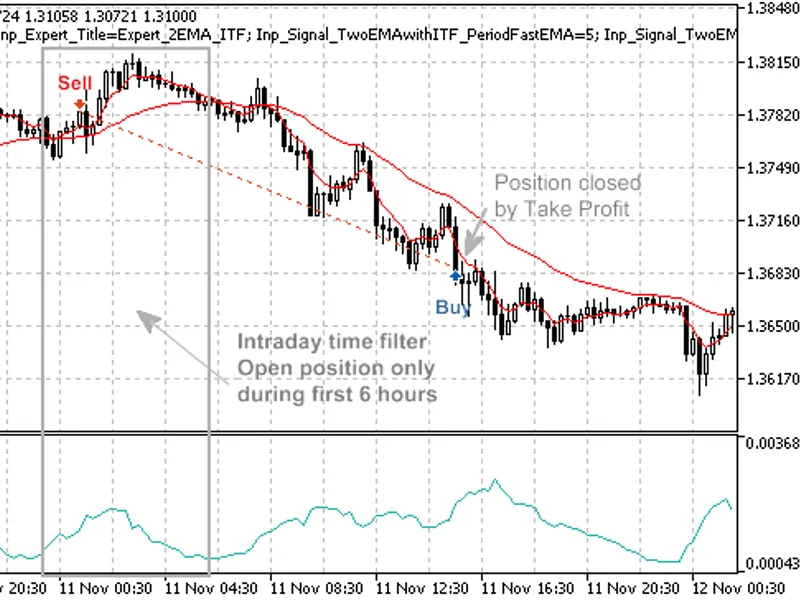
The trading signals of the strategy, based on two moving averages are considered in . The moving averages are effective when trend, in other cases they provide many false signals. One of the ways to improve the strategy is the use of the time filters (for example, open new positions when European session of FOREX).
Here we will consider the strategy based on crossover of two exponentially smoothed Moving Averages (fast EMA and slow EMA) with intraday time filter. The strategy called
"Signals based on crossover of two EMA with intraday time filter"
(when creating EA automatically in MQL5 Wizard).
Trade signals:
Open long position: the Fast EMA crossovers upward the slow EMA and intraday time filter conditions are not satisfied.
Open short position: the Fast EMA crossovers downward the slow EMA and intraday time filter conditions are not satisfied.
This strategy is implemented in CSignal2EMA_ITF class.
The filtration of signals, based on specified time periods is implemented in CSignalITF class. As example of its use, we will consider the CSignal2EMA_ITF class (it contains the CSignalITF class object).
The trading system is based on pending orders, the price levels are calculated depending on values of moving average, the ATR units (Average True Range) are used.
Figure 1. Trade signals, based on crossover of two EMA with intraday time filter
Trade signals
The trading strategy is implemented in CSignal2EMA_ITF, it has some protected methods to simplify access to indicator values:
The feature of this system is following: the trade depends on Limit input parameter. Depending on its sign, there are different cases:
Limit>0. It will enter on back movement when false breakdown of moving average on the price better than market price (Buy Limit and Sell Limit orders will be placed depending on trade signal)
Limit<0. It will enter in price movement direction (Buy Stop and Sell Stop orders will be placed depending on trade signal).
Limit=0. In this case it will trade using the market prices.
1. Open long position
It checks the conditions to open long positon: if the difference between the fast and slow EMA on the last completed bar has changed its sign from "-" to "+" (StateEMA(1)>0 && StateEMA(2)<0).
Next, it checks the conditions intraday time filter by calling the CheckOpenLong() method of the CSignalITF class. If trading allowed, it will calculate the base price level (the value of moving average) and the value ATR range of the last completed bar.
Depending on sign of the Limit input parameter it will place the buy pending order. The order price, Take Profit and Stop Loss levels are calculated relative to the base price level (in ATR units). The order expiration time is defined (in bars) by Expiration input parameter.
2. Close long position
In our case the function, that checks the conditions to close long position always returns false, i.e. it's assumed that long position will be closed by Take Profit or Stop Loss. If neccessary, you can write your own code with implementation of this method.
3. Open short position
It checks the conditions to open short positon: if the difference between the fast and slow EMA on the last completed bar has changed its sign from "+" to "-" (StateEMA(1)<0 && StateEMA(2)>0).
Next, it checks the conditions intraday time filter by calling the CheckOpenLong() method of the CSignalITF class. If trading allowed, it will calculate the base price level (the value of moving average) and the value ATR range of the last completed bar.
Depending on sign of the Limit input parameter it will place the sell pending order. The order price, Take Profit and Stop Loss levels are calculated relative to the base price level (in ATR units). The order expiration time is defined (in bars) by Expiration input parameter.
4. Close short position
In our case the function, that checks the conditions to close short position always returns false, i.e. it's assumed that position will be closed by Take Profit or Stop Loss. If neccessary, you can write your own code with implementation of this method.
5. Trailing Stop of Buy Pending Order
The Expert Advisor will trail pending orders depending on current value of moving average and ATR.
The trading system will place pending orders dependent on trade signals. If order has been placed successfully, it will trail the pending order along the moving average. The order will be executed if market price will reach the order price.
6. Trailing Stop of Sell Pending Order
The Expert Advisor will trail pending orders depending on current value of moving average and ATR.
The order will be executed if market price will reach the order price.
Creating Expert Advisor using MQL5 Wizard
To create a trading robot based on the strategy you need to select the signal properties as "
Signals based on crossover of two EMA with intraday time filter
" in "Creating Ready-Made Expert Advisors" option of :
Figure 2. Select "Signals based on crossover of two EMA with intraday time filter" in MQL5 Wizard
The next you have to specify the needed algorithm and system. The code of Expert Advisor will be created automatically, you can compile it and test in of MetaTrader 5 client terminal.
Testing Results
Let's consider backtesting of the Expert Advisor on historical data (EUenSD H1, testing period: 1.1.2010-05.01.2011, PeriodFastEMA=5, PeriodSlowEMA=30, PeriodATR=7, Limit=1.2, StopLoss=5, TakeProfit=8, Expiration=4, GoodMinuteOfHour=-1, BadMinutesOfHour=0, GoodHourOfDay=-1, BadHoursOfDay=0, GoodDayOfWeek=-1, BadDaysOfWeek=0).
In creation of Expert Advisor we used the fixed volume (, 0.1), Trailing Stop algorithm is not used ().
Figure 3. Testing Results of the Expert Advisor with trading signals, based on crossover of two EMA without use of ITF filter
The intraday filter is not used, so there are many false signals. The trading signals can be improved if we perform the analysis of the deal results depending on trade hours.
In our case we have found that crossover of two EMA provides many false signals starting from 6:00 till 23:59. We can specify the intraday time filter by setting the filter parameters.
For example, we can specify time filter, that allows to open positions only from 0:00 till 5:59. It can be done by setting the value of BadHoursOfDay=16777152=111111111111111111000000b. All other trade hours are "bad", so it's better to prohibit the opening of new positions from 6:00 till end of the day.
If we set the value of BadHoursOfDay=16777152, we will filter many false signals:
Figure 4. Testing Results of the Expert Advisor with trading signals, based on crossover of two EMA with time filter (BadHoursofDay=16777152)
The CSignalITF provides many other time filtration features (just specify the "good" and "bad" minutes within the hour, hours within the day, days within the week).
The use of time filters allows to improve the trading signals and take into account the market dynamics (for example, the trade session features).
Attachments:
The Signal2EMA-ITF.mqh with CSignal2EMA_ITF class must be placed to terminal_data_folder\MQL5\Include\Expert\Signal folder.
The expert_2ema_itf.mq5 contains the code of the Expert Advisor, created using MQL5 Wizard.