MA C D Sample
This software component for MetaTrader 5 is built to enhance the capabilities of your trading environment. This Expert Advisor serves as automated trading software. It is utilized to monitor financial markets and execute trades based on predefined algorithmic rules, enabling precise position management without the need for constant manual oversight.
How to Setup and Use MA C D Sample
1. Installation: Open the "File" menu, select "Open Data Folder," navigate to MQL/Experts, paste your file, and restart the terminal.
2. Activation: Drag the EA from the Navigator onto a chart, ensure "Allow live trading" is checked in the Common tab, and verify the AutoTrading button is green.
3. Optimization: Right-click your chart, choose "Expert List," click "Properties" to adjust inputs, and save your preferred setup as a set file for future use.
4. Maintenance: Regularly check the "Experts" tab in the terminal window to monitor trade logs and potential execution errors.
Frequently Asked Questions
Q: Why is my EA not opening trades? A: Check the "AutoTrading" button, ensure "Allow live trading" is enabled, and verify your broker allows automated trading on your account type.
Q: Can I run multiple EAs on one chart? A: No, each chart can only host one active EA; however, you can open multiple charts for different currency pairs to run several EAs.
Q: What does the "smiley face" icon mean? A: A smiley face in the top-right corner of the chart indicates the EA is successfully running; a frowny face means it is disabled.
Description & Settings
The MACD Sample EA is included in the standard pack of the client terminal and is an example of the EA that trades using the indicator.
The file of the MACD Sample.mq5 expert Advisor is located in terminal_data_folder\MQL5\Experts\Examples\MACD\". This Expert Advisor is an example of object-oriented approach in EA development.
Let's consider the structure of the Expert Advisor and how it works.
1 EA Properties
1.1. EA Properties
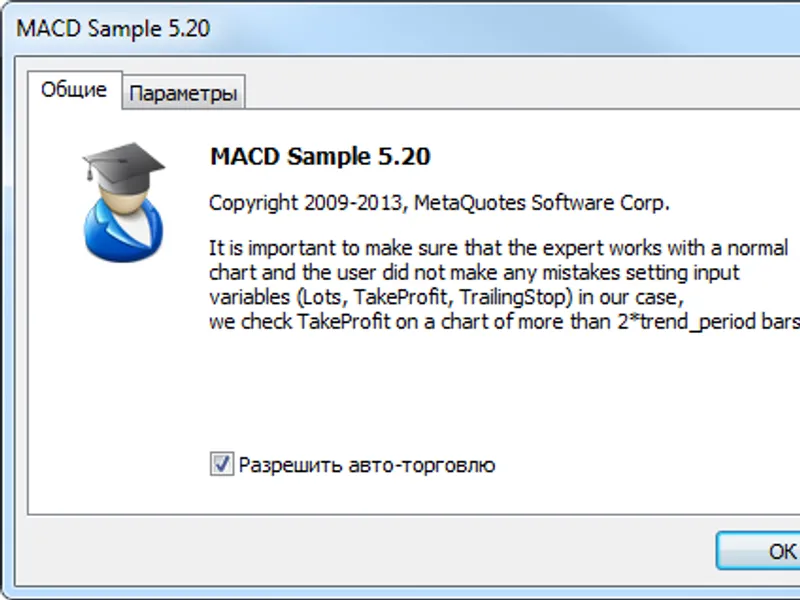
When you run the Expert Advisor they are displayed in the "Common" tab:
Figure 1 Common parameters of the MACD Sample EA
1.2. Include Files
Next, the directive tells the compiler to include the files that contain of the Standard Library.
Trade.mqh ( - a class for trade operations);
SymbolInfo.mqh ( - a class for working with the properties of a trading instrument);
PositionInfo.mqh (- a class for working with open position properties);
AccountInfo.mqh ( - a class for working with trade account properties).
Instances of the appropriate classes are then used as member variables of the CExpert class (Section 3).
1.3. Inputs
Then goes the type, name, default values and a comment. Their role is shown in fig. 2.
Note that the names of the input parameters have the prefix "Inp". Also note that global variables are prefixed with "Ext". Such an approach variable naming simplifies using a lot of different variables.
InpLots - trade volume, InpTakeProfit and InpTrailingStop determine the Take Profit and Trailing Stop levels,
The text in the comment in the input parameter line, along with default values , are displayed in the "Options" tab instead of the name of the input parameter:
Figure 2. Input parameters of the MACD Sample EA
1.4. Global Variables
Then the global variable ExtTimeOut is declared. It will be used for controlling execution time of trade operations.
After declaration of the CSampleExpert class, in line 76 another global variable is declared: ExtExpert - CSampleExpert class instance:
The ExtExpert object (CSampleExpert class sample) contains the basic logic of the trading strategy (Section 3).
2. Event Handling Functions
Event Handling Functions
2.1. The OnInit() initialization function
The function is called once during the first start of the Expert Advisor. Usually in the OnInit() event handler the EA is prepared for operation: input parameters are checked, indicators and parameters are initialized, etc. In the case of critical errors, when further work is meaningless, function is exited with a return code INIT_FAILED.
In this case, the Init() method of the ExtExpert object is called, which returns true or false depending on preparation of all the objects required for operation (see Section 3.4). In case of an error, OnInit() is exited with a return code - it is a correct way to complete the EA/indicator operation in the case of an unsuccessful initialization.
2.2. The OnTick() function
The function is called each time a new quote is received for the symbol of the chart, on which the EA runs.
In the OnTick() event handler includes a mechanism for periodic calls of the ExtExpert.Processing() method, which is used for market analysis and trading operations when trading conditions are met.
The time interval between the calls is set by the value of the ExtTimeOut input parameter.
2.3. The OnDeInit() deinitialization function
is called when an EA is removed from the chart. If a program places graphical objects during operation, they can be removed from the chart.
In these example no deinitialization function is used, no actions are performed.
3. The CSampleExpert class
3.1. The CSampleExpert class
The EA class contains declaration of variables (class members) and functions (class methods).
For a more convenient work with variables all class member variables contain the prefix "m_" (member), which indicates that a variable is a class member. Before the declaration of a variable or a method, its type is specified (or return value for functions).
Visibility of class member variables and methods is defined using . In class CSampleExpert modifiers protected and public are used. All variables and methods defined in the public section, are public and accessible from the outside. The CSampleExpert class has five such methods:
CSampleExpert(void) - a constructor (called automatically when creating a class instance);
~CSampleExpert(void) - a destructor (called automatically when deleting a class instance);
bool Init(void) - initialization method, in which all data required for operation are prepared;
void Deinit(void) - method of deinitialization;
bool Processing(void) - method of processing.
CSampleExpert class member variables declared with the protected access modifier will be available only inside the CSampleExpert class methods (and child classes).
double m_adjusted_point - multiplier variable for a correct operation with 3/5-digit quotes;
CTrade m_trade - class sample;
CSymbolInfo m_symbol - class sample;
CPositionInfo m_position - class sample;
CAccountInfo m_account - class sample;
int m_handle_macd - a variable for storing the value of the handle.
int m_handle_ema - a variable for storing the value of the handle;
double m_buff_MACD_main[] - a dynamic array of type double, which is used for requesting the values of the main MACD line;
double m_buff_MACD_signal[] - a dynamic array of type double, which is used for requesting the values of the signal MACD line;
double m_buff_EMA[] - a dynamic array of type double, which is used for requesting the values of the EMA indicator;
double m_macd_current - is used for storing the current value of the main MACD line;
double m_macd_previous - is used for storing the previous value of the main MACD line;
double m_signal_current - is used for storing the current value of the signal MACD line;
double m_signal_previous - is used for storing the previous value of the signal MACD line;
double m_ema_current - is used for storing the current value of the EMA indicator;
double m_ema_previous - is used for storing the previous value of the EMA indicator
double m_macd_open_level,
double m_macd_close_level,
double m_traling_stop,
double m_take_profit - are used for storing the values of price levels (set in input parameters) taking into account the m_adjusted_point multiplier.
CSampleExpert class methods declared with the protected access modifier:
bool InitCheckParameters(const int digits_adjust) - checking correctness of input parameters and initialization of EA parameters;
bool InitIndicators(void) - initialization (creation ) of the and indicators;
bool LongClosed(void) - returns true (and closes an open long position) if conditions for closing a long position are met;
bool ShortClosed(void) - returns true (and closes an open short position) if conditions for closing a short position are met;
bool LongModified(void) - returns true (and modifies the Stop Loss price) if conditions for changing the Stop Loss level of an open long position are met;
bool ShortModified(void) - returns true (and modifies the Stop Loss price) if conditions for changing the Stop Loss level of an open short position are met;
bool LongOpened(void) - returns true (and opens a long position) if conditions for opening a long position are met;
bool ShortOpened(void) - returns true (and opens a short position) if conditions for opening a short position are met.
3.2. CSampleExpert Class Constructor
is called automatically when a class sample object is created. When it is called, default values (in brackets) for class member variables are set and timeseries is set for m_buff_MACD_main[], m_buff_MACD_signal[], m_buff_EMA[].
3.3. CSampleExpert Class destructor
The CSampleExpert class destructor do not contain any code.
3.4. The Init method of the CSampleExpert class
In the Init() method, class member variables are initialized and the input parameters are verified.
A call of the method for the m_symbol object ( class instance) sets the name of the symbol, on which the Expert Advisor runs, then method is called; it sets the value of the EA's magic number for the m_trade object (will be used for trade operations). After that, the method is used for requesting the symbols's number of digits after the decimal point and, if necessary, the values of the levels are corrected.
Next the method of the m_trade object is called, in which the value of the allowed slippage in trade operations is set.
3.5. The InitCheckParameters method of the CSampleExpert class
The correctness of the EA input parameters is checked in the InitCheckParameters() method. If any of the parameters is invalid, an appropriate message appears, and the function returns false.
3.6. The InitIndicators() method of the CSampleExpert class
In the InitIndicators() method, the correctness of initial values of the m_handle_macd and m_handle_ema variables is checked (they must be equal to INVALID_HANDLE, since they have been initialized in the constructor), and the technical indicators and are created (using the and functions). If successful, the function returns true, and the indicator handles are saved in the m_handle_macd and m_handle_ema class members.
The handles of the created indicators will then be used for checking the amount of calculated data () and obtaining the numerical values () of the indicators in the Processing() method.
3.7. The LongClosed() method of the CSampleExpert class
The LongClosed() method returns true (and closes the open long position) if conditions for position closing are met:
m_macd_current>0 - the current value of the main line of the MACD indicator is positive (MACD histogram is above the zero line);
m_macd_current<m_signal_current && m_macd_previous>m_signal_previous - the main line of the MACD indicator has crossed the signal one downwards.
m_macd_current>m_macd_close_level - the current value of the main line of the MACD indicator is greater than m_macd_close_level.
3.8. The ShortClosed() method of the CSampleExpert class
The ShortClosed() method returns true (and closes an open short position) if positions for closing a short position are met:
m_macd_current<0 - the current value of the main line of the MACD indicator is negative (MACD histogram is below the zero line).
m_macd_current>m_signal_current && m_macd_previous<m_signal_previous - the main line of the MACD indicator has crossed the signal one upwards.
MathAbs(m_macd_current)>m_macd_close_level - the current value of the main line of the MACD indicator is greater than m_macd_close_level.
3.9. The LongModified() method of the CSampleExpert class
The LongModified() method returns true (and modifies the Stop Loss value of the position) if conditions for long position modification are met: If the value of the input InpTrailingStop>0, then the fact of price passing InpTrailingStop points from the open price in the position direction is checked. Next, the value of the new Stop Loss level is calculated and the Stop Loss parameter of the open position is modified.
3.10. The ShortModified method of the CSampleExpert class
The ShortModified() method returns true (and modifies the Stop Loss value of the position) if conditions for short position modification are met: If the value of the input InpTrailingStop>0, then the fact of price passing InpTrailingStop points from the open price in the position direction is checked. Next, the value of the new Stop Loss level is calculated and the Stop Loss parameter of the open position is modified.
3.11. The LongOpened() method of the CSampleExpert class
The LongOpened() method returns true (and opens a long position) if conditions for opening a buy position are met:
m_macd_current<0 - the current value of the main line of the MACD indicator is negative (MACD histogram is below the zero line);
m_macd_current>m_signal_current && m_macd_previous<m_signal_previous - the main line of the MACD indicator has crossed the signal one upwards;
MathAbs(m_macd_current)>m_macd_open_level - the current value of the main line of the MACD indicator modulo is greater than m_macd_open_level;
m_ema_current>m_ema_previous - ema grows.
When all the conditions are met, free margin is checked (the method of the Standard library class) and a long position is opened using the method of the class.
3.12. The ShortOpened method of the CSampleExpert class
The ShortOpened() method returns true (and opens a short position) if conditions for opening a sell position are met:
m_macd_current>0 - the current value of the main line of the MACD indicator is positive (MACD histogram is above the zero line);
m_macd_current<m_signal_current && m_macd_previous>m_signal_previous - the main line of the MACD indicator has crossed the signal one downwards;
m_macd_current>m_macd_open_level - the current value of the main MACD line is greater than m_macd_open_level;
m_ema_current<m_ema_previous - ema falls.
When all the conditions are met, free margin is checked (the method of the Standard library class) and a short position is opened using the method of the class.
3.13 The Processing() method of CSampleExpert class
The Processing() method of the CSampleExpert class is the method of the Expert Advisor. The Processing() method is called in the OnTick() event handler, and time interval between successive calls of this method is monitored (no less than ExtTimeOut seconds) (section 2.2).
By calling the method of the class quotes are updated. The function is used for requesting the number of bars, for which indicators and are calculated (section 3.6.); if the number of bars is less than 2, exit the function and return false.
Next, the function call requests the last two values of technical indicators (the main and signal MACD lines and Moving Average values ); and if the amount of data copied is less than two, then exit the function. After that the values of the indicators from arrays m_buff_MACD_main[], m_buff_MACD_signal[] and m_buff_EMA[] are copied to variables m_macd_current, m_macd_previous, m_signal_current, m_signal_previous, m_ema_current and m_ema_previous.
The next step is working with a position carried out by means of class of the Standard library. If the method call has returned true, this means that currently there is an open position, its type is determined using the method. Further work is carried out in accordance with the type of the open position.
4. Backtesting
The best values of the parameters can be found using the of the MetaTrader 5 terminal.
Figure 3 shows the results of the Expert Advisor testing for 2013 with default settings.
Figure 3. Backtesting results of the MACD Sample Expert Advisor
Conclusions
The MACD Sample Expert Advisor, included in the standard delivery pack of the terminal, is an example of object-oriented approach in EA development.


![[EA] - Charles 2. 1. 5](/images/10823.webp)