Long-Only Trend Breakout with Dynamic Risk Management
This professional-grade solution for MetaTrader 5 helps traders achieve greater efficiency in their daily workflow. This Expert Advisor serves as automated trading software. It is utilized to monitor financial markets and execute trades based on predefined algorithmic rules, enabling precise position management without the need for constant manual oversight.
How to Setup and Use Long-Only Trend Breakout with Dynamic Risk Management
1. Installation: Open the "File" menu, select "Open Data Folder," navigate to MQL/Experts, paste your file, and restart the terminal.
2. Activation: Drag the EA from the Navigator onto a chart, ensure "Allow live trading" is checked in the Common tab, and verify the AutoTrading button is green.
3. Optimization: Right-click your chart, choose "Expert List," click "Properties" to adjust inputs, and save your preferred setup as a set file for future use.
4. Maintenance: Regularly check the "Experts" tab in the terminal window to monitor trade logs and potential execution errors.
Frequently Asked Questions
Q: Why is my EA not opening trades? A: Check the "AutoTrading" button, ensure "Allow live trading" is enabled, and verify your broker allows automated trading on your account type.
Q: Can I run multiple EAs on one chart? A: No, each chart can only host one active EA; however, you can open multiple charts for different currency pairs to run several EAs.
Q: What does the "smiley face" icon mean? A: A smiley face in the top-right corner of the chart indicates the EA is successfully running; a frowny face means it is disabled.
Description & Settings
Breakout
is a clean, automated MetaTrader 5 expert advisor designed to capture algorithmic breakout momentum in structural bull markets. It features a precise bar-breakout setup, execution strictly at the open of a new bar to minimize noise, and an advanced dynamic lot-sizing module that guarantees you risk a fixed currency amount on every setup, regardless of market volatility.
This EA is specifically tailored for indices and instruments with strong directional biases—such as the
NASDAQ (NAS100)
—where asset growth tends to reward disciplined structural buying.
Strategy Overview
The core logic is built around catching immediate, high-probability structural expansions:
The Signal:
The EA looks at the last completed bar (Bar 1). If its Close price is strictly greater than the High of the previous bar (Bar 2), a bullish breakout is triggered.
The Execution:
It runs strictly on
New Bar Open
( OnTick structure), protecting you from execution lag and intra-candle noise.
Stop Loss (SL):
Placed dynamically at the Low of the breakout candle (Bar 1).
Take Profit (TP):
Mathematically calculated based on your custom Risk-to-Reward ratio.
Directionality:
Long Only
. Designed specifically to harvest gains during structural macro-bull trends.
Performance & Backtesting Notes
Tested Instrument:
NASDAQ (NAS100)
Timeframe:
H4
Backtest Window:
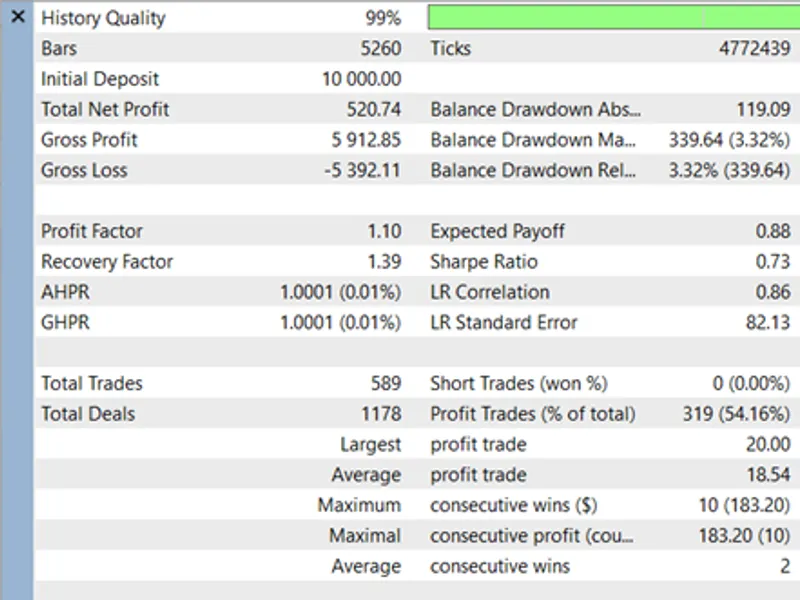
3.5 Years (showing positive net returns)
Backtest Method:
Conducted using
M1 OHLC (Open, High, Low, Close)
bars.
⚠️
Note to Users:
This strategy has shown robust structural returns via M1 OHLC testing. However, it has not yet been simulated on "Every Tick based on Real Ticks." Users are highly encouraged to run their own real-tick simulations and optimizations matching their broker's specific spreads and contract specifications before going live.
Advanced Risk Management & Dynamic Lot Sizing
Unlike basic EAs that use fixed lot sizes,
Breakout
uses your account equity intelligently.
You input a precise currency amount you are willing to lose (e.g., $20 or $50). The EA extracts the current market SYMBOL_TRADE_TICK_VALUE and SYMBOL_TRADE_TICK_SIZE to calculate the exact distance to your Stop Loss in ticks. It then normalizes this data into a calculated position volume, adjusting seamlessly to broker rules ( SYMBOL_VOLUME_STEP ). If a setup requires a lot size smaller than your broker's minimum allowance, the trade is safely skipped.
Input Parameters & Optimization Guide
The EA exposes highly flexible inputs designed for the MT5 Strategy Tester:
How to Optimize:
Run a
Fast (Genetic Algorithm)
optimization on your target index.
Vary
InpMinSLPoints
to filter out small structural candles that result in false breakouts.
Optimize
InpRewardToRiskRatio
between 0.5 and 2.5 to find the mathematical edge for the H4 timeframe.