









ivan
Info
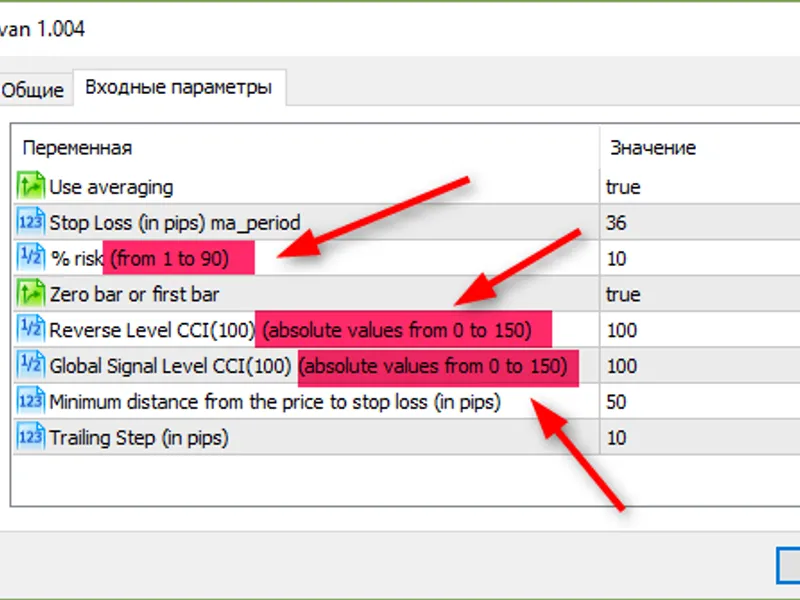
The ivan is a Expert Advisor for MetaTrader 5 that input parameters stop loss — the stop loss price level% risk — percentage of risk per trade based on the free marginreverse level cci(100) — the value of the cci(100) indicator, crossing which means a position reverse signalglobal signal level cci(100) — the value of the cci(100) indicator, crossing which means a position opening signalminimum distance from the price to stop loss (in pips) — the minimum distance between the current price and the calculated stop loss leveltrailing step (in pips) — trailing step.
Usage
This tool is typically used for automated trading on major forex pairs and gold.
Platform
This Expert Advisor works exclusively on MetaTrader 5 (both build 600+ and newer versions).
Setup
Place the downloaded file in MQL5/Experts folder via File ? Open Data Folder in MetaTrader 5.
How to Install and Use ivan
1. Installation: Open the "File" menu, select "Open Data Folder," navigate to MQL/Experts, paste your file, and restart the terminal.
2. Activation: Drag the EA from the Navigator onto a chart, ensure "Allow live trading" is checked in the Common tab, and verify the AutoTrading button is green.
3. Optimization: Right-click your chart, choose "Expert List," click "Properties" to adjust inputs, and save your preferred setup as a set file for future use.
4. Maintenance: Regularly check the "Experts" tab in the terminal window to monitor trade logs and potential execution errors.
Frequently Asked Questions
Q: Why is my EA not opening trades? A: Check the "AutoTrading" button, ensure "Allow live trading" is enabled, and verify your broker allows automated trading on your account type.
Q: Can I run multiple EAs on one chart? A: No, each chart can only host one active EA; however, you can open multiple charts for different currency pairs to run several EAs.
Q: What does the "smiley face" icon mean? A: A smiley face in the top-right corner of the chart indicates the EA is successfully running; a frowny face means it is disabled.
What this tool does
input parameters stop loss — the stop loss price level% risk — percentage of risk per trade based on the free marginreverse level cci(100) — the value of the cci(100) indicator, crossing which means a position reverse signalglobal signal level cci(100) — the value of the cci(100) indicator, crossing which means a position opening signalminimum distance from the price to stop loss (in pips) — the minimum distance between the current price and the calculated stop loss leveltrailing step (in pips) — trailing step.
Typical Use Case
This Expert Advisor excels in automated trading and technical analysis on MetaTrader 5.
Compatible Platform & Setup
This Expert Advisor works on MetaTrader 5. Place the file in the MQL5/Experts folder and restart the terminal.
Description & Settings
Related: double zig zag - another powerful expert for MetaTrader 5 traders.
input parameters
stop loss — the stop loss price level
% risk — percentage of risk per trade based on the free margin
Also recommended: pro ma crossover ea for mt5 - similar expert with strong performance on MetaTrader 5.
reverse level cci(100) — the value of the cci(100) indicator, crossing which means a position reverse signal
global signal level cci(100) — the value of the cci(100) indicator, crossing which means a position opening signal
minimum distance from the price to stop loss (in pips) — the minimum distance between the current price and the calculated stop loss level
trailing step (in pips) — trailing step
You may also like: exp trading channel index - excellent alternative for expert users on MetaTrader 5.
Source Code
/.......
⚠ Limitations & Risk Warning
- This tool is provided for educational and testing purposes only.
- Past performance does not guarantee future results.
- Trading involves substantial risk of loss. Use on a demo account first.
- Results may vary depending on market conditions, broker, and settings.
- We recommend thorough backtesting and forward testing before using with real funds.