








indiana jones mean reversion ea
Info
The indiana jones mean reversion ea is a Expert Advisor for MetaTrader 5 that the strategygo short when price hits n-lookback bars high targeting mean of n-lookback. go long when price hits n-lookback bars low targeting mean of n-lookback.
Usage
This tool is typically used for automated trading on major forex pairs and gold.
Platform
This Expert Advisor works exclusively on MetaTrader 5 (both build 600+ and newer versions).
Setup
Place the downloaded file in MQL5/Experts folder via File ? Open Data Folder in MetaTrader 5.
How to Install and Use indiana jones mean reversion ea
1. Installation: Open the "File" menu, select "Open Data Folder," navigate to MQL/Experts, paste your file, and restart the terminal.
2. Activation: Drag the EA from the Navigator onto a chart, ensure "Allow live trading" is checked in the Common tab, and verify the AutoTrading button is green.
3. Optimization: Right-click your chart, choose "Expert List," click "Properties" to adjust inputs, and save your preferred setup as a set file for future use.
4. Maintenance: Regularly check the "Experts" tab in the terminal window to monitor trade logs and potential execution errors.
Frequently Asked Questions
Q: Why is my EA not opening trades? A: Check the "AutoTrading" button, ensure "Allow live trading" is enabled, and verify your broker allows automated trading on your account type.
Q: Can I run multiple EAs on one chart? A: No, each chart can only host one active EA; however, you can open multiple charts for different currency pairs to run several EAs.
Q: What does the "smiley face" icon mean? A: A smiley face in the top-right corner of the chart indicates the EA is successfully running; a frowny face means it is disabled.
What this tool does
the strategygo short when price hits n-lookback bars high targeting mean of n-lookback.
Typical Use Case
This Expert Advisor excels in automated trading and technical analysis on MetaTrader 5.
Compatible Platform & Setup
This Expert Advisor works on MetaTrader 5. Place the file in the MQL5/Experts folder and restart the terminal.
Description & Settings
Related: exp xde marker histogram vol - another powerful expert for MetaTrader 5 traders.
the strategy
go short when price hits n-lookback bars high targeting mean of n-lookback.
Also recommended: Risk Pilot Pro - Drag-to-Trade Risk Panel with Break-Even, Trailing and Daily Loss Guard - similar expert with strong performance on MetaTrader 5.
go long when price hits n-lookback bars low targeting mean of n-lookback.
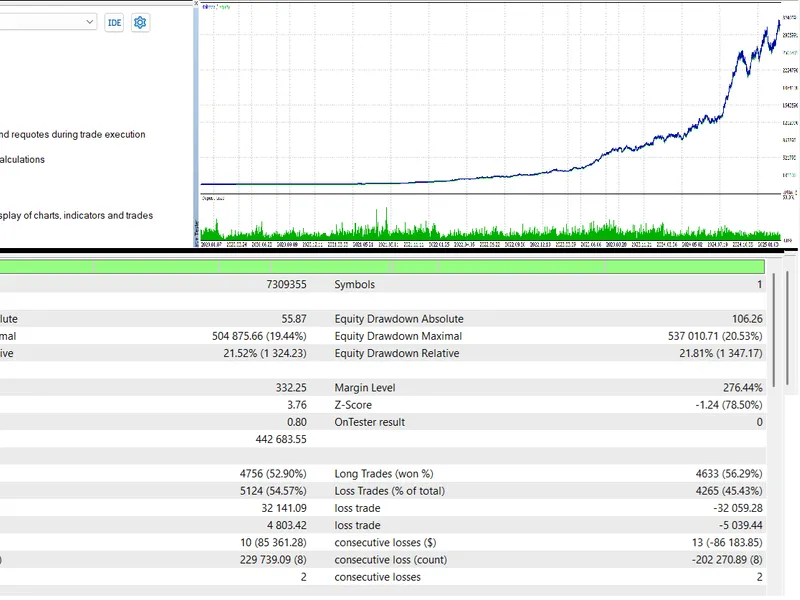
this is a misleading simulation conducted on one-minute ohlc:
Source Code
#include <Trade\Trade.mqh>
CTrade trade;
input group "EA Setting"
input int lookback = 200;
input double risk_per_trade = 1;
void OnTick()
{
if(PositionsTotal()>0)
return;
if(iLowest(_Symbol, PERIOD_CURRENT, MODE_LOW, lookback, 0)==0)
.......
⚠ Limitations & Risk Warning
- This tool is provided for educational and testing purposes only.
- Past performance does not guarantee future results.
- Trading involves substantial risk of loss. Use on a demo account first.
- Results may vary depending on market conditions, broker, and settings.
- We recommend thorough backtesting and forward testing before using with real funds.