










frontend ea: ui cleanup and quick-trading layer for mt5
Info
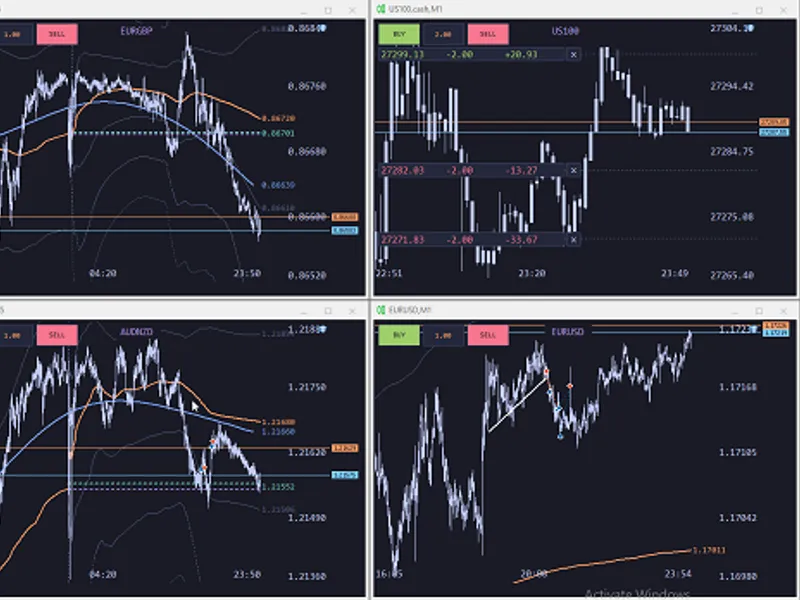
The frontend ea: ui cleanup and quick-trading layer for mt5 is a Expert Advisor for MetaTrader 5 that frontend ea a ui cleanup and quick-trading layer for mt5. it removes default clutter, replaces built-in price and time axes with large, readable labels, and provides a one-click trading panel, all within a single ea.
Usage
This tool is typically used for automated trading on major forex pairs and gold.
Platform
This Expert Advisor works exclusively on MetaTrader 5 (both build 600+ and newer versions).
Setup
Place the downloaded file in MQL5/Experts folder via File ? Open Data Folder in MetaTrader 5.
How to Install and Use frontend ea: ui cleanup and quick-trading layer for mt5
1. Installation: Open the "File" menu, select "Open Data Folder," navigate to MQL/Experts, paste your file, and restart the terminal.
2. Activation: Drag the EA from the Navigator onto a chart, ensure "Allow live trading" is checked in the Common tab, and verify the AutoTrading button is green.
3. Optimization: Right-click your chart, choose "Expert List," click "Properties" to adjust inputs, and save your preferred setup as a set file for future use.
4. Maintenance: Regularly check the "Experts" tab in the terminal window to monitor trade logs and potential execution errors.
Frequently Asked Questions
Q: Why is my EA not opening trades? A: Check the "AutoTrading" button, ensure "Allow live trading" is enabled, and verify your broker allows automated trading on your account type.
Q: Can I run multiple EAs on one chart? A: No, each chart can only host one active EA; however, you can open multiple charts for different currency pairs to run several EAs.
Q: What does the "smiley face" icon mean? A: A smiley face in the top-right corner of the chart indicates the EA is successfully running; a frowny face means it is disabled.
What this tool does
frontend ea a ui cleanup and quick-trading layer for mt5.
Typical Use Case
This Expert Advisor excels in automated trading and technical analysis on MetaTrader 5.
Compatible Platform & Setup
This Expert Advisor works on MetaTrader 5. Place the file in the MQL5/Experts folder and restart the terminal.
Description & Settings
Related: exp jbrain trend1 stop re open - another powerful expert for MetaTrader 5 traders.
frontend eaa ui cleanup and quick-trading layer for mt5. it removes default clutter, replaces built-in price and time axes with large, readable labels, and provides a one-click trading panel, all within a single ea. this ea serves as a solid foundation for users looking to customize its interface.
Also recommended: istochastic trading - similar expert with strong performance on MetaTrader 5.
chart appearance
hides grid, volumes, ticker bar, and one-click trading panel on load
custom price scale
features a custom price scale with round-number labels (1 / 2 / 2.5 / 5 x 10k steps)
custom time scale
displays only the date once per day at 00:00, and the time otherwise
auto-padding around the bid tag and horizontal-line endpoint labels to prevent overlap (work in progress)
compact mode
when the chart is tiled, displays 5 price levels (top / ¾ / mid / ¼ / bottom) and 3 time labels (left / mid / right)
quick trading
buy
and
sell
buttons located in the top-left corner with an editable volume box
volume is persisted per slot using globalvariable
symbol label displayed at the top center (suffix '.cash' is stripped)
open position plates (left side)
one plate per open position displayed at its entry price
shows price | signed volume | live pnl
'+' for longs, '-' for shorts
pnl includes swap and commission, refreshed every second
color coding:
green when in profit,
red when in loss, orange for flat
overlapping entries at the same price level merge into one plate with summed volume and summed pnl
a small '
×
' button next to each plate allows closing all tickets in that cluster with a single click
fixed-width fields ensure plates remain aligned across refreshes
indicators
l1 trend filter
on h1 timeframe (configurable lambda)
session vwap
with ±2σ, ±5σ, ±8σ bands
previous close and today open markers
keyboard shortcuts
performance
80 ms paint loop with dirty-checking: geometry + price range + position-list hash + 1 hz pnl pulse
label pools are reused across frames (no objectfind in the hot path)
inline price-to-y math, cached geometry refreshed only on chart_change
smooth repainting during drag/resize operations, near-idle cpu usage when the chart is static
color palette
tokyo night theme: dark background with soft blue, orange, and purple accents, designed for eye comfort during extended sessions.
all indicator source code is derived from mql5.com with performance optimizations. special thanks to the community for their free contributions.
this ea currently meets my specific needs but serves as a good starting point for users interested in ui customization. developed by claude. suggestions for improvement are welcome, though input settings for colors or minor adjustments will not be added. use at your own risk; the ea is largely untested.
updated for 2026.
You may also like: zig zag evge trofi ver. 1 - excellent alternative for expert users on MetaTrader 5.
Source Code
#property copyright "robotfx"
#property version   "1.02"
#property strict
#include <trade\trade.mqh>
input double           inpqtscale       = 1.0;
input double           inpqtdefaultvol  = 0.10;
input ulong            inpqtmagicbase   = 777000;
input ulong            inpqtdeviation   = 20;
input bool             inpsclenable     = true;
input int              inpsclpriceticks = 12;
.......
⚠ Limitations & Risk Warning
- This tool is provided for educational and testing purposes only.
- Past performance does not guarantee future results.
- Trading involves substantial risk of loss. Use on a demo account first.
- Results may vary depending on market conditions, broker, and settings.
- We recommend thorough backtesting and forward testing before using with real funds.