






first algorithmic trading panel
Info
The first algorithmic trading panel is a Expert Advisor for MetaTrader 5 that this graphic panel allows for the automation of manual trading and has many functions, including the visual construction of trading strategies. the automated trading is popular among traders.
Usage
This tool is typically used for automated trading on major forex pairs and gold.
Platform
This Expert Advisor works exclusively on MetaTrader 5 (both build 600+ and newer versions).
Setup
Place the downloaded file in MQL5/Experts folder via File ? Open Data Folder in MetaTrader 5.
How to Install and Use first algorithmic trading panel
1. Installation: Open the "File" menu, select "Open Data Folder," navigate to MQL/Experts, paste your file, and restart the terminal.
2. Activation: Drag the EA from the Navigator onto a chart, ensure "Allow live trading" is checked in the Common tab, and verify the AutoTrading button is green.
3. Optimization: Right-click your chart, choose "Expert List," click "Properties" to adjust inputs, and save your preferred setup as a set file for future use.
4. Maintenance: Regularly check the "Experts" tab in the terminal window to monitor trade logs and potential execution errors.
Frequently Asked Questions
Q: Why is my EA not opening trades? A: Check the "AutoTrading" button, ensure "Allow live trading" is enabled, and verify your broker allows automated trading on your account type.
Q: Can I run multiple EAs on one chart? A: No, each chart can only host one active EA; however, you can open multiple charts for different currency pairs to run several EAs.
Q: What does the "smiley face" icon mean? A: A smiley face in the top-right corner of the chart indicates the EA is successfully running; a frowny face means it is disabled.
What this tool does
this graphic panel allows for the automation of manual trading and has many functions, including the visual construction of trading strategies.
Typical Use Case
This Expert Advisor excels in automated trading and technical analysis on MetaTrader 5.
Compatible Platform & Setup
This Expert Advisor works on MetaTrader 5. Place the file in the MQL5/Experts folder and restart the terminal.
Description & Settings
Related: KCI Embedded Sniper: High-Precision Algorithmic Trading - another powerful expert for MetaTrader 5 traders.
this graphic panel allows for the automation of manual trading and has many functions, including the visual construction of trading strategies.Also recommended: examples from the book "neural networks for algorithmic trading with mq l5" - similar expert with strong performance on MetaTrader 5.
the automated trading is popular among traders. however, not all traders are programmers, and the creation of an expert advisor with a specific trading strategy requires knowledge of basic programming skills in mql5. visual panels can simplify trade operations, but the implementation of a simple trading algorithm often requires writing code or finding a programmer to implement the algorithm.
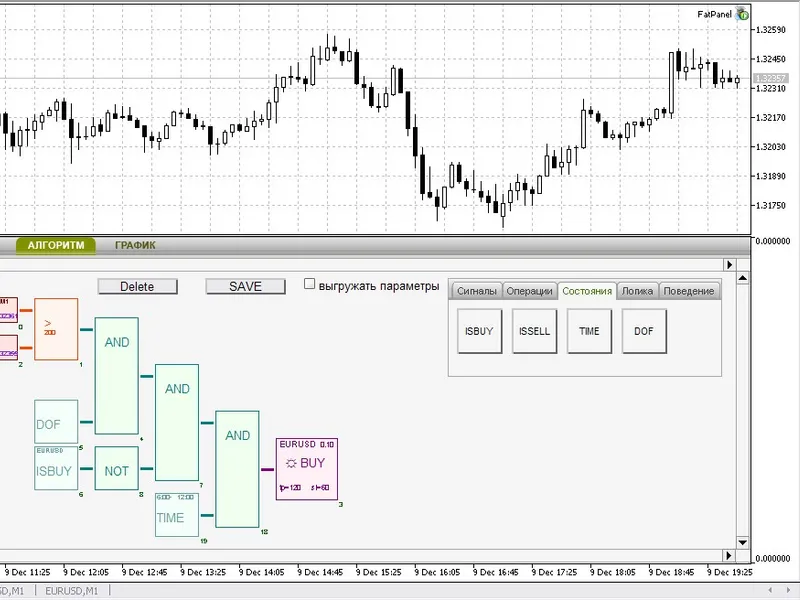
the first algorithmic trading panel allows you to create automated trading strategies without writing code.
the panel has a convenient user interface, including tabs with visual tools, a properties window, checkboxes, radiobuttons, scroll, and zoom.
the algorithm tab provides a workspace for the visual creation of the expert advisor algorithm. it includes ready logical blocks combined by purpose, and values of indicators can be used as input parameters. there are also additional signal blocks, such as bid and constants.
the panel features 4 logical blocks of signal operation processing, 4 state blocks, 3 logical operations, and 2 order blocks. it also allows for intuitive operation of addition, selection, handling, connections, moving, and deleting groups of blocks. the parameters of each block can be configured, and the creation of multicurrency trading strategies is possible.
the panel also includes zoom and scrolling of the workspace, saving and loading of trade algorithms and settings, and history backtesting with saved schemes. input parameters of the blocks can be used for optimization in the strategy tester, and there is visual control.
future plans include the extension of the indicators list, extension of the behavior blocks, workspace optimization, and a new scheme storage format.
to install the panel, extract the contents of the archive to the client terminal folder, open metaeditor, and compile the indicator and expert advisor. attach the expert advisor to the chart, allowing the use of dlls.
creating a trading algorithm is straightforward. the simplest trading scheme can be created using 4 logical blocks. to add a logical block to the workspace, click on the block and then click on the specified place on the workspace. connect the blocks, and configure the block properties as needed. enable the autotrading feature to start trading.
attention: it is not recommended to test the work of the expert advisor on real accounts. instead, use the strategy tester to test the strategy on historical data. save the scheme, select the expert advisor in the strategy tester, and view the strategy results.
the chart tab provides information on symbols and opened positions and allows for manual trading. it includes easy position management, closing positions, and placement of pending orders. the color of the symbol tab is dependent on the current profit of the opened position, and it checks parameters and shows warning messages.
You may also like: Moving Average Crossover EA - excellent alternative for expert users on MetaTrader 5.
⚠ Limitations & Risk Warning
- This tool is provided for educational and testing purposes only.
- Past performance does not guarantee future results.
- Trading involves substantial risk of loss. Use on a demo account first.
- Results may vary depending on market conditions, broker, and settings.
- We recommend thorough backtesting and forward testing before using with real funds.