











eabest26
Info
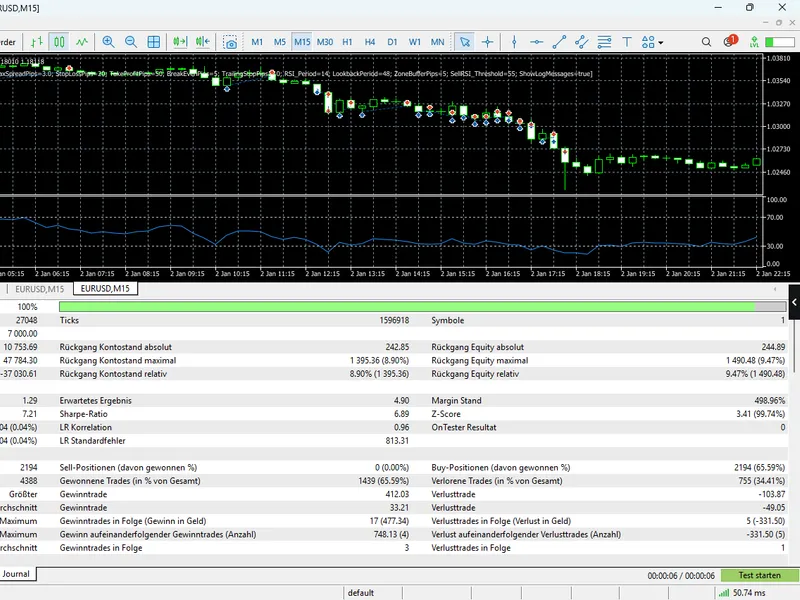
The eabest26 is a Expert Advisor for MetaTrader 5 that core trading logic dynamic price zones:the expert advisor (ea) employs a dynamic approach to identifying key price levels by continuously calculating the highest high and lowest low of the last 48 candles (lookbackperiod). this technique pinpoints critical supply and demand zones in real-time.
Usage
This tool is typically used for automated trading on major forex pairs and gold.
Platform
This Expert Advisor works exclusively on MetaTrader 5 (both build 600+ and newer versions).
Setup
Place the downloaded file in MQL5/Experts folder via File ? Open Data Folder in MetaTrader 5.
How to Install and Use eabest26
1. Installation: Open the "File" menu, select "Open Data Folder," navigate to MQL/Experts, paste your file, and restart the terminal.
2. Activation: Drag the EA from the Navigator onto a chart, ensure "Allow live trading" is checked in the Common tab, and verify the AutoTrading button is green.
3. Optimization: Right-click your chart, choose "Expert List," click "Properties" to adjust inputs, and save your preferred setup as a set file for future use.
4. Maintenance: Regularly check the "Experts" tab in the terminal window to monitor trade logs and potential execution errors.
Frequently Asked Questions
Q: Why is my EA not opening trades? A: Check the "AutoTrading" button, ensure "Allow live trading" is enabled, and verify your broker allows automated trading on your account type.
Q: Can I run multiple EAs on one chart? A: No, each chart can only host one active EA; however, you can open multiple charts for different currency pairs to run several EAs.
Q: What does the "smiley face" icon mean? A: A smiley face in the top-right corner of the chart indicates the EA is successfully running; a frowny face means it is disabled.
What this tool does
core trading logic dynamic price zones:the expert advisor (ea) employs a dynamic approach to identifying key price levels by continuously calculating the highest high and lowest low of the last 48 candles (lookbackperiod).
Typical Use Case
This Expert Advisor excels in automated trading and technical analysis on MetaTrader 5.
Compatible Platform & Setup
This Expert Advisor works on MetaTrader 5. Place the file in the MQL5/Experts folder and restart the terminal.
Description & Settings
Related: gbp chf - another powerful expert for MetaTrader 5 traders.
core trading logicdynamic price zones:
the expert advisor (ea) employs a dynamic approach to identifying key price levels by continuously calculating the highest high and lowest low of the last 48 candles (lookbackperiod). this technique pinpoints critical supply and demand zones in real-time.
Also recommended: exp force trend - similar expert with strong performance on MetaTrader 5.
entry trigger:
the ea initiates trades when the price enters a user-defined buffer zone (zonebufferpips), strategically positioned near historical support and resistance levels. this method ensures precise entries, capturing potential reversals at pivotal points.
momentum confirmation:
to enhance trade accuracy, the ea incorporates the relative strength index (rsi) indicator for momentum confirmation:
buy:
when the price touches the lower zone and rsi is below 40, indicating potential oversold conditions.
sell:
when the price touches the upper zone and rsi exceeds 55, an optimized threshold for maximizing the win rate.
risk management & trade protection
dynamic lot sizing:
position sizing is automated, considering the account balance and the user's specified risk percentage (riskpercent). this ensures a consistent and controlled approach to risk management.
advanced protection:
each trade is safeguarded with fixed stop loss and take profit levels, providing clear risk boundaries.
profit locking:
an integrated break-even function and trailing stop mechanism work in tandem to secure profits as the trade progresses favorably, minimizing potential losses.
smart exit:
the ea monitors rsi values to detect overbought/oversold conditions, enabling early exit strategies if the rsi reaches extreme opposite levels, thus managing risk proactively.
technical features
live dashboard:
the ea provides a comprehensive live dashboard on the chart, displaying crucial trading information such as current rsi, spread, risk, and the assigned magic number for easy trade management.
optimised performance:
fully compatible with mt5 hedge/netting accounts, the ea boasts zero compiler warnings and detailed diagnostic logging for efficient troubleshooting.
user-friendly customization:
all parameters, including lookback periods, rsi thresholds, and pip values, are easily adjustable, allowing traders to adapt the ea to various market conditions and trading styles.
You may also like: momo trades - excellent alternative for expert users on MetaTrader 5.
Source Code
яю/.......
⚠ Limitations & Risk Warning
- This tool is provided for educational and testing purposes only.
- Past performance does not guarantee future results.
- Trading involves substantial risk of loss. Use on a demo account first.
- Results may vary depending on market conditions, broker, and settings.
- We recommend thorough backtesting and forward testing before using with real funds.