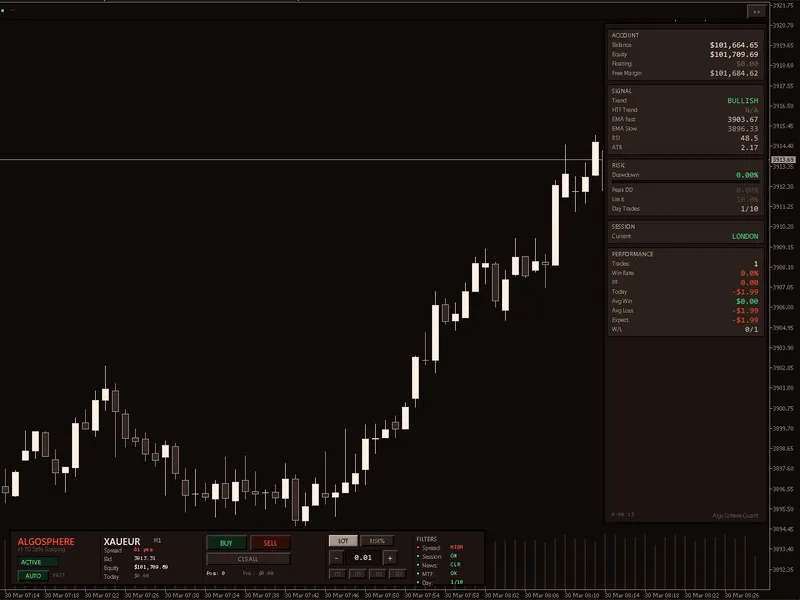
AS Q Safe Scalping
This tool for MetaTrader 5 is specifically engineered to streamline your trading operations. This Expert Advisor serves as automated trading software. It is utilized to monitor financial markets and execute trades based on predefined algorithmic rules, enabling precise position management without the need for constant manual oversight.
How to Setup and Use AS Q Safe Scalping
1. Installation: Open the "File" menu, select "Open Data Folder," navigate to MQL/Experts, paste your file, and restart the terminal.
2. Activation: Drag the EA from the Navigator onto a chart, ensure "Allow live trading" is checked in the Common tab, and verify the AutoTrading button is green.
3. Optimization: Right-click your chart, choose "Expert List," click "Properties" to adjust inputs, and save your preferred setup as a set file for future use.
4. Maintenance: Regularly check the "Experts" tab in the terminal window to monitor trade logs and potential execution errors.
Frequently Asked Questions
Q: Why is my EA not opening trades? A: Check the "AutoTrading" button, ensure "Allow live trading" is enabled, and verify your broker allows automated trading on your account type.
Q: Can I run multiple EAs on one chart? A: No, each chart can only host one active EA; however, you can open multiple charts for different currency pairs to run several EAs.
Q: What does the "smiley face" icon mean? A: A smiley face in the top-right corner of the chart indicates the EA is successfully running; a frowny face means it is disabled.
Description & Settings
ASQ SafeScalping v1.20 is a free, open-source breakout scalping Expert Advisor for MetaTrader 5 by AlgoSphere Quant. It implements a strict seven-condition entry system where every condition must align simultaneously before any trade is taken.
STRATEGY — 7 CONDITIONS, ALL REQUIRED
EMA Trend Direction — Fast EMA (150) above Slow EMA (510) for buys, below for sells
Trend Strength — EMA separation exceeds ATR-based minimum, rejecting sideways markets
Price Position — Close above both EMAs for buys, below both for sells
Breakout Detection — Close exceeds N-bar high/low with ATR buffer
RSI Filter — RSI in healthy zone (40-65 buy / 35-60 sell), not overbought or oversold
Momentum Confirmation — Close higher than previous close for buys, lower for sells
Higher-TF EMA Agreement (optional) — H1 EMA 50/200 confirms the direction
If any single condition fails, no trade. No exceptions.
v1.20 BUG FIXES
The partial close at TP1 could fire repeatedly on every tick instead of once per position. Now uses ticket-based tracking — each position is partially closed exactly once.
The peak drawdown tracker used GlobalVariables that could cause errors in Strategy Tester. Now automatically disabled during backtests.
A legacy MT4 compiler directive has been removed for clean MT5 compilation. Backtest results now accurately reflect the intended strategy logic.
RISK MANAGEMENT
One trade at a time. No martingale, no grid, no hedging. Fixed stop loss and take profit. Percentage-based position sizing. Maximum drawdown auto-pause. Daily trade counter prevents overtrading. Peak drawdown tracked across sessions.
TRADE MANAGEMENT
Breakeven moves the stop loss to protect the entry after a configurable profit threshold. Trailing stop follows price at a fixed distance, locking profit as the trend extends. Partial close takes profit on a percentage of the position at TP1 while letting the remainder run to full TP.
FILTERS
Session filter restricts trading to active hours (default 08:00-20:00). Spread filter blocks entries when costs are elevated. News filter pauses trading around high-impact events. Friday afternoon cutoff avoids weekend gap risk.
5 PRESET FILES INCLUDED
The EA ships with 5 .set files designed for a structured optimization workflow on XAUUSD M5:
ASQ_SafeScalping_XAUUSD_M5_v2.set — Ready-to-trade preset. Grid-optimized via Monte Carlo simulation (500 runs, Sharpe 1.27, 79% profitable). Attach, load, trade.
Phase1_Structure_FIXED.set — Baseline test. All parameters fixed. Run a single backtest to verify the EA compiles and executes correctly on your broker before optimizing anything.
Phase2_SL_TP_Risk.set — Find the optimal risk envelope. Optimizes stop loss, take profit, risk percentage, and breakeven settings. The most impactful parameters — start here after Phase 1.
Phase3_Exit_Management.set — Optimize how profits are locked. Tunes trailing stop start/step and partial close TP1 target/percentage. Uses the best SL/TP from Phase 2 as fixed inputs.
Phase4_Session_DayCap.set — Fine-tune when and how often the EA trades. Optimizes session hours, Friday cutoff, and daily trade limit. Final refinement step.
Run them in order: Phase 1 (verify) → Phase 2 (risk) → Phase 3 (exits) → Phase 4 (timing). Each phase locks the best results from the previous phase and optimizes the next layer.
HOW TO USE
Copy ASQ_SafeScalping_CodeBase.mq5 to your MQL5/Experts folder
Compile in MetaEditor (F7)
Attach to XAUUSD M5 chart
Load ASQ_SafeScalping_XAUUSD_M5_v2.set for immediate use
Or run the 4-phase optimization sequence with the Phase*.set files
Works on: XAUUSD (M5/M15), XAGUSD (M15), EURUSD (M5), GBPUSD (M5)
ARCHITECTURE
Single-file EA with no external dependencies beyond the standard Trade library. Fully readable source code — study the signal logic, modify filters, or use the architecture as a foundation for your own strategies.
AlgoSphere Quant — Zero martingale. Zero grid. Zero gambling.