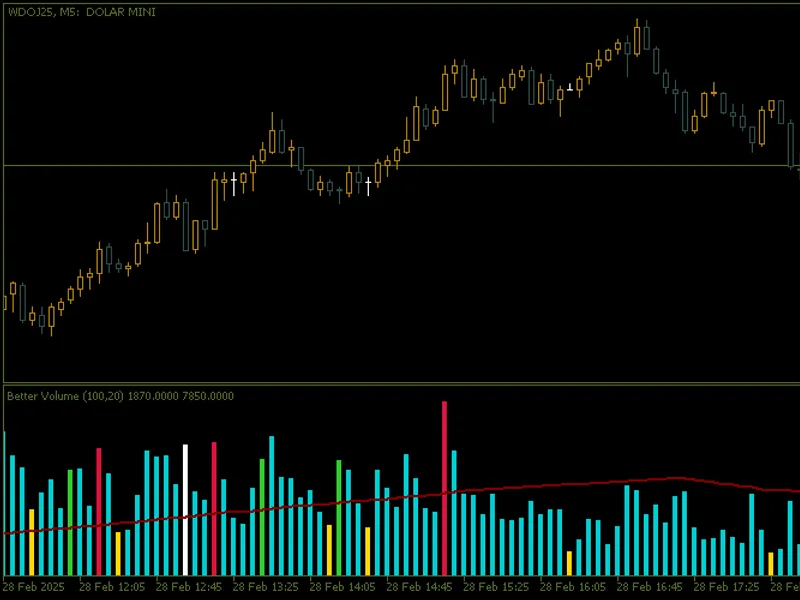
Better volume
This professional-grade solution for MetaTrader 5 helps traders achieve greater efficiency in their daily workflow. This technical indicator acts as a specialized analysis tool designed to visualize market data. It helps traders identify emerging trends, momentum shifts, and key support or resistance levels by plotting statistical calculations directly onto price charts.
How to Setup and Use Better volume
1. Installation: Place your file in the MQL/Indicators folder via "Open Data Folder" and restart your terminal.
2. Loading: Find the indicator in the Navigator, drag it onto your chart, and configure the input parameters in the popup window.
3. Customization: Press Ctrl+I to open the indicator list, select your tool, and click "Properties" to change colors, levels, or visual styles.
4. Updating: Replace the old file in the Indicators folder with the new version and restart the platform to apply changes.
Frequently Asked Questions
Q: Why is my indicator not showing? A: Verify the file is in the MQL/Indicators folder, or try right-clicking the "Indicators" tree in the Navigator and clicking "Refresh."
Q: Do custom indicators slow down the platform? A: Too many complex indicators can impact performance; remove unused ones via the "Indicator List" (Ctrl+I).
Q: Can I use MT4 indicators on MT5? A: No, MQL4 and MQL5 are distinct languages; ensure the indicator is compiled specifically for your platform version.
Description & Settings
Main Features
Dynamic Volume Categorisation
:
The indicator classifies volume into various categories, assigning different colours to facilitate visual interpretation:
Buying Climax
( clrCrimson ): Identifies moments when volume is extremely high and the price is rising.
Selling Climax
( clrLimeGreen ): Signals moments of strong selling pressure with high volume.
Churn
( clrGold ): Detects high volatility without a clear price direction.
Climax Churn
( clrMagenta ): Combines buy/sell climax with churn, indicating extreme volatility.
Weak Candle
( clrDarkTurquoise ): Identifies candles with minimal volume in the lookback window.
Volume Balance
( clrWhiteSmoke ): Represents standard volume, with no specific characteristics that classify it in other categories. This colour is used as a "base colour" when none of the above patterns are detected.
Moving Average Volume
:
A smoothed moving average line ( clrMaroon ) is displayed to help identify trends in volume over time.
Advanced Customisation
:
Moving Average Period
: Adjust the moving average period to adapt the indicator to your trading style.
Lookback Window
: Set up the lookback window to compare the current volume with recent values.
Volume Type
: Choose between real volume ( VOLUME_REAL ) or tick volume ( VOLUME_TICK ) to suit the characteristics of the asset being analysed.
Clear visual interface
:
A coloured histogram ( DRAW_COLOR_HISTOGRAM ) displays the volume categories in an intuitive way, allowing for quick and efficient analysis.
Flexibility for Different Timeframes
:
The indicator works on any timeframe, from intraday charts to weekly or monthly charts.
How to interpret the signals
Buy/Sell Climax
: Indicates moments of strong accumulation or distribution, suggesting possible trend reversals or continuations.
Churn
: Signalling high volatility without a clear direction, indicating uncertainty in the market.
Weak Candles
: Shows moments of low activity in the market, often associated with consolidations or periods of indecision.
Volume Balance
: Represents normal market behaviour, without significant anomalies. It is useful for identifying areas of stability.
Configuration and Use
Better Volume
is easy to set up and use:
Add the indicator to your chart in MetaTrader 5.
Adjust the parameters as necessary:
Moving Average Period
: Sets the smoothness of the moving average line.
Lookback Window
: Determines the number of candles used for comparisons.
Volume Type
: Choose between real volume or tick volume.
Observe the signals generated by the histogram and the moving average line to make informed decisions.
Why Use Better Volume?
Volume Flow Analysis
: Better understand the behaviour of market participants based on volume.
Pattern Identification
: Detect buy/sell climaxes, churn and other important patterns that can influence your trading decisions.
Ease of Use
: The intuitive visual interface and customisation options make the indicator accessible to both beginners and experienced traders.
Application example
Use the indicator to confirm entry/exit signals in volume-based strategies.