Xml Parser
This tool for MetaTrader 5 is specifically engineered to streamline your trading operations. This library provides a collection of modular, reusable code. It is utilized by developers to organize common functions, allowing for the integration of complex logic across multiple Expert Advisors, indicators, or scripts without the need for code duplication.
How to Setup and Use Xml Parser
1. Storage: Place library files in the MQL/Libraries directory to ensure they are accessible to your projects.
2. Implementation: Include the library in your code using the #import directive, ensuring you match the exact function names and parameters.
3. Compilation: Ensure the library is present in the directory before you compile your main EA or script, as the compiler links them during this phase.
4. Management: Keep libraries organized in sub-folders if you manage many custom functions to maintain a clean project structure.
Frequently Asked Questions
Q: What is a library file used for? A: Libraries store reusable code modules, allowing you to centralize common logic used by multiple EAs or indicators.
Q: Is a library executable? A: No, libraries are non-executable files containing functions; they must be imported into an EA, indicator, or script to function.
Q: Can I update a library while the platform is running? A: You should compile your EA or script after updating a library to ensure the latest code changes are integrated.
Description & Settings
The
CXmlElement
class provides the following opportunities for working with XML documents.
It allows you to create DOM-model (objects tree) from the XML-document (or from its single element);
It allows you to read, modify, create and delete the nested elements and text;
It allows you to save the object model to XML.
Class interface:
class CXmlElement { public: string Name; CXmlElement *Elements[]; CXmlAttribute *Attributes[]; string Text; ... string SetXml (string xml); string GetXml (); };
For access to the class attributes a simple class
CXmlAttribute
is used:
class CXmlAttribute { public: string Name; string Value; };
Here is a simple example of script, that parses XML and prints an information from DOM tree:
//+------------------------------------------------------------------+ //| XmlParserScript.mq5 | //| Copyright 2009, MetaQuotes Software Corp. | //| | //| yu-sha@ukr.net | //+------------------------------------------------------------------+ #include <XmlParser.mqh> //+------------------------------------------------------------------+ //| Script start | //+------------------------------------------------------------------+ void OnStart() { CXmlElement xmldoc; string xml="<!--Comment--><ROOT><ITEM Attr1=\"HELLOW\">Terminal "MT5"</ITEM></ROOT>"; Print("XML="+xml); string res=xmldoc.SetXml(xml); if(res=="") { Print("The Root element: "+xmldoc.Name); Print(" Number of Attributes: "+string(ArraySize(xmldoc.Attributes))); Print(" Nested elements: "+string(ArraySize(xmldoc.Elements))); Print(" First nested element:"+xmldoc.Elements[0].Name); Print(" Its first attribute: "+xmldoc.Elements[0].Attributes[0].Name+"="+xmldoc.Elements[0].Attributes[0].Value); Print(" Its text: "+xmldoc.Elements[0].Text); Print("XML="+xmldoc.GetXml()); } else Print(res); } //+------------------------------------------------------------------+
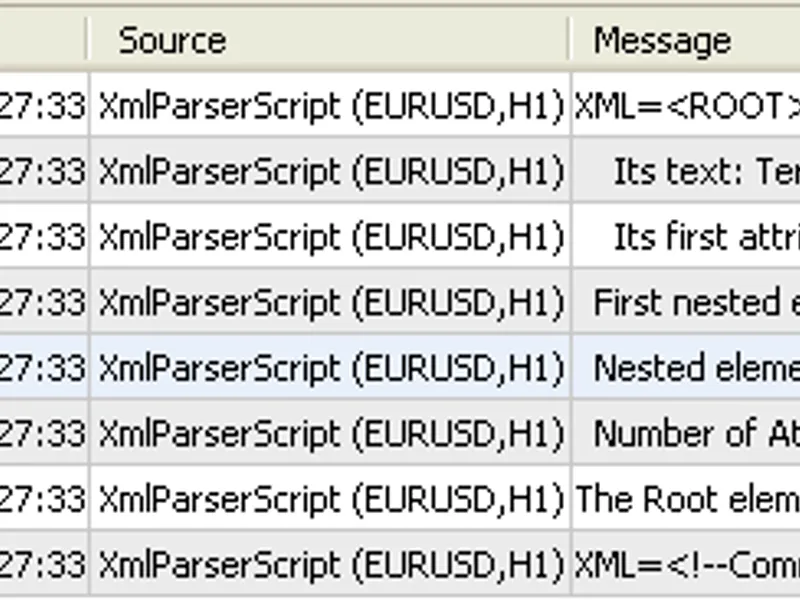
Here is a result of script execution:
Additional information:
The current version loads into the DOM only the elements, their attributes and text. All other types of the information (comments, descriptions, ...) are ignored. As a result - maybe the loss of the information about codepage, version, so XML document may be saved incorrectly.
While saving it converts the special symbols like <"&'> into the essences like <:, >, ... according to the standard.
This parser is intended mostly for parsing the XML documents, rather than fully working with XML documents.
Files location:
terminal_data_folder\MQL5\Libraries\xmlparser.dll
terminal_data_folder\MQL5\Include\xmlparser.mqh
terminal_data_folder\MQL5\Scripts\xmlparserscript.mq5