










i Pulsar: Indicator for Critical Price Level Breakouts
Info
The i Pulsar: Indicator for Critical Price Level Breakouts is a Indicator for MetaTrader 4 that the i pulsar indicator identifies price level breakout moments and their significance. The significance of a level is determined by the duration it remained unbroken.
Usage
This tool is typically used for breakout trading when price moves beyond key support/resistance levels.
Platform
This Indicator works exclusively on MetaTrader 4 (both build 600+ and newer versions).
Setup
Place the downloaded file in MQL4/Indicators folder via File ? Open Data Folder in MetaTrader 4.
How to Install and Use i Pulsar: Indicator for Critical Price Level Breakouts
1. Installation: Place your file in the MQL/Indicators folder via "Open Data Folder" and restart your terminal.
2. Loading: Find the indicator in the Navigator, drag it onto your chart, and configure the input parameters in the popup window.
3. Customization: Press Ctrl+I to open the indicator list, select your tool, and click "Properties" to change colors, levels, or visual styles.
4. Updating: Replace the old file in the Indicators folder with the new version and restart the platform to apply changes.
Frequently Asked Questions
Q: Why is my indicator not showing? A: Verify the file is in the MQL/Indicators folder, or try right-clicking the "Indicators" tree in the Navigator and clicking "Refresh."
Q: Do custom indicators slow down the platform? A: Too many complex indicators can impact performance; remove unused ones via the "Indicator List" (Ctrl+I).
Q: Can I use MT4 indicators on MT5? A: No, MQL4 and MQL5 are distinct languages; ensure the indicator is compiled specifically for your platform version.
What this tool does
The i Pulsar indicator identifies price level breakout moments and their significance.
Typical Use Case
This Indicator excels in automated trading and technical analysis on MetaTrader 4.
Compatible Platform & Setup
This Indicator works on MetaTrader 4. Place the file in the MQL4/Indicators folder and restart the terminal.
Description & Settings
Related: Range Filter Buy and Sell Indicator for MT4 with Signal Statistics - another powerful indicator for MetaTrader 4 traders.
The i Pulsar indicator identifies price level breakout moments and their significance. The significance of a level is determined by the duration it remained unbroken. A level breakout may signal a potential reversal in price movement.Also recommended: Quantum Apex Color Indicator - similar indicator with strong performance on MetaTrader 4.
The indicator includes a noise filter and a signal significance filter. These filters help to disregard reactions to insignificant levels and signals lacking substantially new information.
This indicator was developed in 2012 and improved in 2015 with the addition of alerts for parallel tracking of multiple price charts. The current version is updated for 2026.
External Variables:
scale
The time scale for historical analysis, measured in minutes. A common setting is 1440, which assesses level significance over a 24-hour period.
scaledigits
The number of decimal places displayed on the historical time scale (y-axis). This affects only the axis display.
levelfilter
The minimum significance (depth of operation) for displayed levels, measured in `scale` periods. For example, in natural days.
signalfilter
The signal significance filter. This can be specified in bars (if greater than or equal to 0) or in `scale` periods (if less than 0). It filters out signals that do not offer substantially new information compared to existing ones. A value of zero disables the display of duplicate levels.
setsignalfilter
Activates the `signalfilter`. If set to false, signals are not filtered by significance.
Usage Example:
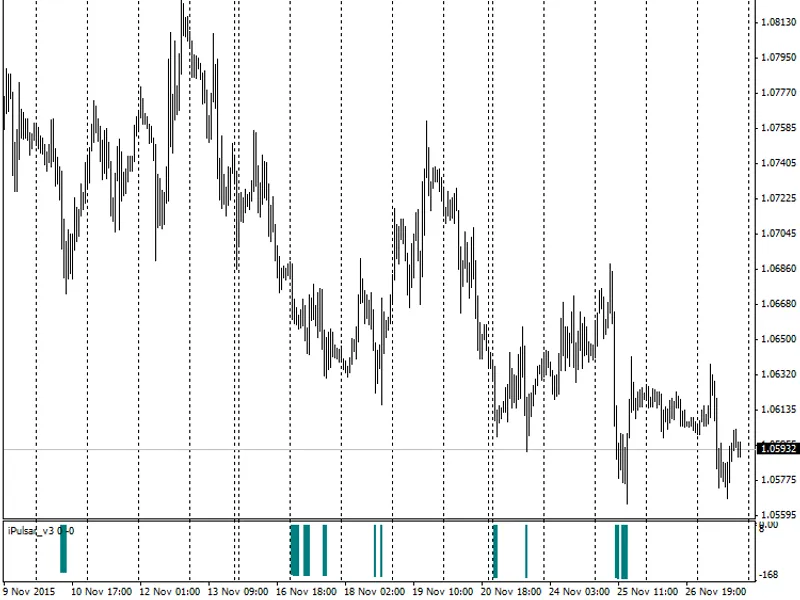
Launching the indicator on November 27, 2015, with the significance filter disabled and omitting levels with significance below 5 trade days, results in:
This display highlights numerous signals pointing to levels of similar significance (140-160 trade days), identified within a short historical interval (12 trade days). This suggests a potential single support level. Determining this level requires using the signal significance filter. Enabling this filter and setting its value to three trade days yields:
In this scenario, the significance of the latest support level on EURUSD as of November 27, 2015, is determined to be 151 trade days, with the level value around 1.06592 (indicated by a blue horizontal line).
To analyze market activity 151 trade days prior to the signal's appearance and the preceding days (5-10 trade days), switch to the D1 timeframe and keep the level on the chart; the indicator is no longer needed:
It becomes apparent that the most significant signal indeed corresponds to a potential reversal level. Identify relevant trading reference points near this level. To do this, lower the signal significance requirements, for instance, to 16 trade hours. The result is:
Note that the indicator's value is calculated in real-time and is only 'redrawn' (corrected, not canceled) on the zero bar. This allows the determined levels to be used for trading. The primary challenge lies in accurately setting the filtration parameters.
You may also like: Mistral Trend Candles Indicator - excellent alternative for indicator users on MetaTrader 4.
Source Code
/* ipulsar      scale(  - ),
                    high  low.
            ,  ""  .
             :
            1.    , levelfilter .  ,
                scale,    .
            2.    ( ),signalfilter .
                ,  ""
               ,      ,
             . */
.......
⚠ Limitations & Risk Warning
- This tool is provided for educational and testing purposes only.
- Past performance does not guarantee future results.
- Trading involves substantial risk of loss. Use on a demo account first.
- Results may vary depending on market conditions, broker, and settings.
- We recommend thorough backtesting and forward testing before using with real funds.