Color Fill MA
This professional-grade solution for MetaTrader 4 helps traders achieve greater efficiency in their daily workflow. This technical indicator acts as a specialized analysis tool designed to visualize market data. It helps traders identify emerging trends, momentum shifts, and key support or resistance levels by plotting statistical calculations directly onto price charts.
How to Setup and Use Color Fill MA
1. Installation: Place your file in the MQL/Indicators folder via "Open Data Folder" and restart your terminal.
2. Loading: Find the indicator in the Navigator, drag it onto your chart, and configure the input parameters in the popup window.
3. Customization: Press Ctrl+I to open the indicator list, select your tool, and click "Properties" to change colors, levels, or visual styles.
4. Updating: Replace the old file in the Indicators folder with the new version and restart the platform to apply changes.
Frequently Asked Questions
Q: Why is my indicator not showing? A: Verify the file is in the MQL/Indicators folder, or try right-clicking the "Indicators" tree in the Navigator and clicking "Refresh."
Q: Do custom indicators slow down the platform? A: Too many complex indicators can impact performance; remove unused ones via the "Indicator List" (Ctrl+I).
Q: Can I use MT4 indicators on MT5? A: No, MQL4 and MQL5 are distinct languages; ensure the indicator is compiled specifically for your platform version.
Description & Settings
Color Fill - MA1 + MA2 :
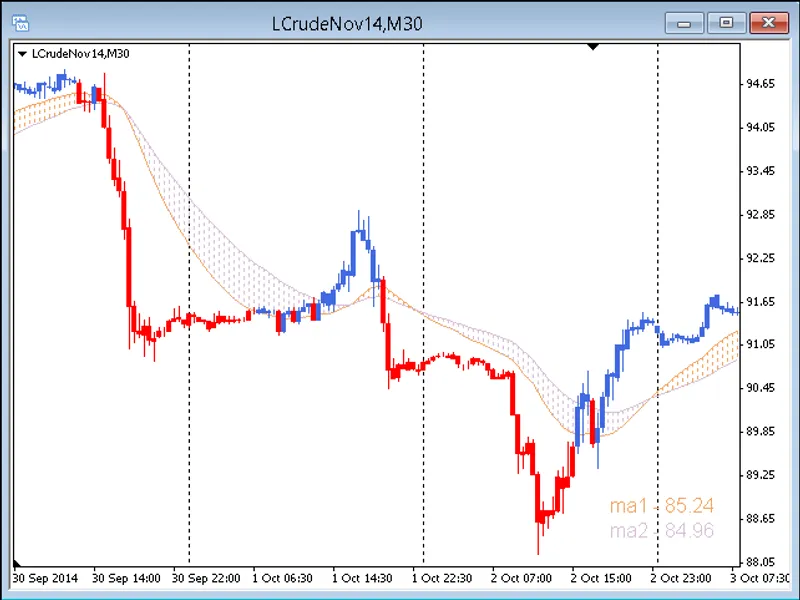
Color Fill (Color Histogram) enhances visual perception of price action assisting with decisions of trade entry, continuation, exit and trade re-entry on trend continuation.
This indicator draws
Two Moving Averages - MA1 and MA2.
Two associated Price Labels - MA1 and MA2.
The below Color Fill options.
Color Fill options
Color Fill between Price and MA1.
Color Fill between Price and MA2.
Color Fill between MA1 & MA2.
No Fill.
Image:
Color Fill - 3 of 1, 2, 3 or 4.
Check Chart on foreground - Chart Properties (press F8)
Parameters and Trading
All Inputs parameters and options can be changed and will save automatically.
User should investigate personal preferences.
The MA1 and MA2 default periods are 50 and 100 EMA. Adjust MA1 and MA2 periods as required. Line thickness can be increased for better visual definition.
Lower timeframes can be enhanced with Session Open V-Line Indicator.
Use of Color Fill - MA1 + MA2 as part of a Trading System or Trading Tool is subject to user discretion and innovation.
MA1 and MA2 Price Labels
The Labels are positioned at the lower right corner but can be re-positioned to any position on the chart.
The Price Labels can be hidden if not required.
If MA1 or MA2 is hidden the associated Price Label will also be hidden.
Accuracy of Price Labels can be determined by drawing a horizontal line on the chart and setting the line Parameters - Value to the price indicated on a MA1 or MA2 Label. The horizontal line should align precisely with the end of MA1 or MA2 depending on Label chosen.
Notes
The original Indicator code does not include a Price Inputs Variable and Close is the default price. A Price Inputs Variable has been added and includes Value parameters: Close, Open, High, Low and Median.
Accuracy of Price coding can be checked by placing on chart a standard MT4 Moving Average (Insert → Indicators → Trend → Moving Average) to serve as a Test Component and comparing overlay of MA1 and MA2 against the Test Component. The below parameters table includes all 20 test combinations.
>Median (H + L) / 2
The Inputs Shift Variable can be checked in a similar manner by comparing MA1 and MA2 shift parameters against the Test Component.
Inputs and Parameters
MA_Color_Fill_1_2_3_or_4 - 3.
MA1_Period - 50.
MA2_Period - 100.
MA1_Shift - 0.
MA2_Shift - 0.
MA1_Method - Exponential.
MA2_Method - Exponential.
MA1_Price - Close.
MA2_Price - Close.
Show_MA1 - true.
Show_MA2 - true.
MA1_Label_Color - indicator_color1.
MA2_Label_Color - indicator_color2.
Label_Bold - true.
Label_Size - 12.
Label_Corner - 3.
Label_Left_Right - 20.
Label_Up_Down - 10.
Show_Labels = false.