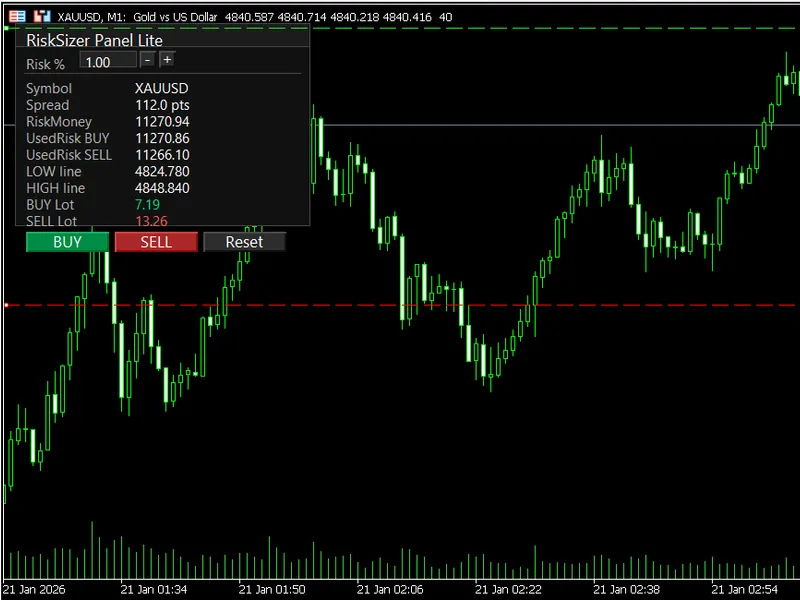
Risk Sizer Panel Lite MT5 - Risk Percent Lot Calculator With One Click Buy Sell
This professional-grade solution for MetaTrader 5 helps traders achieve greater efficiency in their daily workflow. This Expert Advisor serves as automated trading software. It is utilized to monitor financial markets and execute trades based on predefined algorithmic rules, enabling precise position management without the need for constant manual oversight.
How to Setup and Use Risk Sizer Panel Lite MT5 - Risk Percent Lot Calculator With One Click Buy Sell
1. Installation: Open the "File" menu, select "Open Data Folder," navigate to MQL/Experts, paste your file, and restart the terminal.
2. Activation: Drag the EA from the Navigator onto a chart, ensure "Allow live trading" is checked in the Common tab, and verify the AutoTrading button is green.
3. Optimization: Right-click your chart, choose "Expert List," click "Properties" to adjust inputs, and save your preferred setup as a set file for future use.
4. Maintenance: Regularly check the "Experts" tab in the terminal window to monitor trade logs and potential execution errors.
Frequently Asked Questions
Q: Why is my EA not opening trades? A: Check the "AutoTrading" button, ensure "Allow live trading" is enabled, and verify your broker allows automated trading on your account type.
Q: Can I run multiple EAs on one chart? A: No, each chart can only host one active EA; however, you can open multiple charts for different currency pairs to run several EAs.
Q: What does the "smiley face" icon mean? A: A smiley face in the top-right corner of the chart indicates the EA is successfully running; a frowny face means it is disabled.
Description & Settings
RiskSizer Panel Lite
is a lightweight MT5 trading panel that helps you calculate an estimated lot size from a fixed
risk percentage
of your account balance, using
two draggable horizontal lines
on the chart as your SL/TP zone. It also includes
one-click BUY/SELL
execution for fast manual trading.
Key Features
Risk-based lot sizing
by % of
Account Balance
.
Two draggable chart lines
(LOW / HIGH) to define your SL and TP levels quickly.
One-click trading
: BUY / SELL.
Editable Risk%
:
Click the Risk% box and type your value
Enter
= Apply,
Esc
= Cancel
Use
+
and
-
buttons for quick adjustment (step size configurable)
Live preview
on the panel:
Symbol
Spread (points)
Risk money (account currency)
Calculated BUY lot / SELL lot
LOW/HIGH line prices
Reset
button to restore default SL/TP line distances around current price.
Optional
Max Spread
filter to block trades when spread is too high. How It Works
The panel uses
two horizontal lines
on the chart:
LOW line
= lower price line
HIGH line
= higher price line
BUY logic:
Entry = Ask, SL = LOW line, TP = HIGH line (only if HIGH > Ask)
SELL logic:
Entry = Bid, SL = HIGH line, TP = LOW line (only if LOW < Bid) Inputs / Parameters
Risk % per trade
(InpRiskPercent)
Risk step
(InpRiskStep)
Default SL points
(InpDefaultSL_Points)
Default TP points
(InpDefaultTP_Points)
Max spread (points)
(InpMaxSpread_Points) — 0 disables the filter
Deviation (points)
(InpDeviation_Points)
Magic number
(InpMagic)
UI refresh (ms)
(InpUiRefreshMs) Notes
This is a
Lite
tool designed for simplicity and fast manual execution.
Risk is calculated from
Account Balance
(not Equity).
Lot sizing engine is intentionally simplified
(approximate calculation for universal symbols).
Please test on a
demo account
before using on real accounts.
If you find this utility helpful, feel free to leave feedback and suggestions.