Icq Messenger
This professional-grade solution for MetaTrader 5 helps traders achieve greater efficiency in their daily workflow. This Expert Advisor serves as automated trading software. It is utilized to monitor financial markets and execute trades based on predefined algorithmic rules, enabling precise position management without the need for constant manual oversight.
How to Setup and Use Icq Messenger
1. Installation: Open the "File" menu, select "Open Data Folder," navigate to MQL/Experts, paste your file, and restart the terminal.
2. Activation: Drag the EA from the Navigator onto a chart, ensure "Allow live trading" is checked in the Common tab, and verify the AutoTrading button is green.
3. Optimization: Right-click your chart, choose "Expert List," click "Properties" to adjust inputs, and save your preferred setup as a set file for future use.
4. Maintenance: Regularly check the "Experts" tab in the terminal window to monitor trade logs and potential execution errors.
Frequently Asked Questions
Q: Why is my EA not opening trades? A: Check the "AutoTrading" button, ensure "Allow live trading" is enabled, and verify your broker allows automated trading on your account type.
Q: Can I run multiple EAs on one chart? A: No, each chart can only host one active EA; however, you can open multiple charts for different currency pairs to run several EAs.
Q: What does the "smiley face" icon mean? A: A smiley face in the top-right corner of the chart indicates the EA is successfully running; a frowny face means it is disabled.
Description & Settings
Backgrounds / Usage Motivation
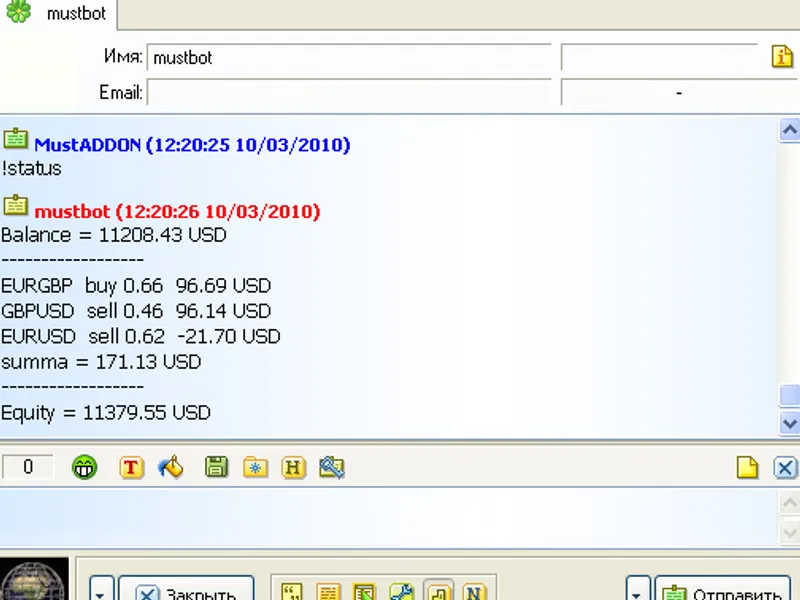
Using the automated trading system, once in a while we may need to enquire information concerning account balance, opened positions, etc., being far from a trading terminal, but having Internet connection and ICQ on any computer (or any other device). One does not have time nor desire to install and log in
MetaTrader
to get such a common information. So the idea of finding a way to get needed information concerning a trading account via ICQ has appeared.
Implementation
I chose <saving information in txt-file> ; <sending information on request> as a way to implement the idea.
I developed a common mt-advisor
exp_statusbot
for saving information. It saves information concerning account balance in
status.txt
and opened positions changes in
notify.txt
.
Installation Instructions
Download and compile
exp_statusbot.
mq4
.
Launch MT and add the advisor to any chart.
Download icqbot
mustwatcher_v1.16.zip
.
Launch the bot (please ensure that "Microsoft .NET Framework 3.5" is installed on your computer)
Using
Add
button add needed
status.txt
and
notify.txt
(located in
<metatrader_dir>\experts\files\statusbot
) to the list
Register UIN for the bot (Universal Identification Number, or flatly the ICQ number which can be obtained on the official web-site )
Enter UIN of the bot and a password.
Enter your name as an administrator.
Click
Connect
Then send command
!
status
(as the file is named
status.txt
) from your UIN and get what we needed.
To enable automatic notifier of changed files (here
notify.txt
) we shall enter
!
spamon.
And after a corresponding change we receive what we subscribed to =)
The administrator can add other users to the registry, if they also need an access to this information. This is just an example. Needless to say that you can make as many txtfiles with any content as you wish and receive this content upon corresponding demand. The list of all available commands appears by means of
!help
or can be seen in the file
<mustwatcher
_dir>\data\help_admin.txt
. The bot's interface contains several buttons, so you won't be confused. Putting it in a nutshell, the one who needs it will grasp it.
MustWatcher v1.16
Optimization. Fixed errors.