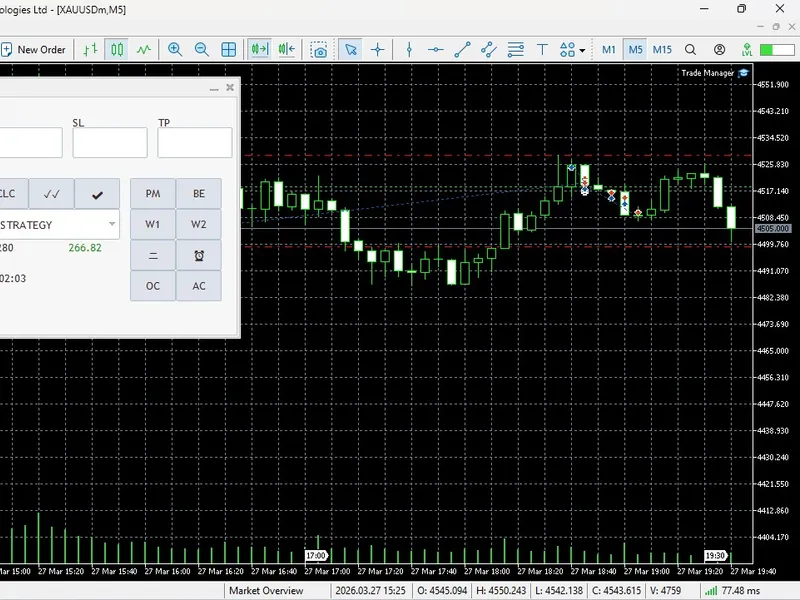
Quantum Algo Trade Panel
This software component for MetaTrader 5 is built to enhance the capabilities of your trading environment. This technical indicator acts as a specialized analysis tool designed to visualize market data. It helps traders identify emerging trends, momentum shifts, and key support or resistance levels by plotting statistical calculations directly onto price charts.
How to Setup and Use Quantum Algo Trade Panel
1. Installation: Place your file in the MQL/Indicators folder via "Open Data Folder" and restart your terminal.
2. Loading: Find the indicator in the Navigator, drag it onto your chart, and configure the input parameters in the popup window.
3. Customization: Press Ctrl+I to open the indicator list, select your tool, and click "Properties" to change colors, levels, or visual styles.
4. Updating: Replace the old file in the Indicators folder with the new version and restart the platform to apply changes.
Frequently Asked Questions
Q: Why is my indicator not showing? A: Verify the file is in the MQL/Indicators folder, or try right-clicking the "Indicators" tree in the Navigator and clicking "Refresh."
Q: Do custom indicators slow down the platform? A: Too many complex indicators can impact performance; remove unused ones via the "Indicator List" (Ctrl+I).
Q: Can I use MT4 indicators on MT5? A: No, MQL4 and MQL5 are distinct languages; ensure the indicator is compiled specifically for your platform version.
Description & Settings
Advanced Risk Management & Execution
Stop calculating lot sizes manually. QuantumAlgo features an
Automatic Position Size Calculator
that instantly determines your volume based on your Stop Loss and predefined Risk percentage.
Total Volume at Risk:
Real-time visual indication of exactly how much capital is on the line.
Position Splitting (Twin Trading):
Execute two orders simultaneously (50% lot size each). Set one to a 1:1 Risk-Reward Ratio (RRR) and let the second one run with no TP for maximum profit potential.
Margin Intelligence:
Displays free margin and the exact margin required to open a position before you click buy or sell.
Professional Strategy Filters & Alerts
QuantumAlgo isn't just a trade manager; it’s a strategy engine. It includes built-in logic for
Bill Williams (Profitunity)
and
Ichimoku Kinko Hyo
.
Bill Williams Wise Man 1, 2, & 3:
Automated alerts for specific Profitunity signals.
Symmetrical Pair Filter:
A unique institutional feature that cancels alerts for correlated pairs if a position is already open, preventing over-exposure.
Advanced Price Filters:
Filter your entries using the
Alligator
,
Kijunsen
, or
Senkou Span A
to ensure you only trade in high-probability zones.
Smart Alerts:
Get notified when price crosses custom lines, Moving Averages, or Ichimoku levels.
Automated Trade Handling
Global Break-Even:
Move all positions on the current chart to Break-Even (BE) with a single click.
Auto-Management (PM Mode):
Turn on the Position Management function to let the EA handle trailing stops and automated exits based on your custom inputs.
Session Visualizer:
Automatically draw session boxes to identify London, New York, or Asian ranges instantly.
Interactive Interface Guide (Icon Legend)
Execution & Setup:
M/P:
Toggle between
Market
and
Pending
orders.
S / B:
Set direction to
Sell
or
Buy
.
ST / LM:
Toggle between
Stop
and
Limit
orders.
三 (Lines):
Show/Hide visual SL, TP, and Entry lines for drag-and-drop execution.
CLC:
Instant Lot Size calculation based on Risk %.
✔:
Send single order |
✓✓:
Send Split/Twin orders.
Management & Analytics:
PM:
Toggle
Automatic Position Management
(Trailing/Auto-Exits).
BE:
Instant
Break-Even
for all active trades.
SCN:
The
Ichimoku Scanner
—scans your entire Market Watch for multi-timeframe trends.
✖:
Emergency
Close All
positions on the current chart.
🖉:
Visual Audit—draws rectangles over your SL/TP zones for clear PnL visualization.
CLR:
Reset all input fields instantly.
Alerts & Strategy:
ICHIMOKU ▼:
Strategy Selector to tag your trades (SMC, Order Block, etc.) for better journal tracking.
W1, W2, W3:
Enable/Disable
Wise Man
signal alerts.
⼆ & ⏰:
Set horizontal alert lines with price-close notifications.
MBE:
Advanced "Move to Break-Even" triggered by price closing past a specific line.
Utility Functions:
OC / AC / CC:
Bulk Chart Management—Open all Market Watch charts, open only charts with active positions, or close all charts.