Time GM T library for the strategy tester
This tool for MetaTrader 5 is specifically engineered to streamline your trading operations. This library provides a collection of modular, reusable code. It is utilized by developers to organize common functions, allowing for the integration of complex logic across multiple Expert Advisors, indicators, or scripts without the need for code duplication.
How to Setup and Use Time GM T library for the strategy tester
1. Storage: Place library files in the MQL/Libraries directory to ensure they are accessible to your projects.
2. Implementation: Include the library in your code using the #import directive, ensuring you match the exact function names and parameters.
3. Compilation: Ensure the library is present in the directory before you compile your main EA or script, as the compiler links them during this phase.
4. Management: Keep libraries organized in sub-folders if you manage many custom functions to maintain a clean project structure.
Frequently Asked Questions
Q: What is a library file used for? A: Libraries store reusable code modules, allowing you to centralize common logic used by multiple EAs or indicators.
Q: Is a library executable? A: No, libraries are non-executable files containing functions; they must be imported into an EA, indicator, or script to function.
Q: Can I update a library while the platform is running? A: You should compile your EA or script after updating a library to ensure the latest code changes are integrated.
Description & Settings
TimeGMT() Function
Returns the GMT, which is calculated taking into account the DST switch by the local time on the computer where the client terminal is running. There are 2 variants of the function.
Call without parameters
Call with MqlDateTime type parameter
However, during testing in the strategy tester, is always equal to TimeTradeServer() simulated server time.
TimeGMT Library
Usage:
Before testing an expert advisor that uses News filter or any time restriction in strategy tester, just include this line at the beginning of code, then recompile the source in MetaEditor.
- optionally, to see debug messages add this line before the #include directive:
No other modifications or any function calls are required for the expert advisor or indicator.
TimeGMT is fixed only if the strategy tester is detected.
The fix works on the symbol selected in the strategy tester.
No calculation errors during the weekends or Christmas holidays.
Low overhead and fast calculation time in the strategy tester
The recalculation of broker offset takes place only at the start of the expert advisor and every Sunday and Monday midnight. The calculated broker offset will be cached in memory and it will be used for subsequent calls to TimeGMT.
Selecting The Symbol For Estimation of The Server TZ/DST
By default, the library will search and load the XAUUSD symbol for estimation of server's timezone offset. XAUUSD can provide more reliable results (esp., for brokers that follow EU DST schedule) on weeks during US DST and EU DST schedules are out of sync (March and late October). Optionally, if your broker follows the US DST schedule, or no schedule at all, then using the chart symbol is also fine. Call CTimeGMT::SetUsingGoldSymbol() with 'false' to use the current chart's symbol, instead of XAUUSD.
To determine your broker's daylight (DST) schedule, you can use this script
Note
:
As a side effect that XAUUSD starts an hour after Forex, therefore dst switches will occur one hour later in the strategy tester.
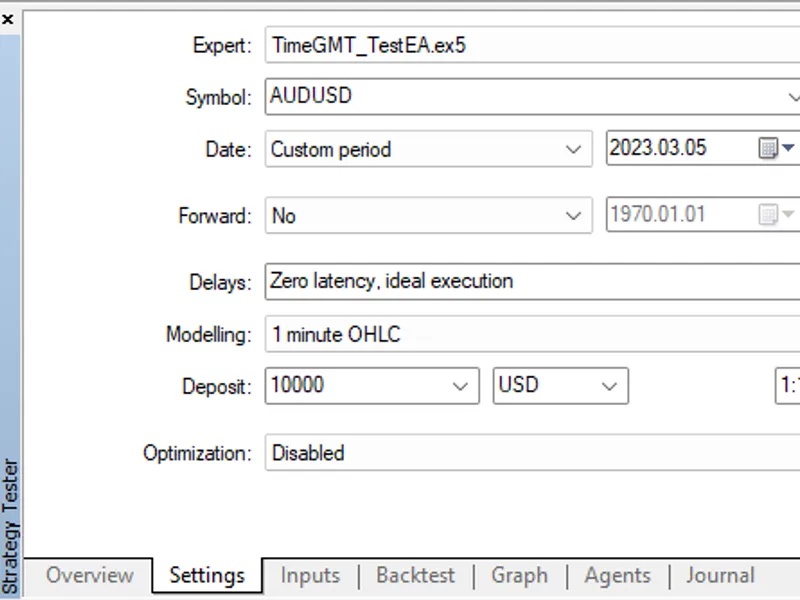
TimeGMT_TestEA
To explore the library in the strategy tester, a demo expert advisor is tested in the strategy tester
these are the results of running the expert advisor in the strategy tester:
Updates:
2024.03.30 - v.1.25 : Fixed broker GMT offset. Currently, the library scans H1 bars only on the GOLD chart as it has the most accurate start times.
2024.04.09 - v.1.33 : Fixed potential issue in the calculation of the broker GMT offset during the Christmas holidays on GMT+0 brokers.
2024.04.12 - v.1.35 : Fixed issue in the calculation of the broker GMT offset on few brokers which do not provide gold trading.
2024.07.07 - v.1.36 : Fixed issue in proper detection of the GOLD symbol on some brokers.
2024.10.21 - v.1.40 : Improved detection of the GOLD symbol with a fallback to EURUSD symbol.
2024.10.22 - v.1.45 : Faster determination of the server's GMT offset during weekend in the strategy tester..
2024.10.26 - v.1.47 : Added better error-handling and debugging code. Renamed the HistoryBrokerOffset() method to TimeServerGMTOffset().
2024.10.28 - v.1.49 : Converted all macros for dealing with time to functions to avoid double evaluation of parameters inside macro body. More code clean-up in other lines.
2024.10.30 - v.1.50 : Fixed issue of wrong estimation of GMT offset from XAUEUR quotes on some brokers.
2024.11.23 - v.1.55 : Added an option to switch off the default loading of Gold symbol for estimation of the server's TZ/DST. Call CTimeGMT::SetUsingGoldSymbol() with 'false' to use the current chart's symbol, instead.
2024.12.12 - v.1.60 : Improved performance of HistoryServerGMTOffset() function and other minor code changes.
2024.12.14 - v.1.61 : Improved performance of FindSymbol() function.
2024.12.17 - v.1.62 : Further optimization of HistoryServerGMTOffset() function.
2024.12.24 - v.1.63 : Fixed potential issue in HistoryServerGMTOffset() function.
Broker’s Time Zone and DST Schedule
Greenwich Mean Time (GMT), also called Coordinated Universal Time (UTC) is used as the official world reference for time. You will often see time zones represented like UTC - 3h or GMT - 3h. In this example the (-3h) refers to that time zone being three hours behind UTC or GMT. UTC+3h or GMT +3h would refer to that time zone being three hours ahead of UTC of GMT. The difference in time between our local time and GMT (UTC) is called GMT offset.
The Forex market opens Sunday at 17:00 New York time (GMT-5:00 in winter and GMT-4:00 in summer) and closes Friday at the same time. The Forex market starting time at NY Sun, 17:00 corresponds to
Sun, 10:00 PM UTC
in winter (and Sun, 09:00 PM UTC in summer). Forex closes on
Fri, 10:00 PM UTC
in winter (and 09:00 PM UTC in summer). Gold and silver spot market usually starts an hour later.
Each forex broker has its time zone and server time. Therefore, the start of the trading week (H1 candles) is variable between brokers, and it can vary from
Sun, 02:00 PM server time
for brokers in San Francisco (GMT-8), up to
Mon, 09:00 AM server time
for brokers in Sydney (GMT+11). The end of trading week also varies from
Fri, 02:00 PM server time
, up to
Sat, 09:00 AM server time.
Each broker is free to choose their Daylight-saving time (DST). And DST is not necessarily the same for that time zone. Sometimes they mix it using an EU time zone and a US DST instead of the EU DST. For brokers that do not follow the US schedule, the server time for the start (and end) of week varies by +/- one hour for the same broker throughout the year. To handle these variations, the recalculation of broker offset has to be done on a weekly basis, so that DST changes on the broker can be detected on time.
Using a time zone of +2 (and +3 in summer on the US schedule) therefore means that candles each week start at midnight Monday, and there are five D1 candles per week and the start of a daily candle (and H4) is the start of a new FX day. Each week ends just before midnight Saturday. There are no candles on Saturday and Sunday. Simply, time on these servers is always 7 hours ahead of New York and represented as NY+7. By far this is the most common setting, but there's a lot of less common variations.
Details of Calculation of the
True GMT
When a call to TimeGMT() is intercepted by the library, it first checks if it is not running in the strategy tester, then it returns the original function. If the strategy tester is detected, the code starts to calculate the broker offset (see later), then the return value is simply the result of subtracting this offset from the current time of the trading server in the client terminal.
The '
ServerGMTOffset
' itself can estimated, by analysis of H1 quotes history, as the difference between two known times:
1) the time at which the first bar of the trading week appears on the
GOLD
chart (FstBarWk),
2) the corresponding UTC time for GOLD trading starting time in New York at Sun, 18:00.
The calculation of BrokerOffset utilizes an optimized modification of the algorithm that was published by Carl Schreiber here in
According to
In New York, DST begins (summertime) at 02:00 am local time on the second Sunday of March. The clock will move forward by one hour to GMT-4, thus the corresponding UTC time for NY Sun, 18:00 is (Sun, 22:00 UTC).
As, the DST ends (wintertime) in New York at 02:00 local time on the first Sunday of November, the clock will move backward by one hour to GMT-5, thus the corresponding UTC time for NY Sun, 18:00 is (Sun, 23:00 UTC).
For example, if the FstBarWk on the GOLD chart starts at Mon, 01:00, and it is winter in New York at that bar, then BrokerOffset can be calculated as:
and, if it is summer in New York, then BrokerOffset:
Traders can use TimeGMT() to convert session times to the corresponding server time to determine when specific markets will open or close. For instance, if a trader wants to trade in the Asian (Tokyo) session, they must adjust their trading times, accordingly
1] Determine the offset of the broker's trade server
2] Convert local times of specific markets to the corresponding broker's server time
The second term in the equation (xxx_GMTOffset) should be increased by +1 hour, if the destination time zone is currently in the daylight-savings time.