Download ALL MT5 librarys (391)

Similar MetaTrader Tools









cdatetime msc
Info
The cdatetime msc is a Library for MetaTrader 5 that when i recently started to intensively test the functionality of copyticksrange(), i encountered a few unfavourable problems when handling millisecond times:i actually wanted to use cdatetime, since it is derived from mqltimestruct and you can edit the different time units very easily using the included increment and decrement methods. at the same time, i needed a way to smoothly translate millisecond times (seconds since 1 january 1970 times 1000 in ulong format) back and forth.
Usage
This tool is typically used for enhancing chart analysis and decision making.
Platform
This Library works exclusively on MetaTrader 5 (both build 600+ and newer versions).
Setup
Place the downloaded file in MQL5/Libraries folder via File ? Open Data Folder in MetaTrader 5.
How to Install and Use cdatetime msc
1. Storage: Place library files in the MQL/Libraries directory to ensure they are accessible to your projects.
2. Implementation: Include the library in your code using the #import directive, ensuring you match the exact function names and parameters.
3. Compilation: Ensure the library is present in the directory before you compile your main EA or script, as the compiler links them during this phase.
4. Management: Keep libraries organized in sub-folders if you manage many custom functions to maintain a clean project structure.
Frequently Asked Questions
Q: What is a library file used for? A: Libraries store reusable code modules, allowing you to centralize common logic used by multiple EAs or indicators.
Q: Is a library executable? A: No, libraries are non-executable files containing functions; they must be imported into an EA, indicator, or script to function.
Q: Can I update a library while the platform is running? A: You should compile your EA or script after updating a library to ensure the latest code changes are integrated.
What this tool does
when i recently started to intensively test the functionality of copyticksrange(), i encountered a few unfavourable problems when handling millisecond times:i actually wanted to use cdatetime, since it is derived from mqltimestruct and you can edit the different time units very easily using the included increment and decrement methods.
Typical Use Case
This Library excels in automated trading and technical analysis on MetaTrader 5.
Compatible Platform & Setup
This Library works on MetaTrader 5. Place the file in the MQL5/Libraries folder and restart the terminal.
Description & Settings
Related: cis session - class to set time intervals (sessions) - another powerful library for MetaTrader 5 traders.
when i recently started to intensively test the functionality of copyticksrange(), i encountered a few unfavourable problems when handling millisecond times:
Also recommended: simplest logger class for meta trader 5 - similar library with strong performance on MetaTrader 5.
i actually wanted to use cdatetime, since it is derived from mqltimestruct and you can edit the different time units very easily using the included increment and decrement methods.
at the same time, i needed a way to smoothly translate millisecond times (seconds since 1 january 1970 times 1000 in ulong format) back and forth.
here i encountered the difficulty that the number of milliseconds, for example, is a very vague number that does not tell you very much about the exact date. however, if you use cdatetime or timestruct, all the time units are easy to change, but the format tears them apart and the result is also very unclear. this cdatetimemsc class was created to solve this problem.
the new methods were inserted under the inheritance of the old structure.
now the class, which is actually a structure (see structures/classes), can also work with milliseconds, provided that such exact times are available.
furthermore, the increment and decrement methods have been extended to the msc property. one could now argue whether the additional variable "check_datetime" is really necessary, as it creates a certain overhead (for some people this is very important). however, i assumed that usually not many cdatetime objects are used, but only a few in the important places where time units such as hours, minutes, seconds or days need to be changed. i also had a few doubts about the updatetime() method, which is called unnecessarily with every increment/decrement. all in all, however, the handling factor was the main focus.
the test
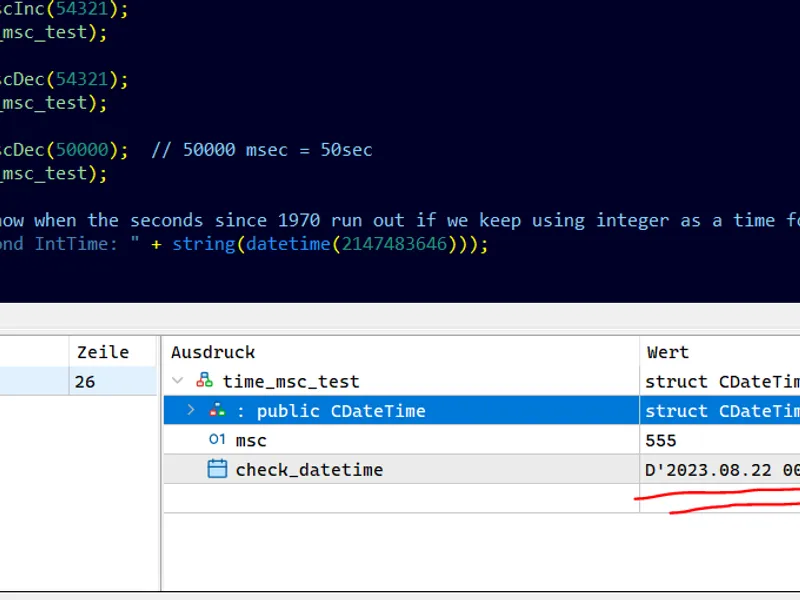
you no longer have to query the time with an additional datetime variable if you want to know the exact date, but can simply place the variable "check_datetime" under supervision: (testea see above)
the millisecond time was automatically translated into the datetime format.
You may also like: high-performance time functions (time utils) - excellent alternative for library users on MetaTrader 5.
Source Code
#property copyright "RobotFX"
#property link "https://robotfx.org"
#property version   "1.00"
#include <Tools\Custom\DateTimeMsc.mqh>
CDateTimeMsc time_msc_test;
int OnInit()
{
ulong time_current_msc = ulong(1000 * TimeCurrent());
time_msc_test.DateTime(TimeCurrent());
time_msc_test.MscInc(55555);
.......
⚠ Limitations & Risk Warning
- This tool is provided for educational and testing purposes only.
- Past performance does not guarantee future results.
- Trading involves substantial risk of loss. Use on a demo account first.
- Results may vary depending on market conditions, broker, and settings.
- We recommend thorough backtesting and forward testing before using with real funds.