
AS Q Order Executor
Info
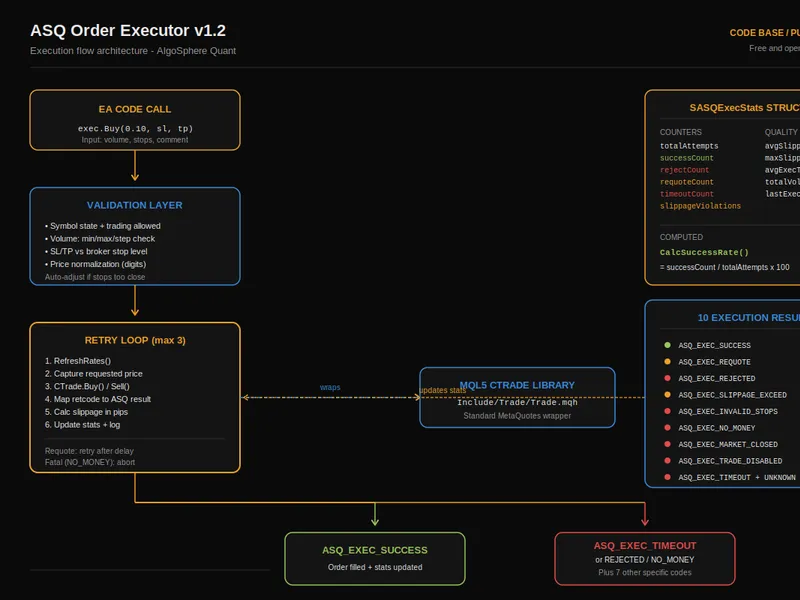
The AS Q Order Executor is a Library for MetaTrader 5 that features:- automatic retry logic with configurable max attempts and delay - requote handling with separate retry path from rejections - slippage calculation in pips with violation detection - auto-normalization of sl/tp against broker stop level - auto-detection of fill policy (fok / ioc / return) - full execution statistics (success rate, avg slippage, avg exec time, volume) - market orders (buy / sell) and pending orders (limit / stop, buy / sell) - position management (close, partial close, modify sl/tp, close-all-by-magic) - human-readable result codes with 10 execution states - verbose logging toggle for debuggingdemo ea included: attach to any chart: — dashboard with buy, sell, close all action buttons — live execution statistics with color-coded metrics — success rate gauge (green >=95%, amber >=80%, red below) — total attempts, successful, rejections, requotes, timeouts, slippage violations — avg and max slippage in pips, avg execution time in ms, total volume executed — reset button to clear stats mid-session usage: #include "asq_orderexecutor. mqh" CASQOrderExecutor exec; exec.
Usage
This tool is typically used for enhancing chart analysis and decision making.
Platform
This Library works exclusively on MetaTrader 5 (both build 600+ and newer versions).
Setup
Place the downloaded file in MQL5/Libraries folder via File ? Open Data Folder in MetaTrader 5.
How to Install and Use AS Q Order Executor
1. Storage: Place library files in the MQL/Libraries directory to ensure they are accessible to your projects.
2. Implementation: Include the library in your code using the #import directive, ensuring you match the exact function names and parameters.
3. Compilation: Ensure the library is present in the directory before you compile your main EA or script, as the compiler links them during this phase.
4. Management: Keep libraries organized in sub-folders if you manage many custom functions to maintain a clean project structure.
Frequently Asked Questions
Q: What is a library file used for? A: Libraries store reusable code modules, allowing you to centralize common logic used by multiple EAs or indicators.
Q: Is a library executable? A: No, libraries are non-executable files containing functions; they must be imported into an EA, indicator, or script to function.
Q: Can I update a library while the platform is running? A: You should compile your EA or script after updating a library to ensure the latest code changes are integrated.
What this tool does
FEATURES:- Automatic retry logic with configurable max attempts and delay - Requote handling with separate retry path from rejections - Slippage calculation in pips with violation detection - Auto-normalization of SL/TP against broker stop level - Auto-detection of fill policy (FOK / IOC / RETURN) - Full execution statistics (success rate, avg slippage, avg exec time, volume) - Market orders (Buy / Sell) and pending orders (Limit / Stop, Buy / Sell) - Position management (close, partial close, modify SL/TP, close-all-by-magic) - Human-readable result codes with 10 execution states - Verbose logging toggle for debuggingDEMO EA INCLUDED: Attach to any chart: — Dashboard with BUY, SELL, CLOSE ALL action buttons — Live execution statistics with color-coded metrics — Success rate gauge (green >=95%, amber >=80%, red below) — Total attempts, successful, rejections, requotes, timeouts, slippage violations — Avg and max slippage in pips, avg execution time in ms, total volume executed — RESET button to clear stats mid-session USAGE: #include "ASQ_OrderExecutor.
Typical Use Case
This Library excels in automated trading and technical analysis on MetaTrader 5.
Compatible Platform & Setup
This Library works on MetaTrader 5. Place the file in the MQL5/Libraries folder and restart the terminal.
Description & Settings
Related: Simplified Order Management Class for MT4/MT5 - another powerful library for MetaTrader 5 traders.
FEATURES:
- Automatic retry logic with configurable max attempts and delay - Requote handling with separate retry path from rejections - Slippage calculation in pips with violation detection - Auto-normalization of SL/TP against broker stop level - Auto-detection of fill policy (FOK / IOC / RETURN) - Full execution statistics (success rate, avg slippage, avg exec time, volume) - Market orders (Buy / Sell) and pending orders (Limit / Stop, Buy / Sell) - Position management (close, partial close, modify SL/TP, close-all-by-magic) - Human-readable result codes with 10 execution states
Also recommended: n Close Orders - similar library with strong performance on MetaTrader 5.
- Verbose logging toggle for debuggingDEMO EA INCLUDED: Attach to any chart: — Dashboard with BUY, SELL, CLOSE ALL action buttons — Live execution statistics with color-coded metrics — Success rate gauge (green >=95%, amber >=80%, red below) — Total attempts, successful, rejections, requotes, timeouts, slippage violations — Avg and max slippage in pips, avg execution time in ms, total volume executed — RESET button to clear stats mid-session USAGE: #include "ASQ_OrderExecutor.mqh" CASQOrderExecutor exec; exec.Initialize(_Symbol, 20260417); exec.SetMaxRetries(3); exec.SetMaxSlippage(30); exec.SetVerboseLogging(true); ENUM_ASQ_EXEC_RESULT result = exec.Buy(0.10, sl, tp, "Strategy A"); if(result == ASQ_EXEC_SUCCESS) Print("Executed at ", exec.GetStats().avgSlippagePips, " pips slip"); exec.CloseAllByMagic(); Place both files in the same folder — compiles instantly, no subfolder setup needed. FILES: - ASQ_OrderExecutor.mqh — Library (960 lines) - ASQ_OrderExecutor_Demo.mq5 — Demo EA (334 lines) MetaTrader 5, all brokers, all instruments, all timeframes. Free and open-source. 1,294 lines of production MQL5.
You may also like: n Modify Orders - excellent alternative for library users on MetaTrader 5.
⚠ Limitations & Risk Warning
- This tool is provided for educational and testing purposes only.
- Past performance does not guarantee future results.
- Trading involves substantial risk of loss. Use on a demo account first.
- Results may vary depending on market conditions, broker, and settings.
- We recommend thorough backtesting and forward testing before using with real funds.