Sniper Pro
This professional-grade solution for MetaTrader 5 helps traders achieve greater efficiency in their daily workflow. This technical indicator acts as a specialized analysis tool designed to visualize market data. It helps traders identify emerging trends, momentum shifts, and key support or resistance levels by plotting statistical calculations directly onto price charts.
How to Setup and Use Sniper Pro
1. Installation: Place your file in the MQL/Indicators folder via "Open Data Folder" and restart your terminal.
2. Loading: Find the indicator in the Navigator, drag it onto your chart, and configure the input parameters in the popup window.
3. Customization: Press Ctrl+I to open the indicator list, select your tool, and click "Properties" to change colors, levels, or visual styles.
4. Updating: Replace the old file in the Indicators folder with the new version and restart the platform to apply changes.
Frequently Asked Questions
Q: Why is my indicator not showing? A: Verify the file is in the MQL/Indicators folder, or try right-clicking the "Indicators" tree in the Navigator and clicking "Refresh."
Q: Do custom indicators slow down the platform? A: Too many complex indicators can impact performance; remove unused ones via the "Indicator List" (Ctrl+I).
Q: Can I use MT4 indicators on MT5? A: No, MQL4 and MQL5 are distinct languages; ensure the indicator is compiled specifically for your platform version.
Description & Settings
Most traders enter positions based on a single signal such as a moving average crossover, without checking whether trend strength, momentum, volume, and market bias are all aligned in the same direction. This leads to a high rate of false entries. Sniper Pro was originally inspired by similar multi-confluence indicator concepts seen on TradingView and has been built from scratch in MQL5 with additional features suited to the MetaTrader 5 environment. It combines seven independent conditions into a scoring engine that only confirms a signal when a configurable minimum number of conditions agree simultaneously.
How the problem is solved
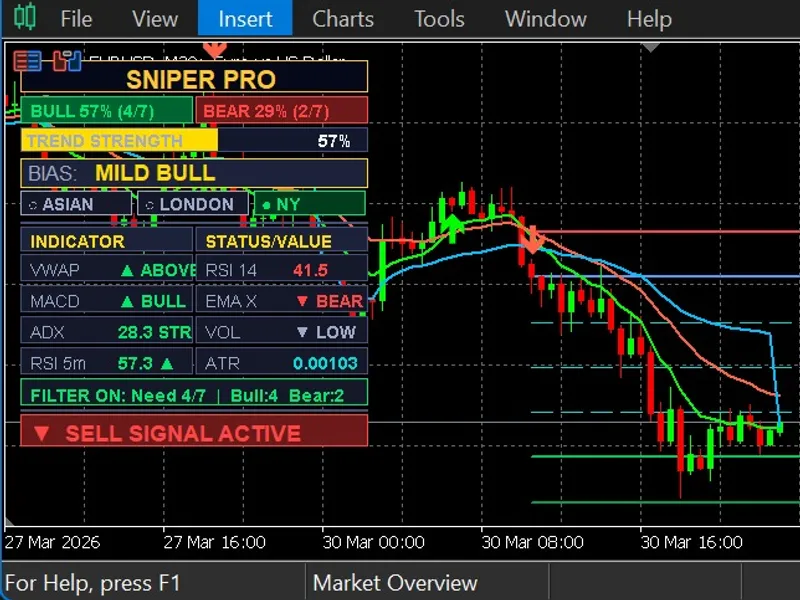
The indicator uses an EMA crossover as a trigger. When EMA 9 crosses EMA 21, it evaluates seven conditions at that specific bar: price position relative to VWAP, RSI above or below 50, MACD main line versus signal line, EMA cross direction, ADX strength with price context, volume versus its moving average, and M5 RSI for short-term momentum. A signal arrow is drawn only if the bull or bear score meets the minimum threshold set by the user. ATR-based stop-loss and five take-profit levels are calculated automatically on each signal. A built-in lot size calculator computes position size based on account balance and risk percentage. An optional session filter restricts signals to Asian, London, or New York hours. A live dashboard panel shows all indicator values, current bias, trend strength percentage, and active signal status. Source code is attached.
The table below lists all input parameters and their purpose:
Conclusion
A ready-to-use MetaTrader 5 indicator inspired by multi-confluence concepts from TradingView and rebuilt from scratch in MQL5 with additional features. It filters EMA crossover signals through a seven-condition scoring system, draws ATR-based risk levels with five take-profit targets, calculates lot size automatically, detects common candlestick patterns, and displays all relevant market data in a single on-chart dashboard.